Week 16 — Element 6
6.5 Assemble final publication for distribution according to organisational procedures
6.5 Planning the final publication package
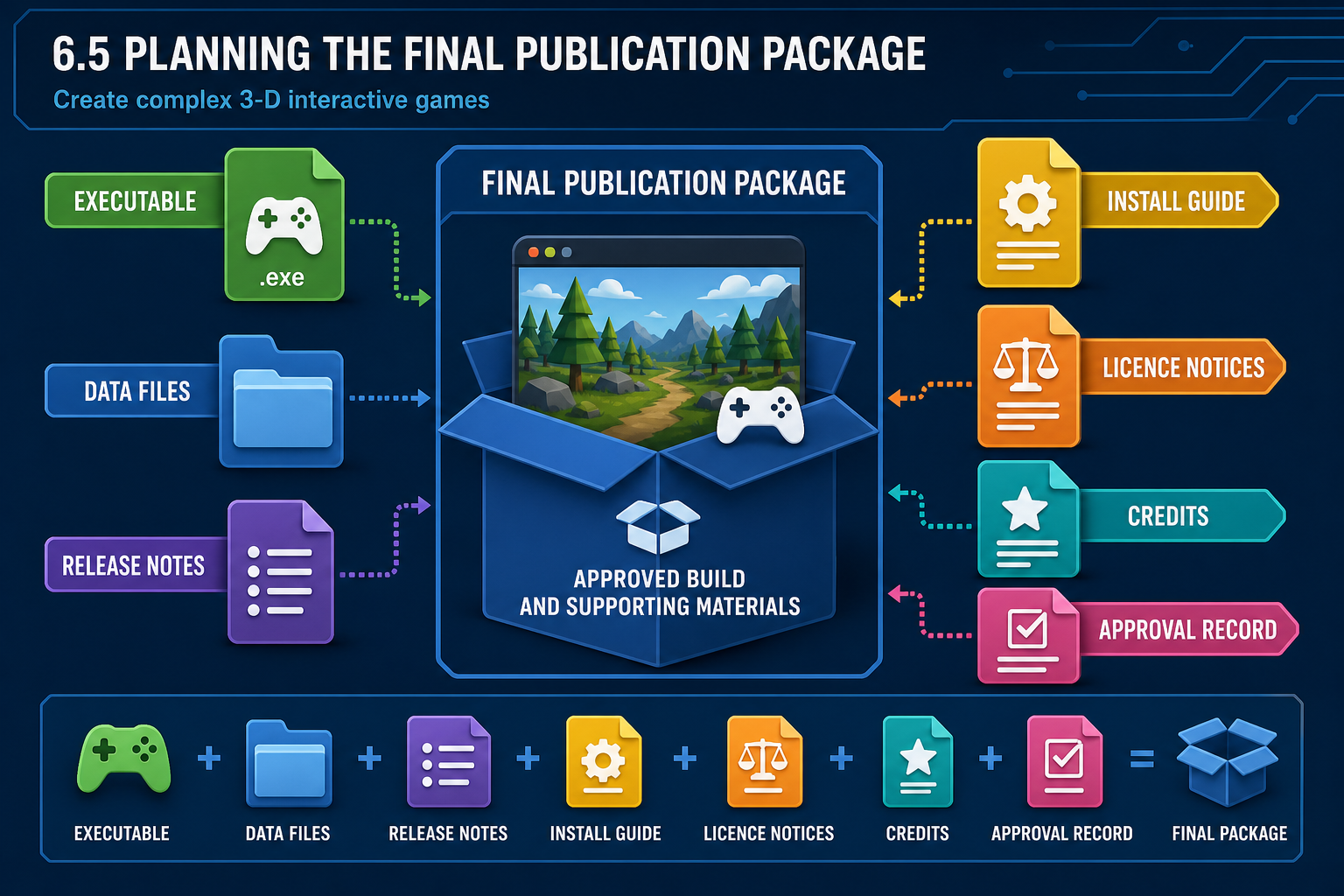
What final publication means
To assemble final publication for distribution is to package the approved game and supporting materials so the intended audience can access, install or launch it correctly. The method depends on the project: Windows executable, macOS build, WebGL upload, Android package, iOS submission, console package, Steam build, itch.io upload, client portal file, LMS activity or archived assessment submission.
Organisational procedures control how this is done. Procedures may cover folder structure, naming, versioning, build settings, file storage, access permissions, release notes, approval records, virus scanning, backup, platform submission and post-release support.
Publication package contents
A final package may include:
- executable or packaged build;
- required data folders and dependencies;
- installer or compressed archive;
- release notes;
- known issues list;
- installation and launch instructions;
- minimum and recommended system requirements if required by the project;
- credits and licence notices;
- privacy notice if the game collects data;
- controller or keyboard guide;
- accessibility notes;
- support contact or defect reporting method;
- checksum or verification information if required.
For a student online submission, the package may also include source files, build files, test evidence and sign-off documentation according to the assessment brief.
Build configuration
Before packaging, check build settings:
- correct scenes or maps included;
- development/debug mode disabled unless required;
- correct company/product name and version;
- target architecture and platform selected;
- icons, splash screens and resolution settings configured;
- required plugins included;
- unused debug assets removed where appropriate;
- compression and asset bundling settings checked;
- save path and permissions valid for the target platform.
Naming and versioning
Use a versioning convention that distinguishes builds clearly, such as product name, platform, version and date. For example: `HarbourQuest_Windows_v1.0.0_2026-07-14.zip`. Avoid ambiguous names such as `final.zip`. If the organisation uses semantic versioning, follow it. If it uses milestone labels such as RC1 or Gold Master, use those labels consistently. Versioning prevents accidental distribution of the wrong file.
Workplace example
A Launceston studio prepares a 3-D walking simulator for a tourism client. The development build contains console commands and an unlicensed placeholder music track. Organisational procedure requires a release checklist before upload. The team replaces the music, updates credits, disables development console, packages a Windows build, writes installation notes and stores the approved ZIP in the release folder with the version number.
WHS and security context
Distribution work involves file handling, uploads and device testing. Avoid unsafe cable setups and long unattended uploads on shared machines. Use authorised storage and access controls. Do not distribute builds through personal public links if organisational procedure requires controlled access.
6.5 Building for engines and platforms
Engine build pipelines
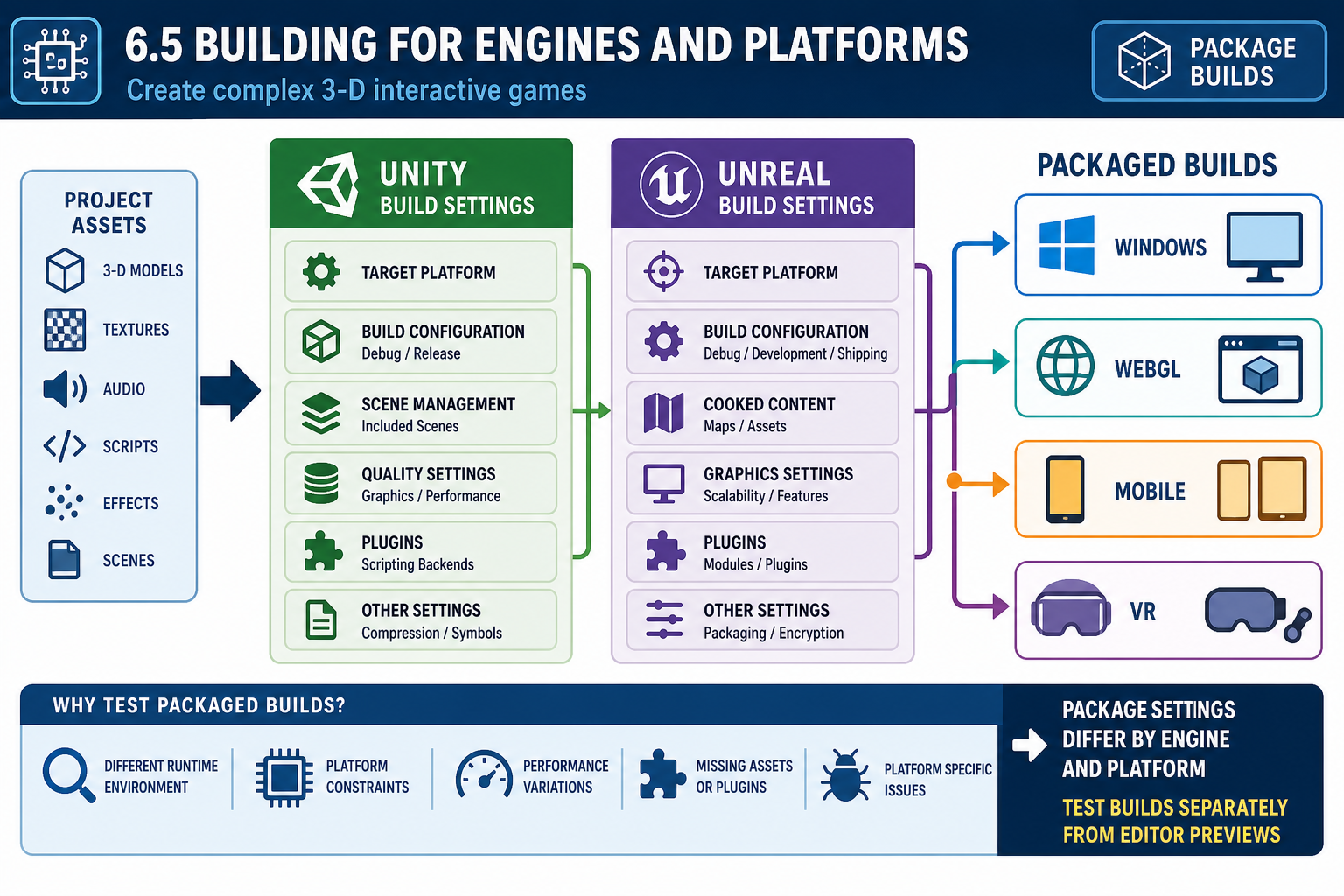
Game engines have specific packaging pipelines. In Unity, you select target platforms in Build Settings, configure Player Settings, include scenes, manage packages and build the application or WebGL output. In Unreal Engine, you configure project settings, maps, packaging options, plugins and target platform, then package or cook content for distribution.
Both engines can produce builds that differ from the editor. Scripts may be compiled differently, assets may be stripped or cooked, shaders may compile at first launch, and platform permissions may change file access. Therefore, a final publication must be launched and tested as a packaged build.
Platform-specific considerations
Different hardware and software products impose constraints:
- Windows/macOS/Linux: installer or archive structure, graphics APIs, controller drivers, antivirus false positives, save locations.
- Web builds: browser compatibility, loading size, memory limits, compression, hosting headers and network access.
- Mobile: touch input, screen aspect ratios, permissions, battery, thermal throttling and store submission requirements.
- VR: headset runtime, tracking space, comfort, frame stability and controller mapping.
- Console: platform holder technical requirements, submission packages and controlled developer access.
Do not assume one build covers all targets. If the specification requires multiple platforms, each needs appropriate packaging and testing.
Asset and dependency problems
Final packaging often reveals integration issues. Missing dynamic assets, editor-only scripts, incorrect file paths, incompatible plugins, uncompressed textures, unsupported shaders and large audio files can break or bloat the build. Review build logs and warnings. Treat packaging errors as defects, not as harmless technical noise.
Basic programming checks
Check for code that depends on development-only paths, local machine folders, debug input keys, editor APIs or hard-coded absolute file locations. Use relative paths and engine-supported persistent data locations. Handle exceptions and missing files gracefully. Remove test cheats unless explicitly allowed.
Build logs and acceptance decisions
A build that completes with warnings still needs review. Some warnings are harmless, such as an unused import. Others indicate missing shaders, unsupported texture compression, invalid platform permissions or assets excluded from the package. Record significant warnings and either resolve them or obtain technical approval to proceed. This is part of organisational procedure because the package must be reliable, not merely generated.
Workplace example
A Townsville team builds a Unity WebGL 3-D game for a school website. The editor version uses a local JSON file for level data. The WebGL build cannot access the local path, so levels fail to load. The team moves data into an approved streaming asset or web request workflow, updates hosting settings and retests in the browser specified by the client.
Industry context
Platform submission may involve technical compliance and content guideline checks. Age-rating processes may also apply for public commercial release. In Australia, classification requirements can be relevant depending on how and where the game is supplied. Follow current organisational and platform guidance rather than guessing.
6.5 Documentation, licences and compliance materials
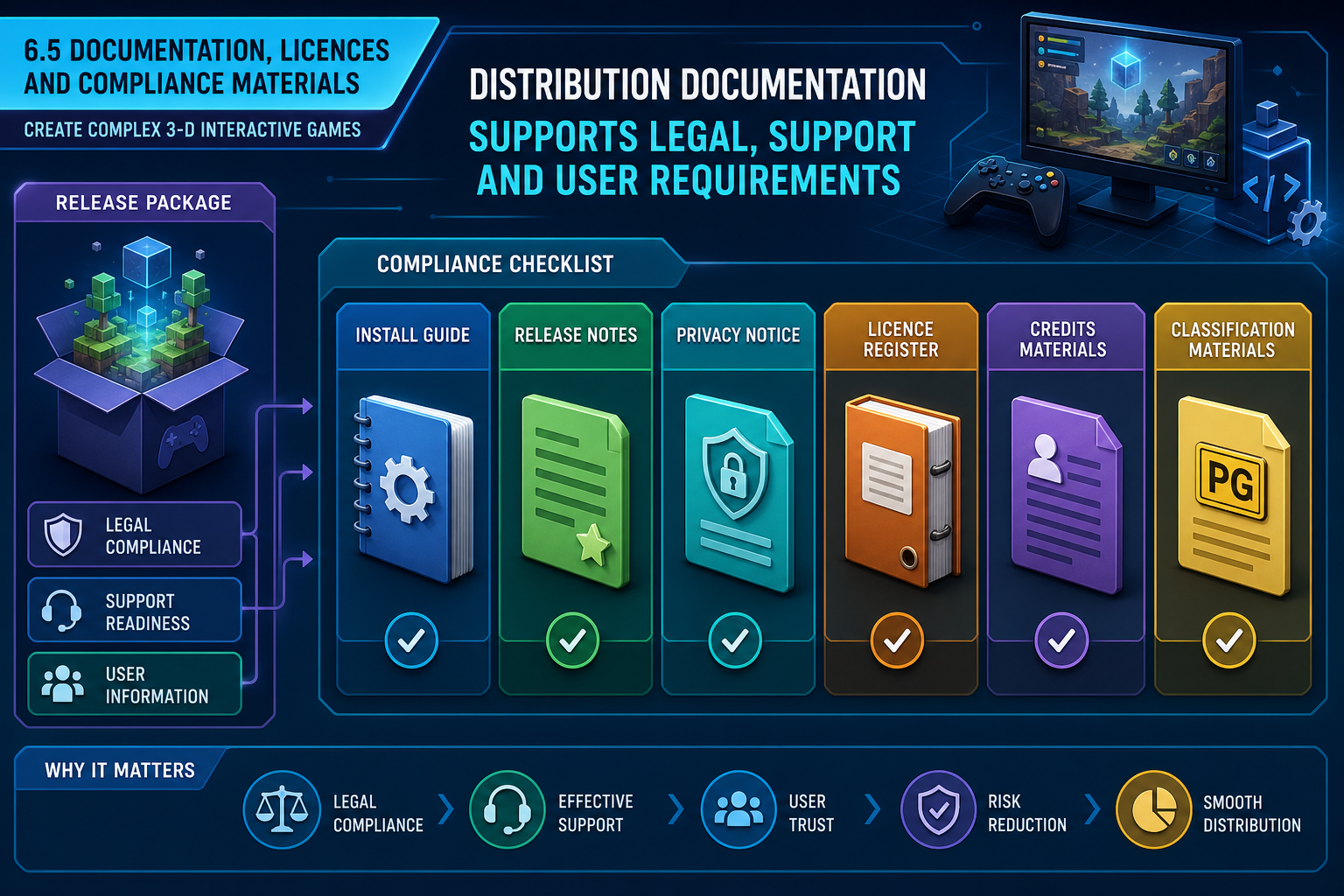
Documentation supports successful distribution
A final publication is more than a build file. Users, clients, platform reviewers and support staff need enough information to install, launch, use and troubleshoot the game. Documentation should match the audience. A public player may need simple installation notes. A client may need deployment instructions. An assessor may need evidence that the build meets the unit requirements.
Common documentation includes:
- release notes summarising changes and version;
- install and uninstall instructions;
- controls and accessibility options;
- known issues and workarounds;
- support contact or bug reporting method;
- system requirements where required;
- third-party notices and credits;
- data collection and privacy information;
- assessment or client acceptance documents.
Licences and intellectual property
Final distribution must include only content the organisation has the right to distribute. Check licences for 3-D models, textures, fonts, music, sound effects, plugins, code libraries and middleware. Some assets allow use in a project but require attribution. Some prohibit commercial use. Some cannot be redistributed as raw source files.
In Australia, copyright protects original creative works including code, art, audio and text. Do not use placeholder assets from the internet in a final package unless the licence permits it. Keep an asset register showing source, licence, author, attribution requirement and any restrictions.
Classification, content and privacy
Commercial public release may require age classification or platform content disclosures. Australia has a national classification scheme for games. Storefronts and platform holders may also require content questionnaires and rating information. Follow the organisation’s process for classification and platform submission.
If the game collects analytics, usernames, assessment results, voice recordings or other personal information, provide the required privacy information and handle data under organisational policy and the Privacy Act 1988 where it applies. For training games, consider whether records are assessment data and who may access them.
Accessibility and inclusive release notes
If accessibility features are included, document them clearly. If there are limitations, state them honestly. For education and public services, accessibility is not just a polish concern; it affects equitable access.
Compliance checklist example
Before distribution, a producer might ask: Are all third-party assets listed? Are required attributions visible in credits or documentation? Has placeholder content been removed? Does the privacy notice describe any data collection? Is the build appropriate for the intended audience and classification pathway? Are culturally sensitive materials approved by the relevant community or client process? These checks reduce the risk that a technically sound build fails organisational release requirements.
Workplace example
A Western Australian studio publishes a 3-D language-learning game. The build uses a third-party font and Creative Commons sound effects. Before distribution, the producer checks each licence, adds required attributions to the credits, confirms the privacy notice for learner progress data, and includes instructions for keyboard-only navigation. Without these materials, the build may technically run but still fail organisational release procedure.
6.5 Distributing and archiving the final publication
Distribution procedure
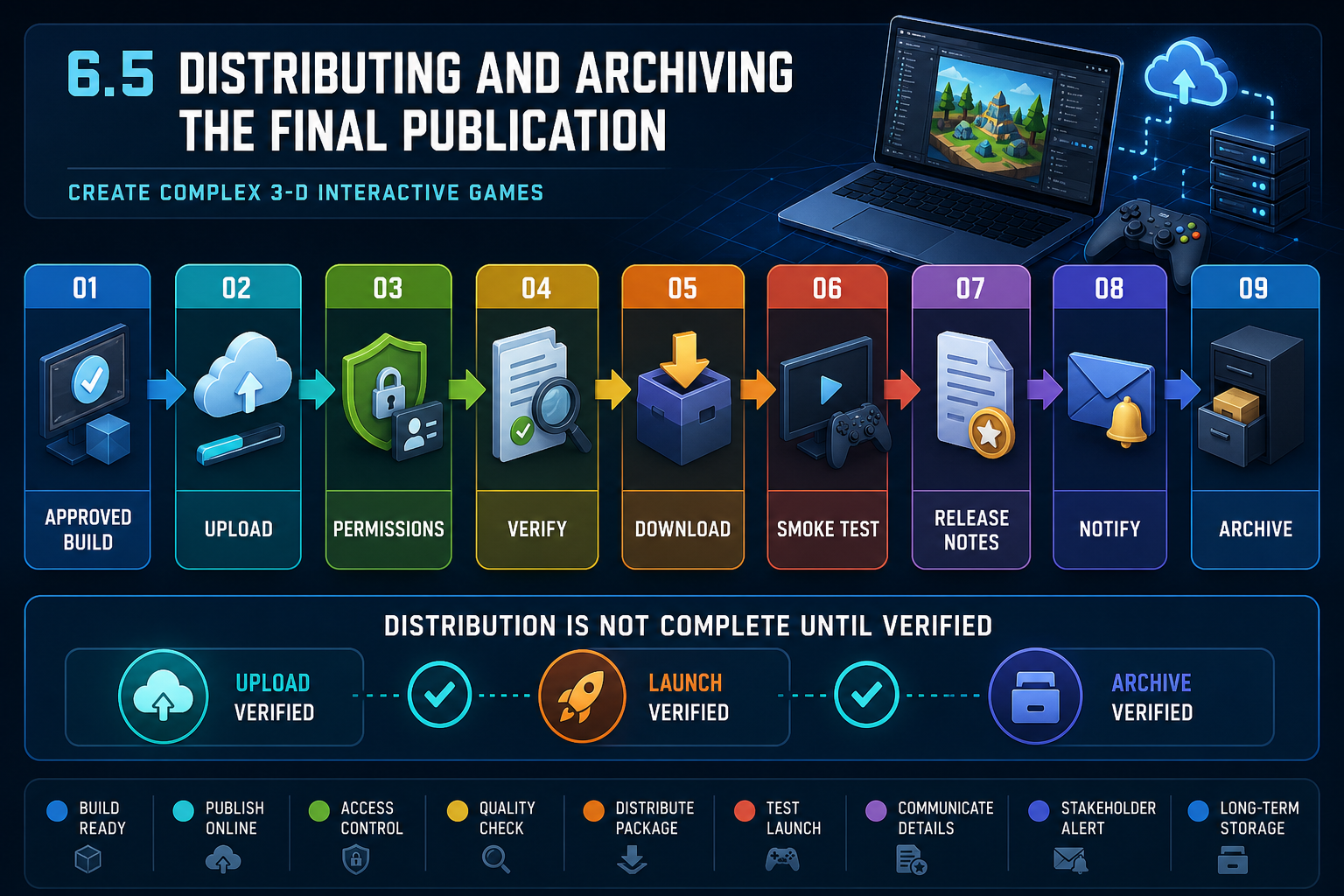
Once sign-off is obtained and the package is prepared, distribute only through approved organisational channels. These may include an LMS, client file portal, cloud release folder, web server, app store, platform dashboard, internal deployment system or versioned repository release.
A safe distribution process is:
- Confirm the build is the approved version.
- Upload to the authorised location.
- Set access permissions correctly.
- Verify the upload completed without corruption.
- Download or install from the distribution channel as a user would.
- Launch and perform a short smoke test.
- Publish release notes and support instructions.
- Notify required stakeholders.
- Archive the final build, source snapshot and evidence pack according to procedure.
Verification after upload
Do not assume that a successful upload means a successful release. Compression, hosting configuration, file permissions, browser security, missing dependencies or incomplete uploads can break the user experience. For web builds, test the hosted URL, not just the local folder. For zipped builds, download and extract the archive on a clean machine if possible. For LMS delivery, check student permissions and whether the file size or file type is supported.
Archiving
Archive the exact approved build and associated source or project state required by organisational procedure. This supports future patches, audits, disputes and maintenance. Include build number, date, platform, sign-off record, release notes and known issues. If using Git or another version control system, tag the release commit.
Post-release readiness
Final publication does not always end the project. Prepare a support pathway for defect reports, crash logs, player feedback and patches. For public release, a day-one patch or hotfix process may be planned. For client release, define who receives support requests and response times according to the contract or organisational policy.
Rollback and contingency planning
Distribution procedures should include what to do if the release is wrong. A rollback plan may involve removing a file, restoring a previous build, disabling a public link, reverting a web deployment, or notifying users of a corrected package. Keep previous approved builds separated from current public files so the team can respond quickly without confusion. For online courses, a faulty upload may affect learner access and assessment timelines, so escalation paths should be clear.
Workplace example
An online Diploma cohort submits final 3-D games through the LMS. One learner uploads only the executable, not the required data folder, so the assessor cannot run the game. Correct procedure is to package the full build folder, include instructions, test the downloaded ZIP on another machine, and submit evidence files separately if required. In industry, the same principle applies: distribution must be verified from the user’s perspective.
Security and privacy
Remove personal test data, debug logs containing names, API keys and internal credentials before distribution. Use authorised accounts for platform uploads. Maintain access control for unpublished builds and archives.