Week 15 — Element 6
6.3 Make final checks and confirm sequences conform to navigation design
6.3 Planning final navigation checks
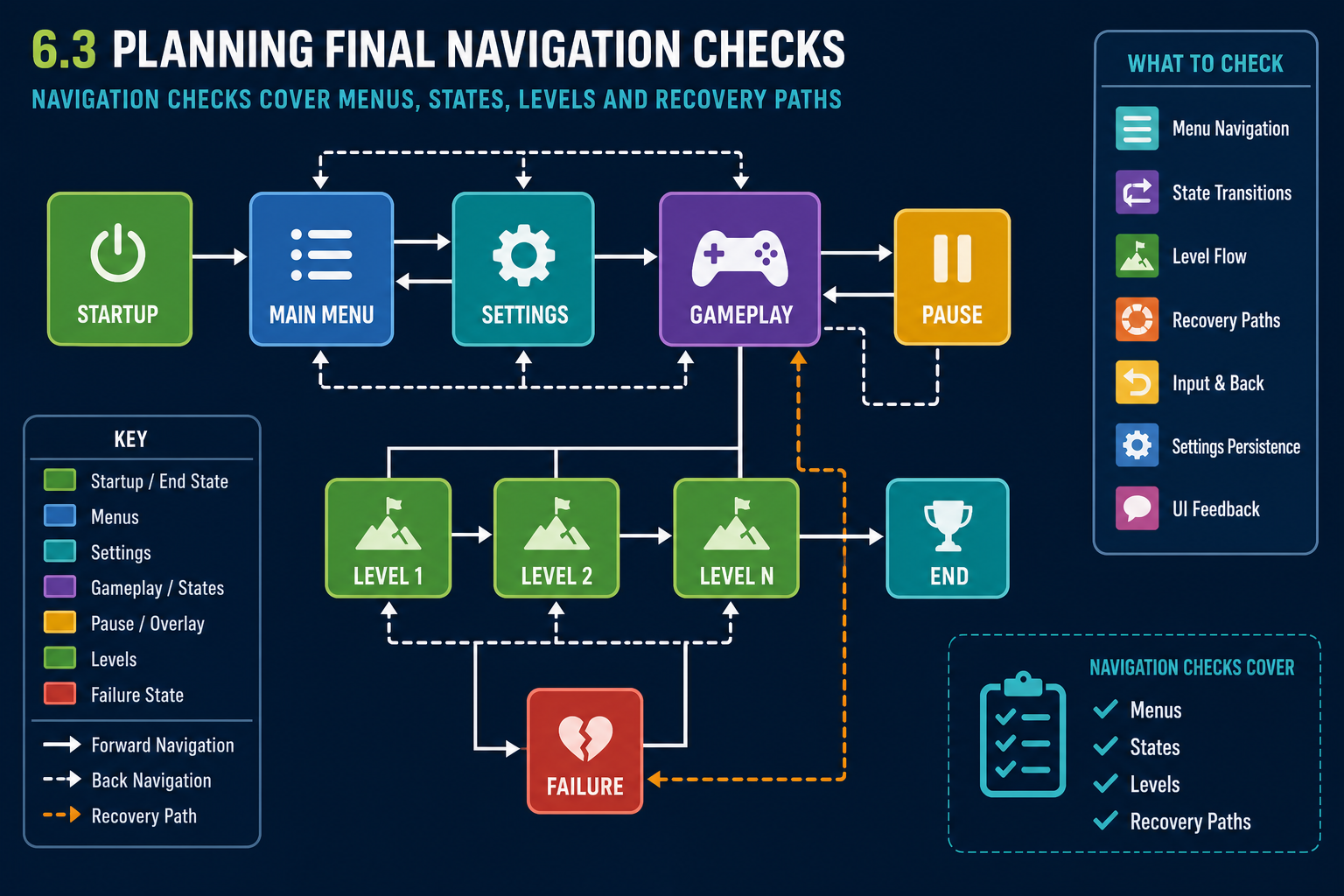
What navigation design covers
The navigation design describes how players move through menus, screens, levels, gameplay states and sequences. It may appear as a flowchart, wireframe set, level progression map, state machine, storyboard or section of the GDD. Final checks confirm that the implemented game follows this design.
Navigation is broader than menu buttons. It includes:
- start-up flow and splash screens;
- main menu, settings, credits and quit options;
- save slots or continue flow;
- tutorial and onboarding sequence;
- level progression and branching paths;
- pause, resume, restart and return-to-menu behaviour;
- death, failure and success states;
- cutscene skipping or replay rules;
- loading screens and transitions;
- end-game and post-completion flow.
Building a navigation test matrix
Convert the navigation design into test cases. For each screen or state, record:
- Entry point: how the player gets there.
- Available actions: buttons, keys, controller inputs or touch gestures.
- Expected destination for each action.
- Data that should persist, such as settings or save progress.
- Conditions that change the route, such as locked levels.
- Expected audio, visual and haptic feedback if specified.
- Exit and recovery options.
Test normal paths and edge paths. Players may press back rapidly, disconnect a controller, pause during a cutscene, die during an objective update, or load a save after changing graphics settings.
Target input devices
Navigation checks must use the intended hardware and software products. Keyboard/mouse behaviour can differ from controller behaviour. Touchscreen interfaces require larger targets and different feedback. VR navigation may involve comfort, gaze, hand tracking and motion-sickness considerations. Console and mobile platforms may have mandatory behaviours for system buttons and suspension, although details are controlled by platform holder documentation.
Planning coverage, not random play
A final navigation pass should be planned so the team can prove coverage. Assign test cases to testers, record pass/fail results, and ensure high-risk paths are checked more than once. High-risk paths include save/load, quitting, returning from pause, platform suspension, settings changes, and any sequence recently changed because of user trials. This is production scheduling in practice: limited QA time is directed to the areas most likely to affect release.
Workplace example
A Gold Coast studio creates a PC and controller-based 3-D adventure game. The mouse works in menus, but when testers use a controller the focus highlight disappears after opening settings. The player can technically move focus, but cannot see what is selected. This fails navigation design because the UI state is not visible. The fix may involve UI event system settings, default selected objects and controller navigation mappings.
WHS and accessibility
For long final test sessions, manage fatigue and ergonomics. Navigation checks can be repetitive, so testers should take breaks and record results carefully. Accessibility checks should include readable text, predictable focus order and alternatives to colour-only navigation cues where required by the project.
6.3 Checking gameplay sequences
Sequences in 3-D games
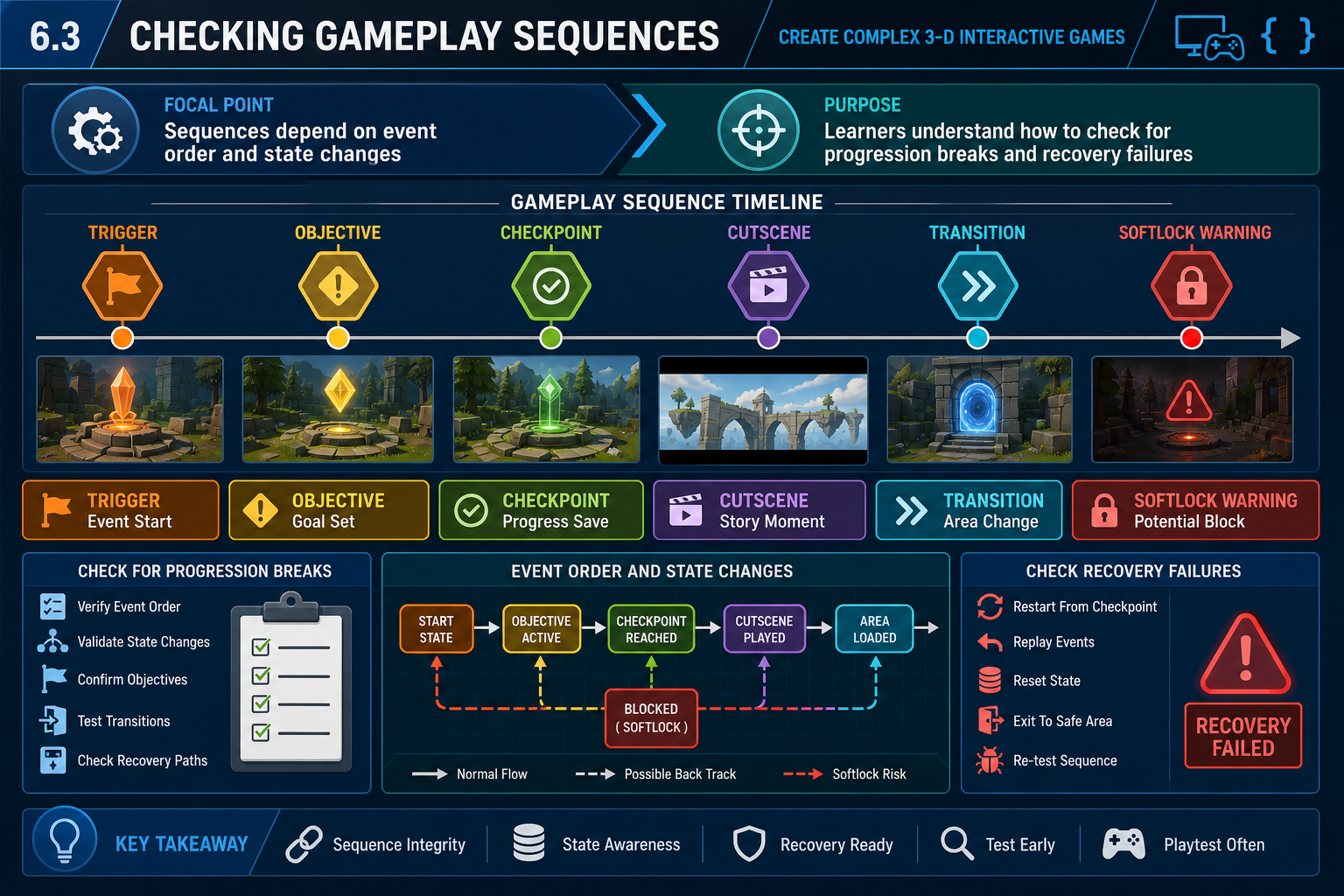
A sequence is an ordered chain of events that should happen during gameplay or navigation. Examples include tutorial steps, puzzle stages, combat encounters, cinematic events, objective updates, level transitions and end-game results. Final checks confirm these sequences match the approved navigation and gameplay design.
A sequence often depends on state variables: objective completed, item collected, enemy defeated, dialogue heard, checkpoint saved or cutscene skipped. If state changes occur in the wrong order, players may encounter broken objectives or softlocks.
How to check a sequence
Use a structured approach:
- Read the intended sequence from the design document or flowchart.
- Start from a clean save or specified test state.
- Perform the expected player path and record each event.
- Repeat with alternative valid paths.
- Attempt likely edge cases, such as leaving and returning, dying, reloading, skipping dialogue or changing settings mid-sequence.
- Check that UI, audio, animation, camera and save systems update correctly.
- Confirm the next sequence begins correctly.
For example, a tutorial may require the player to pick up a torch, open a door, enter a cave and trigger a lighting lesson. Check what happens if the player drops the torch, dies after opening the door, or returns to the first room.
Progression breaks and softlocks
A progression break prevents the player from advancing as required. A softlock leaves the game running but traps the player in an unwinnable or unresponsive state. Both are serious in final publication.
Common causes include:
- triggers firing only once and not resetting;
- checkpoints saved after a required object is destroyed;
- doors locked without alternate path;
- NPCs failing to reach a navigation point;
- cutscenes not returning control;
- objective variables updated in the wrong order;
- loading into a scene without required persistent objects.
Basic programming techniques
Many sequence defects are logic defects. Use basic debugging techniques: inspect variables, add temporary logging, use breakpoints, check event order, validate null references and review state machine transitions. In visual scripting, avoid tangled event graphs with hidden dependencies. In code, use clear functions, guard clauses and predictable state names.
State design and recovery
Good sequence checking also asks whether the game can recover from interruption. What happens if the player quits after the objective updates but before the reward is collected? What happens if a checkpoint is saved while an animation is mid-transition? Use explicit states such as NotStarted, Active, Completed and Rewarded rather than relying on several unrelated booleans that can become inconsistent. This is basic programming discipline applied to final QA.
Workplace example
In a Hobart 3-D environmental game, players must photograph three animals before the exit opens. Final testing shows the exit opens after any three photos, including duplicates. The sequence does not conform to design. The fix requires checking unique animal IDs, updating UI feedback and retesting save/load after the second and third valid photographs.
6.3 Final QA passes and defect triage
Types of final checks
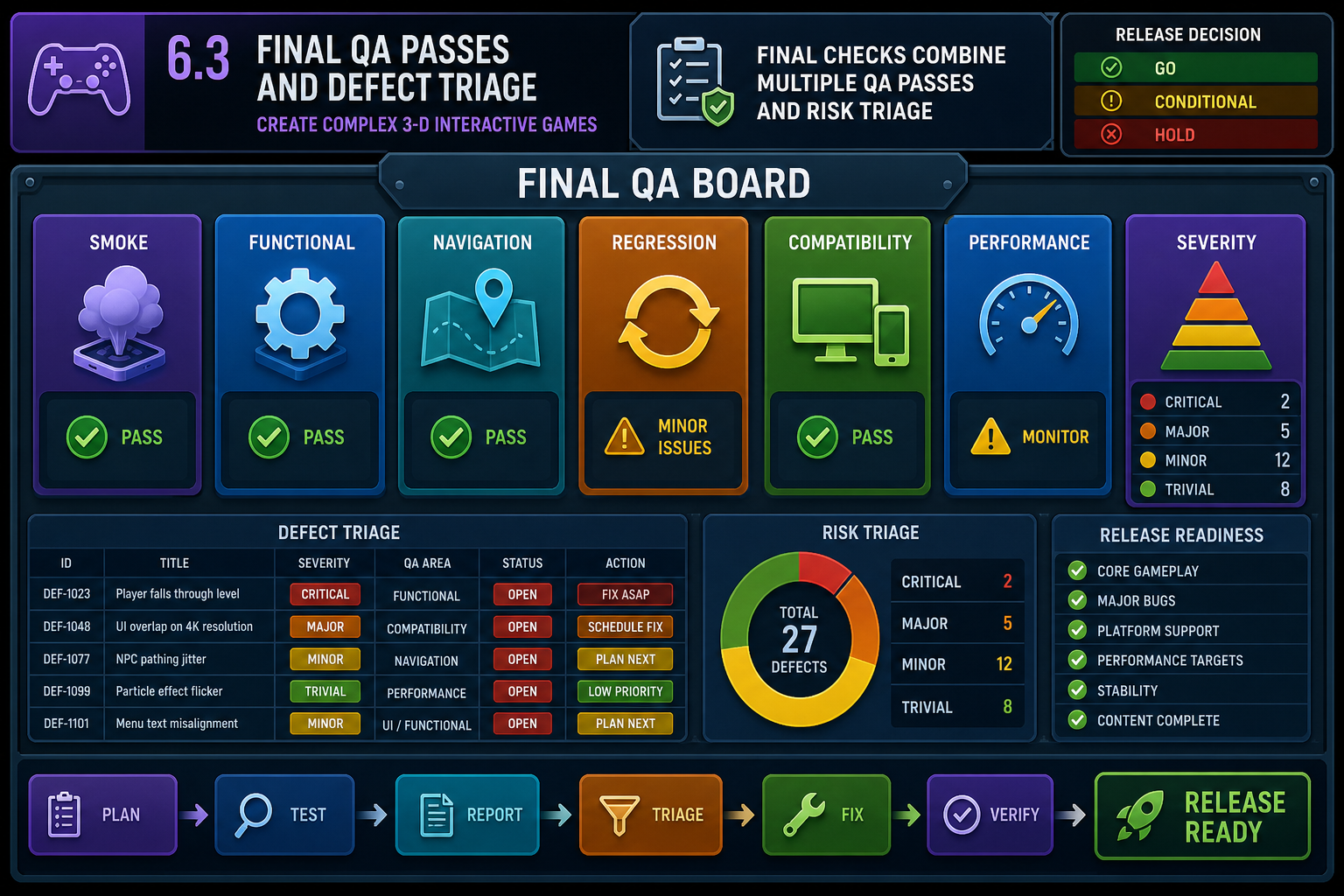
Final checks are not one casual playthrough. They combine several QA activities:
- Smoke testing: confirm the build launches, loads core scenes and is not obviously broken.
- Functional testing: check features behave according to specification.
- Navigation testing: verify screens, states and sequences follow the navigation design.
- Regression testing: confirm previous fixes still work.
- Compatibility testing: check target hardware, operating systems, input devices and graphics settings.
- Performance testing: monitor frame rate, loading, memory and stability against project requirements.
- Certification or compliance-focused testing: where relevant, check platform or client requirements before submission.
Defect triage
Triage is the process of deciding what to do with defects. At final publication, triage should be evidence-based and risk-aware. Crashes, data loss, security problems, progression blockers, severe accessibility blockers and platform submission failures usually outrank cosmetic issues.
For each defect, record:
- build number and platform;
- exact steps to reproduce;
- expected and actual result;
- severity and priority;
- screenshots, video or logs;
- whether it is new or a regression;
- owner and status.
A release candidate should not proceed with unresolved critical defects unless the required personnel formally accept the risk, which is unusual for player-blocking issues.
Capabilities and constraints during checking
Game engines provide useful tools: profilers, console logs, error windows, build reports, memory views and platform-specific diagnostics. However, editor testing is not enough. Packaged builds can behave differently due to asset stripping, file paths, shader compilation, plugin packaging, input handling or platform permissions.
Hardware constraints matter. A scene may pass on a developer’s RTX-equipped desktop but stutter on a minimum-spec laptop. Mobile devices may throttle under heat. VR requires stable performance to reduce discomfort. Networked games require latency, disconnect and reconnection checks.
Escalation and critical path
When a serious defect is found, escalate with options, not panic. State the impact, affected platforms, likely cause, estimated fix effort and testing required. A navigation blocker found late may delay sign-off because it sits on the critical path: fix, rebuild, regression test and reapproval must all occur before distribution. Clear escalation helps producers decide whether to add resources, reduce scope with approval, delay release or issue a staged update.
Workplace example
A regional Queensland studio packages a 3-D tourism game for web distribution. In the editor, all links work. In the WebGL build, the gallery scene fails because a file path uses editor-only loading. Final QA identifies it as high priority because the main experience cannot be completed. The fix requires changing asset loading, rebuilding and rerunning navigation tests from the main menu to the gallery and back.
WHS context
Final QA can involve repetitive testing and extended device use. Follow workplace WHS procedures for breaks, posture, eye strain and safe cable/device setup, particularly when using VR headsets, controllers and multiple monitors.