Week 1 — Element 1
1.1 Obtain project brief and other required documents and organisational procedures
1.1 Obtain the project brief
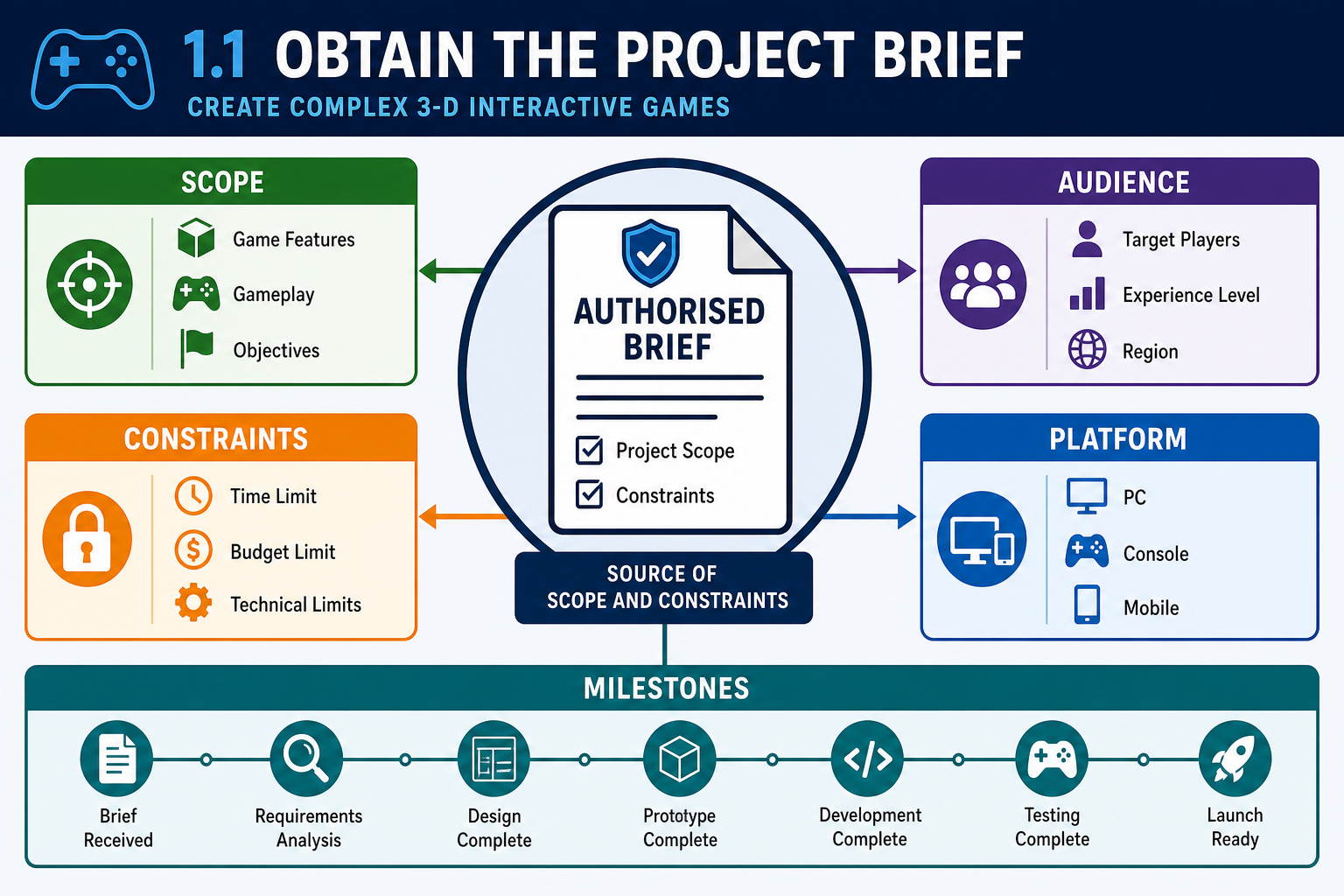
What a project brief is
A project brief is the authorised starting point for production. It explains what the game is intended to be and the constraints under which it must be produced. In a game development workplace, the brief may come from a publisher, client, producer, creative director, teacher, or internal product owner. It may be a short document, a pitch deck, an approved statement of work, or a section in a production management system.
For a complex 3-D interactive game, the brief usually needs to clarify:
- the game concept, genre and player experience
- intended audience and classification considerations
- target platforms, such as Windows PC, console, mobile, VR or web
- required engine or toolset, such as Unity or Unreal Engine
- major features, including game-play systems and interaction modes
- visual style, audio direction and user interface expectations
- deliverables, milestones and approval points
- budget, staffing and schedule constraints
- testing expectations and beta prototype purpose.
At AQF 5 level, you should not passively receive the brief. You should check that it is the current authorised version and identify gaps that could affect production. For example, a brief saying “make a realistic multiplayer 3-D racing prototype” is not enough. You need to know the number of cars, track length, target frame rate, supported controllers, networking requirement, physics expectations and whether the beta must include final art or placeholder art.
How to obtain the brief properly
Use a controlled process:
- Identify the document owner. This may be the producer, project manager, client contact or course facilitator.
- Request the current approved version. Check the date, version number and approval status.
- Store it in the agreed location. Use the studio’s document repository, LMS, cloud workspace or version-controlled project folder.
- Read it against production needs. Highlight unclear scope, missing specifications and dependencies.
- Record questions. Do not rely on memory or chat messages that are not captured.
- Confirm interpretations in writing. A short email, ticket comment or meeting note can prevent later disputes.
Workplace example
A Brisbane serious-games studio receives a brief from a mining training provider for a 3-D equipment inspection simulation. The brief says the trainee must “identify hazards around a parked vehicle”. Before asset production starts, the developer obtains the signed brief and asks for supporting details: required hazard types, target hardware in the training rooms, whether the simulation must run offline, and whether branded vehicle models are supplied or must be created. This prevents the team modelling a high-detail environment that cannot run on the client’s older laptops.
Common mistakes
Common errors include working from an old brief, relying on a verbal description, ignoring platform constraints, or assuming that “prototype” means low quality. A beta-version prototype may still need release-quality systems if it is being used to test real game play. Always confirm the meaning of deliverables before planning production.
1.1 Gather required supporting documents
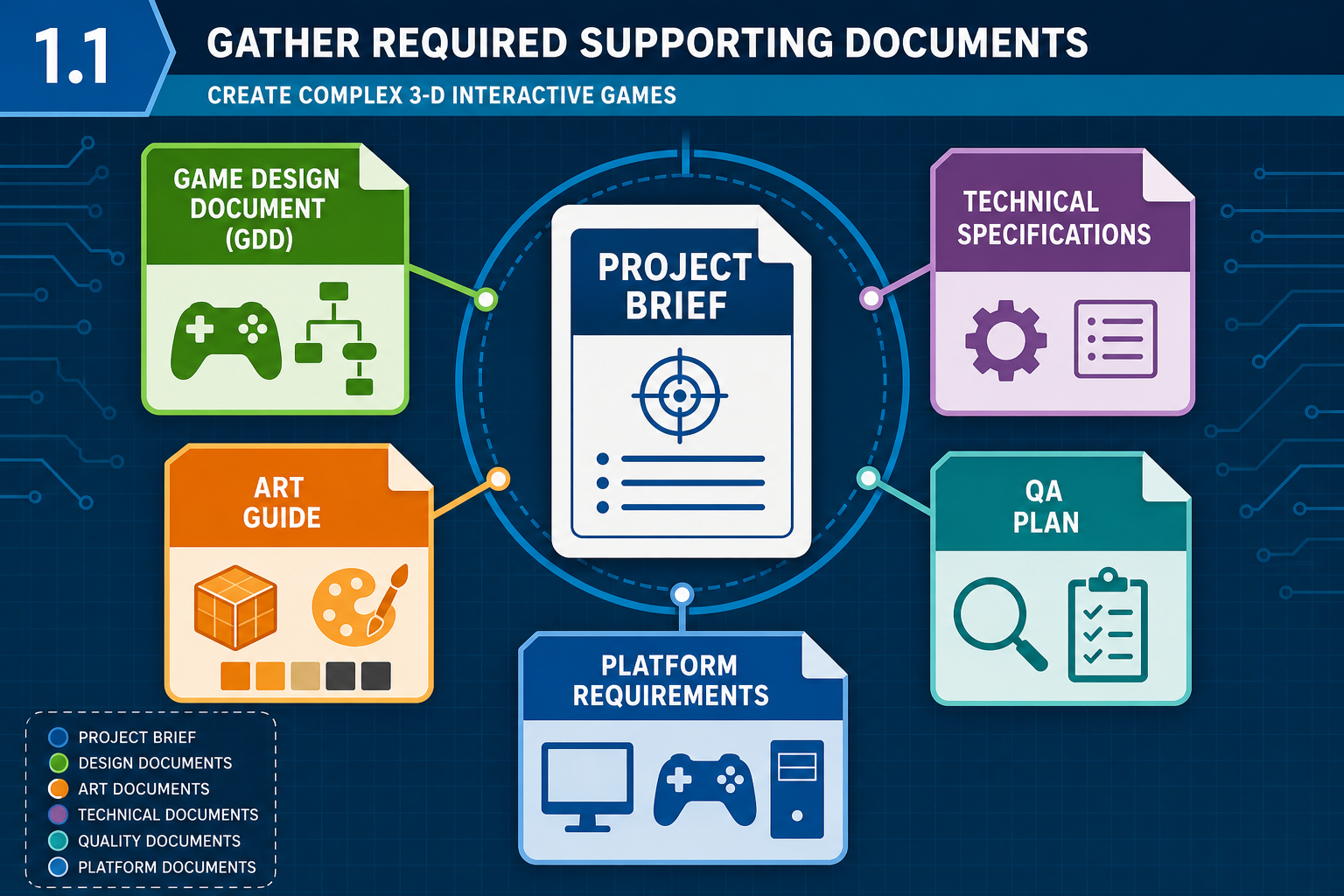
Required documents in game preparation
The project brief tells you what has been commissioned or approved, but it rarely contains enough detail to create a complex 3-D game. You must obtain the other documents needed to understand creative, production and technical requirements. In larger studios, a Game Design Document or GDD is often central. Process-driven companies use detailed documentation because it keeps the team organised, exposes risks early, and helps identify roles or outsourcing needs.
Supporting documents may include:
- Game Design Document (GDD): mechanics, rules, progression, win and fail states, level structure, controls and player feedback.
- Technical design document: engine version, programming language, architecture, data structures, save systems, networking and build pipeline.
- Art bible or style guide: shape language, colour palette, lighting, camera, scale, character style and environment references.
- Audio brief: music style, ambience, sound effect categories, voice-over and implementation requirements.
- Asset list or bill of materials: models, textures, animations, VFX, UI elements, audio and scripts required.
- Platform or marketplace guidelines: requirements for Steam, PlayStation, Xbox, Nintendo, Apple App Store, Google Play, Meta Quest or other release channels.
- Quality assurance plan: test approach, target devices, acceptance criteria, bug severity definitions and reporting tools.
- Legal and licensing records: third-party asset licences, open-source software notices, contractor agreements and copyright clearances.
Why platform documents matter
Platform holders and marketplaces may set requirements for safety, performance, controller behaviour, privacy, content, achievements, networking, accessibility features or store presentation. A team preparing a PC beta on Steam will consider different requirements from a team preparing a VR prototype for a headset. You do not need to memorise every platform rule, but you must know where to obtain the current requirements and who is responsible for interpreting them.
Applied procedure
When gathering documents, build a document register. Record the document name, owner, version, location, approval status and relevance. Then check for conflicts. For example, the GDD may describe a destructible forest while the technical specification sets a strict memory and performance budget for low-end laptops. That conflict must be raised before artists create hundreds of high-poly trees.
Australian workplace context
Australian game studios commonly work with distributed teams, contractors and international publishers. Documentation protects the studio when personnel change or when contractors need precise instructions. It also supports compliance with Australian copyright law by tracking the source and licence of assets. If personal information is collected during testing, privacy obligations under the Australian Privacy Act 1988 may apply, particularly where playtesters provide identifiable feedback, recordings or analytics data.
1.1 Obtain organisational procedures
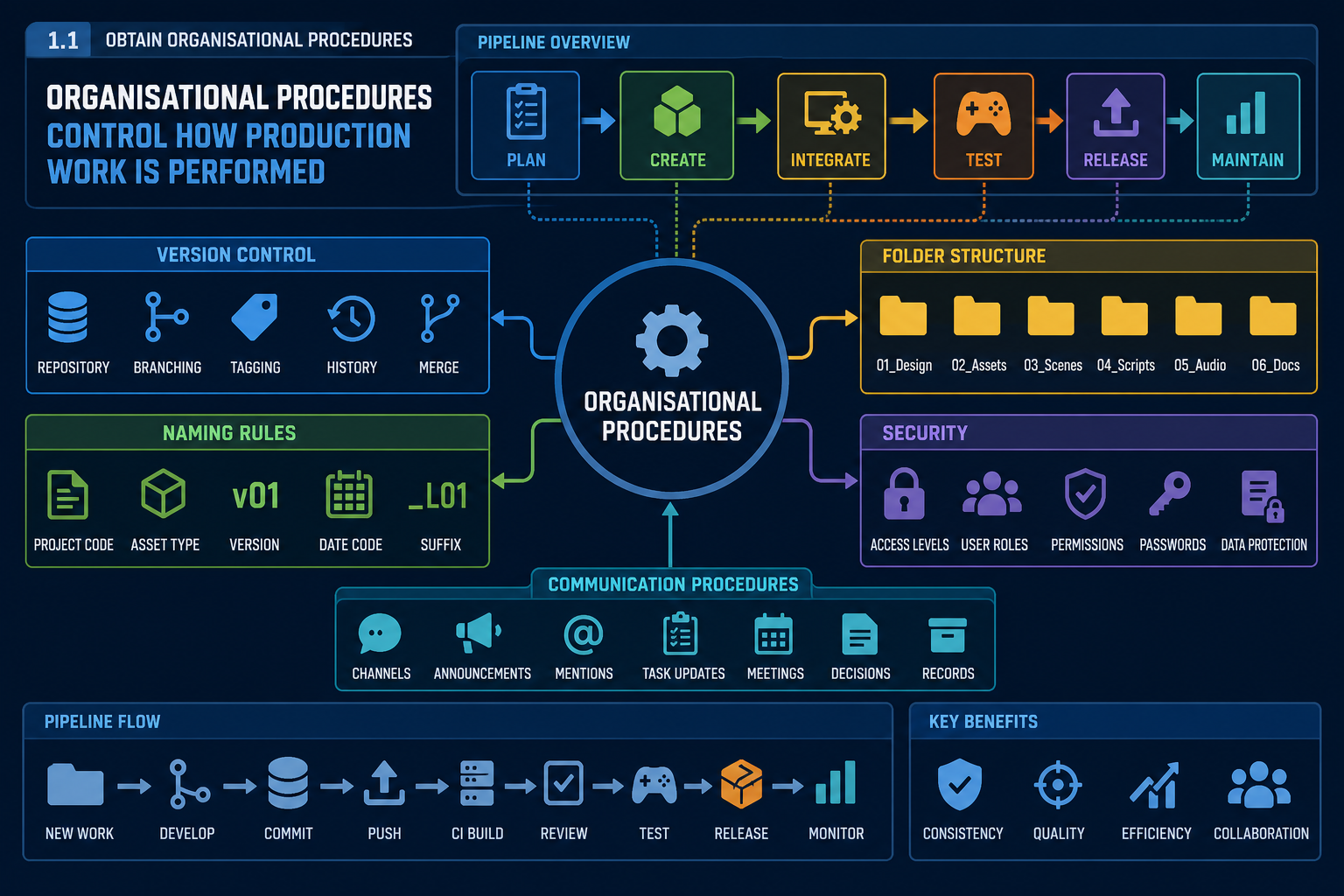
What organisational procedures cover
Organisational procedures are the rules, workflows and standards used by the studio or project team. They may be formal policies, pipeline documents, onboarding notes, LMS instructions or team agreements. Obtaining these procedures is part of preparation because they affect every asset, script, build and test activity.
For game production, procedures commonly cover:
- version control systems, such as Git, Perforce or Plastic SCM
- branch naming, commit message rules and merge approval
- folder structures, file naming conventions and asset metadata
- engine version, plugin approval and package management
- coding standards for C#, C++ or visual scripting graphs
- art export settings, scale units and pivot conventions
- review and approval workflows
- bug reporting, severity levels and test evidence
- backups, access control and confidential material
- remote work communication, meeting cadence and escalation paths.
A procedure is not optional simply because your personal method works on your own computer. In a team, inconsistent practices cause integration failures. A 3-D artist may create a beautiful prop, but if it is named incorrectly, scaled in centimetres instead of metres, and stored outside version control, the developer integrating the scene may waste hours locating and repairing it.
Version control as a core procedure
Complex 3-D games involve many binary files, scripts and scene files. A version control procedure defines how changes are saved, shared and recovered. It also reduces the risk of one person overwriting another person’s work. Many studios use locking for large binary assets, such as Unreal .uasset files, because they do not merge like text files.
When obtaining procedures, confirm:
- repository access and permissions
- which branch is used for stable builds
- how experimental work is isolated
- who reviews merges or pull requests
- how large files are managed
- how builds are tagged for testing.
WHS and online work
For online learners and remote workers, procedures should include safe workstation practices, screen breaks, incident reporting, and respectful communication. Under Australian work health and safety laws, organisations have duties to manage risks to health and safety so far as is reasonably practicable. For a self-paced online cohort, that means you should set up an ergonomic workspace, manage fatigue, and avoid unsafe “crunch” habits when planning production.
Common contingencies
If a procedure is missing, do not invent a private workflow without approval. Propose a simple interim procedure and seek confirmation. For example, if no naming convention exists, suggest one such as `AssetType_ObjectName_Version` and ask the producer or facilitator to approve it. Record the decision so the team applies it consistently.
1.1 Validate and clarify requirements
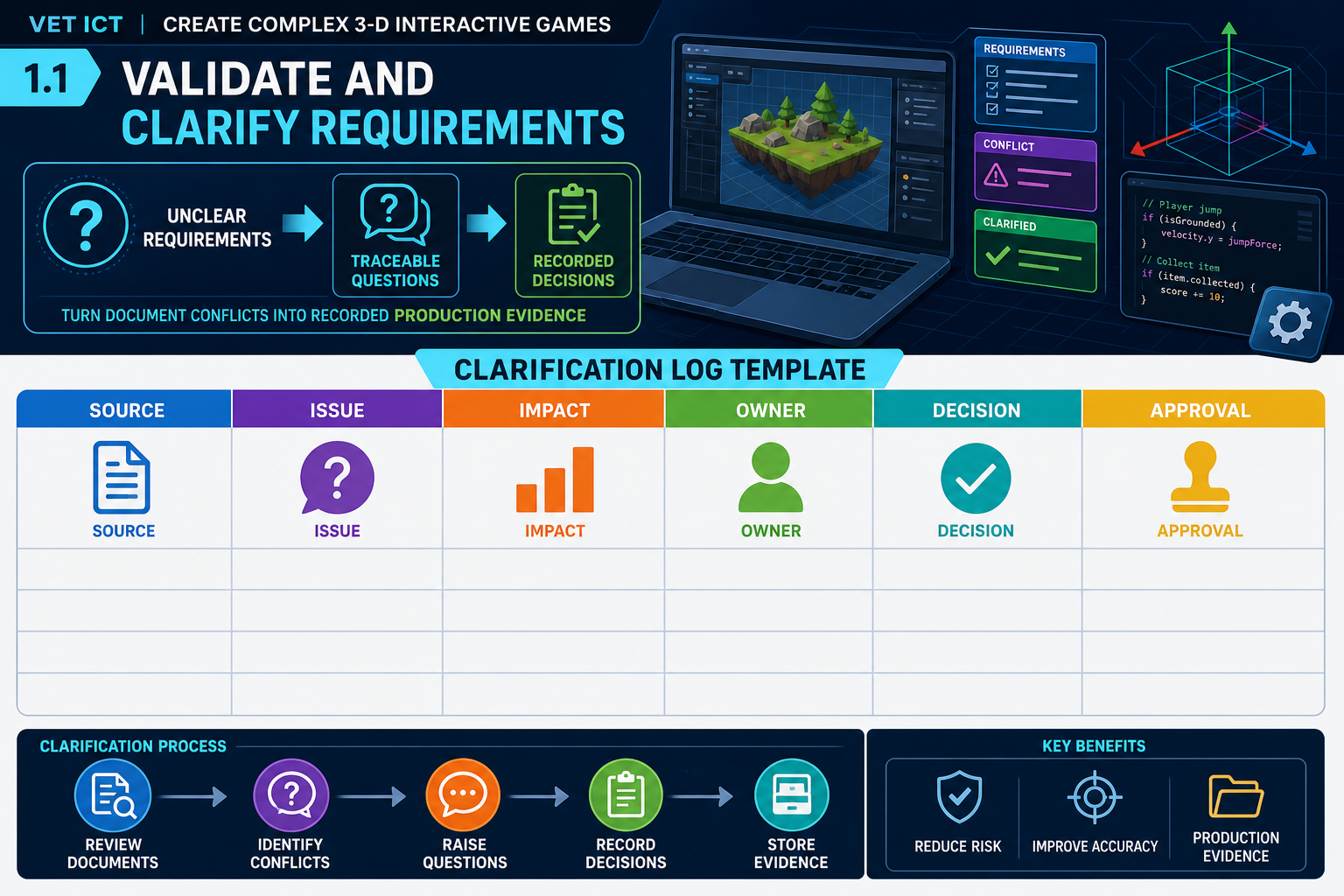
Turning documents into usable requirements
Obtaining documents is not enough. You must validate that the documents are current, complete and usable for production. This means reading them critically and comparing them with each other. At Diploma level, you are expected to recognise when information is unclear and take action before it becomes rework.
A practical method is to create a requirements clarification log. For each issue, record:
- the source document and section
- the unclear or conflicting requirement
- the production impact
- the person responsible for answering
- the agreed decision
- the date and evidence of approval.
For example, the art bible may specify “cinematic realistic lighting”, while the brief requires the beta to run on school laptops. That is not just an art question; it affects engine settings, texture resolution, shader complexity, performance testing and schedule.
Types of questions to ask
Good questions are specific and linked to production decisions. Instead of asking “What should the game look like?”, ask “Is the beta required to demonstrate final lighting quality, or can we use greybox geometry with one representative lit environment?” Instead of asking “What platforms are supported?”, ask “Is the beta target Windows 10/11 PC with keyboard and mouse only, or must it also support gamepad input?”
Ask questions about:
- minimum viable game-play loop
- required content for beta testing
- target hardware and performance expectations
- accessibility expectations, such as remappable controls or captions
- asset ownership and third-party licensing
- build delivery format and test environment
- known exclusions from scope.
Legislative and industry considerations
Game preparation must respect copyright and licensing. Using a model, texture, sound, plugin or code library without a suitable licence can stop a build from being distributed. If the game includes user accounts, analytics, test recordings or identifiable player feedback, privacy considerations must be planned. If the target audience includes children, content, consent and data handling need extra care.
Classification is also relevant in Australia where commercial release may require consideration of the National Classification Scheme. At preparation stage, you should identify content that may affect classification, such as violence, gambling-like mechanics, drug references or online interaction. You do not make legal determinations alone, but you flag risks for the producer or responsible manager.
Evidence of preparation
Your output from PC 1.1 should include a located set of current documents, access to organisational procedures, and recorded clarifications. This evidence lets production begin from a controlled baseline rather than scattered assumptions.