Week 14 — Element 6
6.1 Make required changes as indicated by user trials
6.1 Interpreting user trial evidence
Turning playtest feedback into usable work
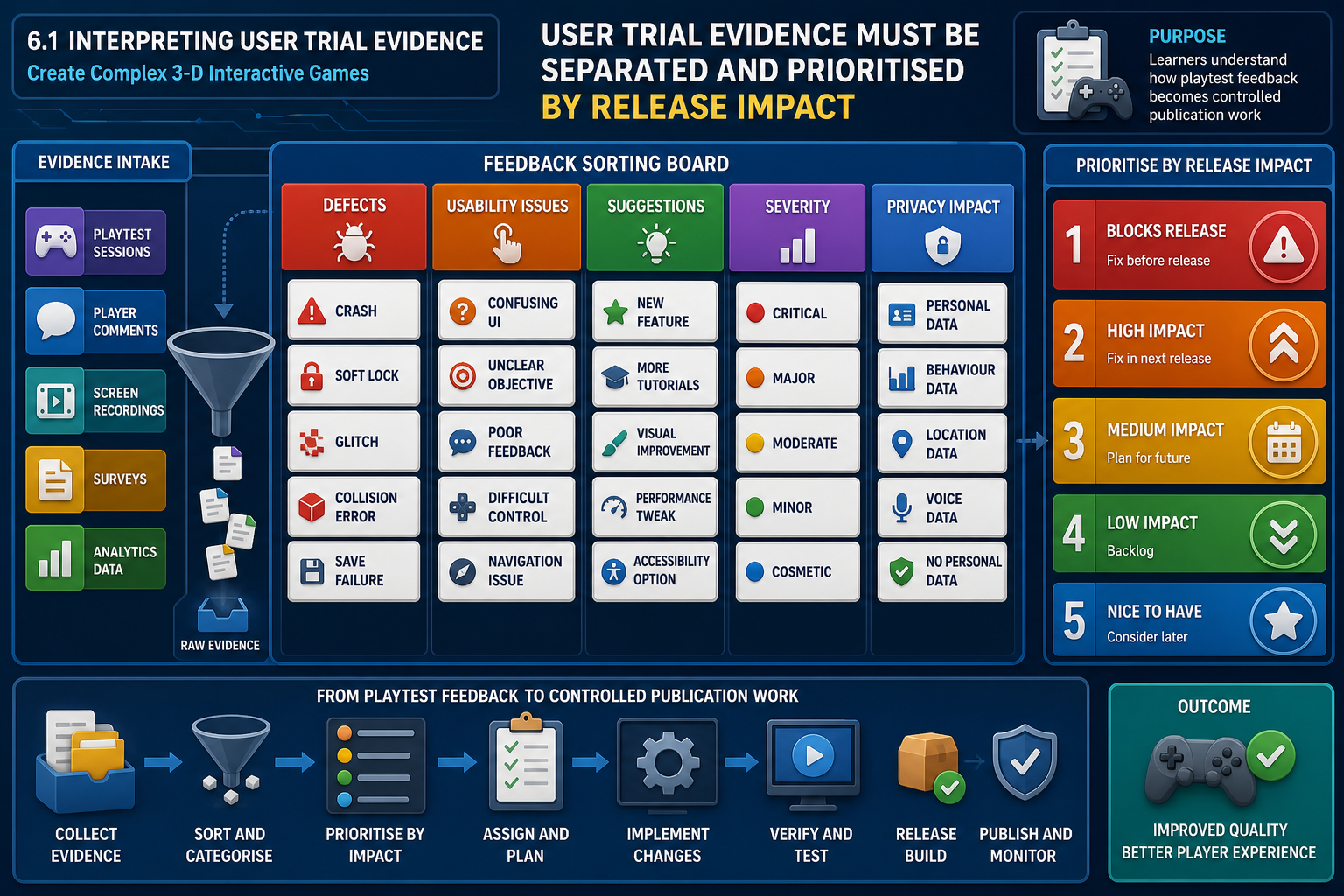
User trials, often called playtests, are structured opportunities to observe real users interacting with the game. At the publication stage, their purpose is not to collect every possible idea. Their purpose is to identify changes required before release: defects, unclear interactions, balance problems, accessibility barriers, performance issues and mismatches between the intended experience and the actual player experience.
Start by separating three kinds of feedback:
- Defects: something does not work as specified, such as a door trigger failing or a save point corrupting progress.
- Usability or experience issues: the game technically works, but players become confused, bored, motion sick or unable to progress without unreasonable effort.
- Suggestions: ideas that may improve the product but are not required for the approved release.
A useful process is to review notes, recordings, telemetry and tester comments against the game design document, test plan and acceptance criteria. Look for repeated evidence. One player saying, "I did not like this weapon", may be personal taste. Five players failing to understand the reload prompt is a design communication issue.
Severity and priority
A common workplace mistake is treating the loudest feedback as the most important. Instead, classify each issue by severity and priority. Severity describes technical or player impact. Priority describes when the team must act.
For example:
- Blocker or critical: crash, data loss, game-breaking bug, progression break, severe performance failure or legal/compliance risk.
- High: major feature malfunction, repeated softlock, serious navigation confusion or balance problem that prevents intended play.
- Medium: noticeable defect with workaround, inconsistent feedback, animation glitch that affects clarity.
- Low: cosmetic issue, typo, minor polish item.
In many game QA workflows, defects move through a pipeline such as Find, Report, Assign, Fix and Regress. Regression means retesting after a fix to confirm the issue is resolved and has not created another defect.
Reading the evidence critically
At final publication stage, you should ask whether feedback is reliable enough to justify change. Check the participant profile, the test conditions, the build version and the hardware used. If a tester reports low frame rate, identify whether the issue is the game, the recording software, an unsupported laptop, a background application or a graphics setting. If trial participants were not part of the intended audience, their feedback may still be useful, but it should be weighted carefully.
A simple evidence matrix helps: list each issue, how many players encountered it, whether staff observed it directly, whether telemetry supports it, and whether it affects a requirement. This prevents overreacting to isolated opinions while still capturing serious one-off defects such as a crash.
Australian workplace example
A Melbourne training studio is preparing a 3-D emergency evacuation simulation for a client. User trials show that learners repeatedly miss the exit route because the lighting system makes one corridor appear blocked. The art team likes the moody lighting, but the specification says the simulation must teach correct evacuation decision-making. The required change is not merely aesthetic; it affects learning outcomes and navigation. The issue is logged as high priority, assigned to lighting and level design, and linked to the relevant trial evidence.
WHS, privacy and ethical handling
If user trials collect recordings, names, voice, gameplay logs or survey responses, handle them under organisational privacy procedures and the Australian Privacy Act 1988 where it applies. Use informed consent, collect only necessary data, store it securely and avoid sharing identifiable recordings casually in chat channels. For remote learners and workers, also manage WHS risks such as long screen sessions, poor workstation setup and fatigue when reviewing lengthy test footage.
6.1 Implementing and retesting changes
Implementing required changes safely
Once a change is approved, implement it in a way that reduces risk. Start with the smallest change that satisfies the acceptance criteria. If the issue is that players cannot see an interaction prompt, do not redesign the entire HUD unless required. You might adjust prompt timing, contrast, placement, input hint wording or trigger volume size.
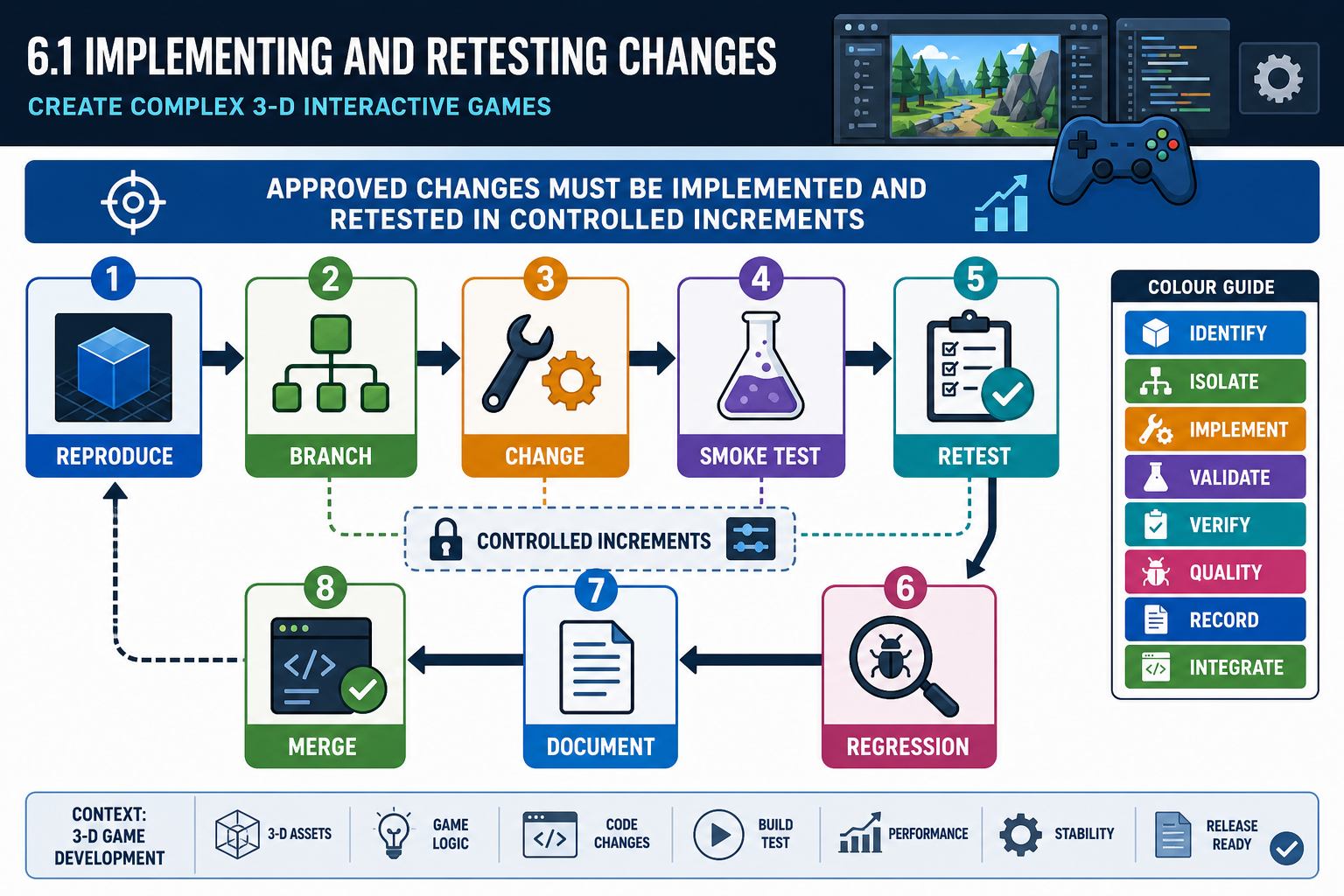
A reliable implementation sequence is:
- Confirm the current build number and reproduce the issue.
- Create or switch to the correct working branch.
- Make the focused change in script, level, asset, UI or engine settings.
- Run a local smoke test to ensure the build still launches and the affected area loads.
- Test the acceptance criteria.
- Commit or save the change with a clear note.
- Submit the change for regression testing.
Regression testing
Regression testing checks whether a fix has broken something that previously worked. This is especially important in complex 3-D games because systems are interconnected. Changing collision on a staircase can affect AI navigation meshes, player movement, footstep audio, camera clipping and performance. Changing a shader can affect lighting, memory use and mobile compatibility.
Retest:
- the original issue;
- the immediate gameplay sequence before and after it;
- related menus, save/load behaviour and checkpoints;
- affected hardware targets or graphics settings;
- any known high-risk systems such as physics, networking, input or streaming.
Contingencies when a fix fails
If the fix does not work, do not keep applying undocumented edits. Reopen the issue, add evidence and escalate if it affects release. If the fix creates a worse defect, revert or branch the change and discuss alternatives. If time is limited, the team may choose a mitigation, such as blocking access to a broken optional area, simplifying an interaction, reducing enemy count or adding clearer player guidance.
Practical debugging approach
Use engine tools before guessing. Check console logs, profiler spikes, collision visualisation, navigation mesh overlays, animation state debugging and input event logs. In code, use breakpoints or temporary log messages to confirm whether the expected event fires. In visual scripting, trace execution pins and check whether object references are valid. Remove temporary debug messages or cheats before release packaging.
Workplace example
A Brisbane indie team receives user trial feedback that players become trapped behind destructible crates after an explosion. The junior developer increases the physics impulse, but regression testing shows crates now fly through walls on lower-end PCs. The better fix is to adjust crate collision, add a cleanup timer and revise the level layout slightly. The bug is retested on the minimum target hardware because frame rate and physics behaviour can vary across machines.
WHS note
Late-stage fixes often happen under time pressure. Organisations should avoid unsafe crunch practices. Manage fatigue, take screen breaks, use ergonomic setups and escalate unrealistic workloads. Poor fatigue management increases the likelihood of mistakes in code, build settings and release packaging.
6.1 Closing user-trial changes
Knowing when a change is complete
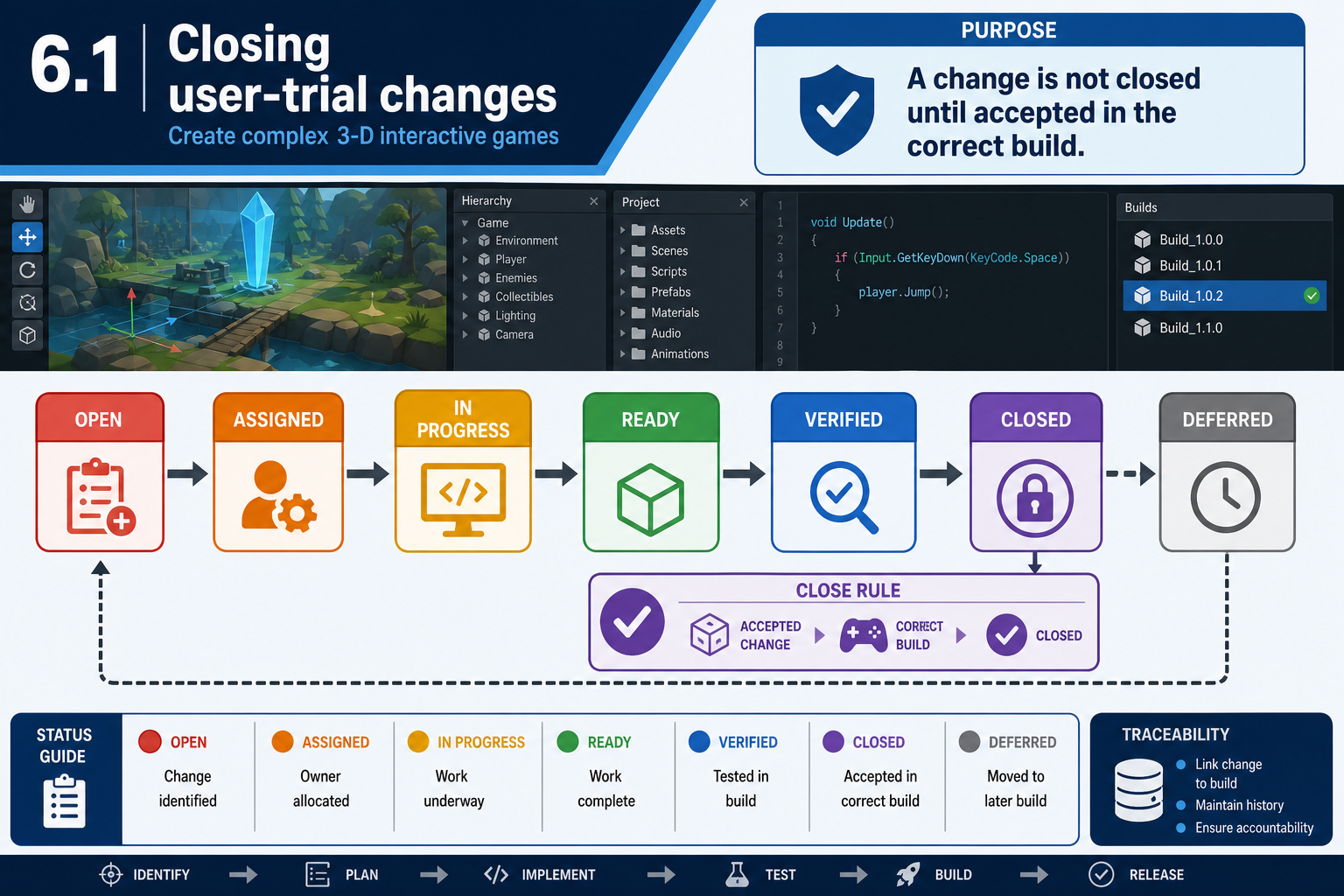
A user-trial change is complete only when it has been implemented, checked against acceptance criteria, regression tested, documented and accepted by the appropriate person. Do not close a bug merely because a developer believes it is fixed. QA or an assigned reviewer should verify it in the correct build.
Useful statuses include:
- Open: issue recorded but not yet resolved.
- Assigned: owner selected.
- In progress: fix being developed.
- Ready for test: developer believes it is fixed.
- Verified: tester confirms the fix.
- Closed: accepted for the release.
- Deferred: not fixed in this release, with approval and reason.
Final publication often requires evidence that high-priority user-trial issues are closed or formally deferred. Keep screenshots, test notes, build numbers and reviewer comments. This evidence supports sign-off later.
Managing deferred issues
Not every issue from user trials will be fixed. Deferral is acceptable only when it is deliberate, documented and approved. Reasons may include low severity, unacceptable schedule risk, out-of-scope suggestion, or a fix planned for a future update. However, do not defer issues that prevent progression, breach client requirements, create safety risks in a training simulation, or block platform submission.
For example, if user trials for a 3-D museum game reveal that a texture seam is visible on one wall, the producer may defer it. If trials reveal that keyboard-only users cannot leave the settings menu, the issue should be treated seriously because it blocks access and may conflict with accessibility expectations and inclusive design obligations.
Release notes and traceability
When closing a change, update the change log or release notes in language appropriate for the audience. Internal notes may state the technical fix, such as "expanded trigger volume and corrected scene transition index". Public or client-facing release notes may state the player outcome, such as "improved reliability of Level 2 lift transition". Traceability does not mean exposing every technical detail to users; it means the team can link evidence, fix and verification if questioned.
Common mistakes
Avoid these errors:
- Editing the live release build without version control.
- Fixing based on memory rather than recorded evidence.
- Closing issues without retesting on the target platform.
- Adding new features during bug fixing.
- Ignoring performance impacts of art and scripting changes.
- Failing to update the GDD, test plan, release notes or known issues list.
Industry and legal context
Final changes must respect intellectual property, software licence and privacy requirements. Do not import unlicensed assets as a quick fix. In Australia, copyright law protects artwork, sound, code and written content. If playtest data includes personal information, use authorised storage and access controls. Accessibility should be considered under inclusive design practice and the Disability Discrimination Act 1992, particularly where a game is used for education, training or public services.
By closing changes properly, you create a reliable bridge between user evidence and final release decisions.