Week 2 — Element 1
1.4 Determine sequence for development of beta-version prototype for testing game play
1.4 Understand beta-version prototype purpose
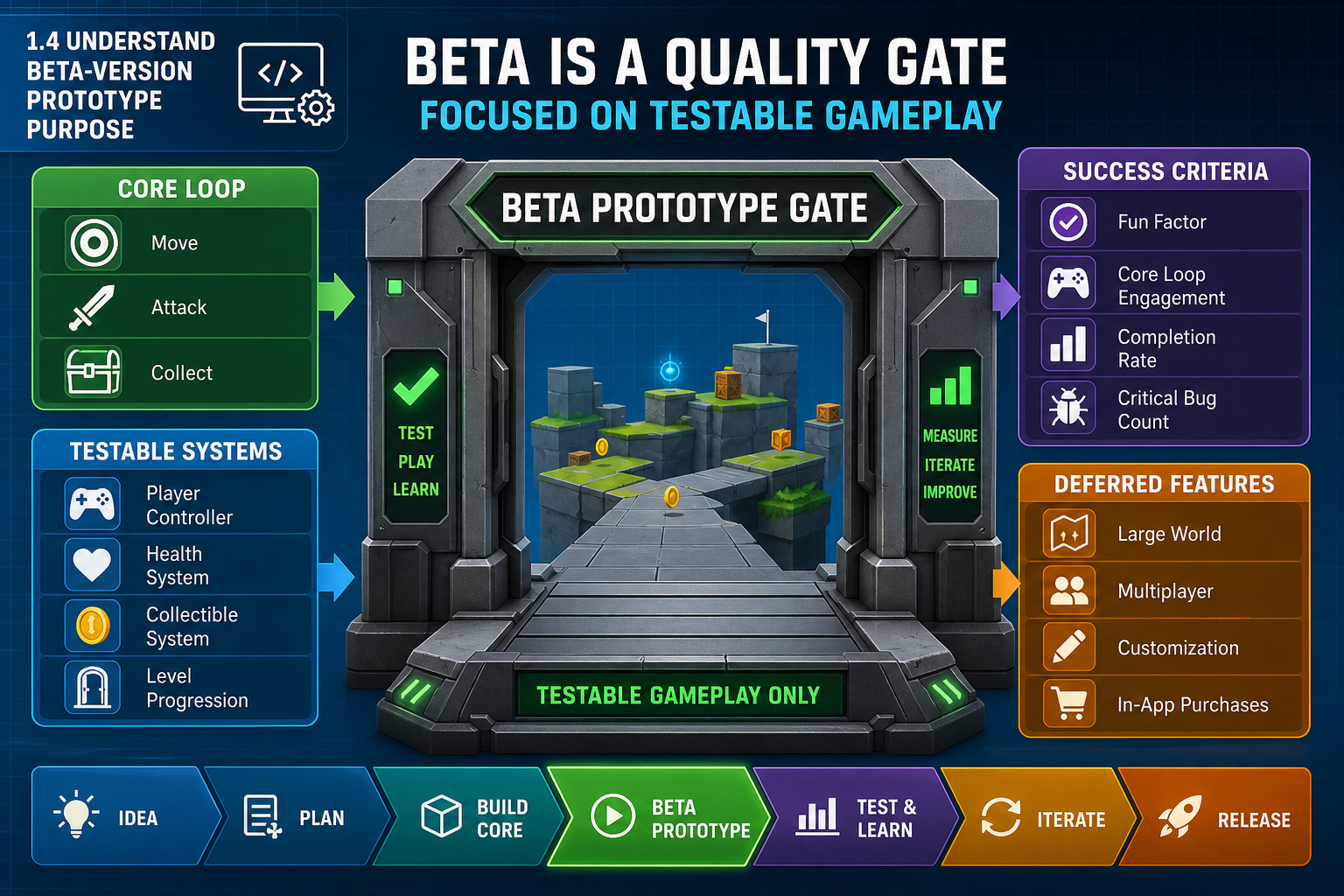
What a beta-version prototype is
A prototype is a testable version of a game or game system used to learn something. Prototypes can be rough, such as paper layouts or greybox levels, or highly polished, such as a vertical slice. A beta-version prototype is more formal than an early experiment. It is intended to test game play with integrated systems at a level that can provide reliable feedback.
In many production processes, beta is a quality gate where features are expected to be complete or at release quality, assets are final or known exceptions are clearly flagged, and serious bugs are controlled. The exact meaning of beta must be confirmed in the project brief, but you should treat it as more than a loose demo.
Sequence from learning goal
The sequence for developing a beta prototype should be guided by what the team needs to prove. Game development cannot always follow a fixed roadmap because every game must “find the fun”. This means planning must allow iteration while still controlling scope.
Ask:
- What game-play question must the beta answer?
- Which systems are essential to answer it?
- Which assets must be representative rather than final?
- Which technical risks must be resolved before meaningful testing?
- What feedback will prove whether the beta succeeds?
For example, if the beta must test whether melee combat feels responsive, the sequence should prioritise input, player controller, enemy behaviour, hit detection, animation timing, camera, feedback VFX, sound and test encounters. Polishing the main menu first would not support the beta purpose.
Success criteria
Define beta success criteria before sequencing. Criteria may include:
- core loop playable from start to finish
- target platform build produced reliably
- no known critical blockers in the test path
- required controls and camera implemented
- test level includes representative challenge and reward
- frame rate and stability are acceptable for testing
- player feedback can be collected using agreed methods.
Workplace example
A Canberra educational games team is creating a 3-D evacuation training game. The beta purpose is to test whether players understand hazard identification and exit decision-making. The development sequence prioritises navigation, hazard interactions, decision prompts, scoring feedback, one representative building area, and data capture for test results. Decorative office clutter and additional building wings are deferred because they do not affect the beta question.
Common mistakes
Do not confuse a beta prototype with a trailer, art showcase or technology experiment unless the brief says that is the purpose. A beautiful scene with no meaningful interaction cannot test game play. Conversely, an ugly but complete game-play loop may be valuable early, but beta expectations may require selected final assets and stability.
1.4 Map dependencies and critical path
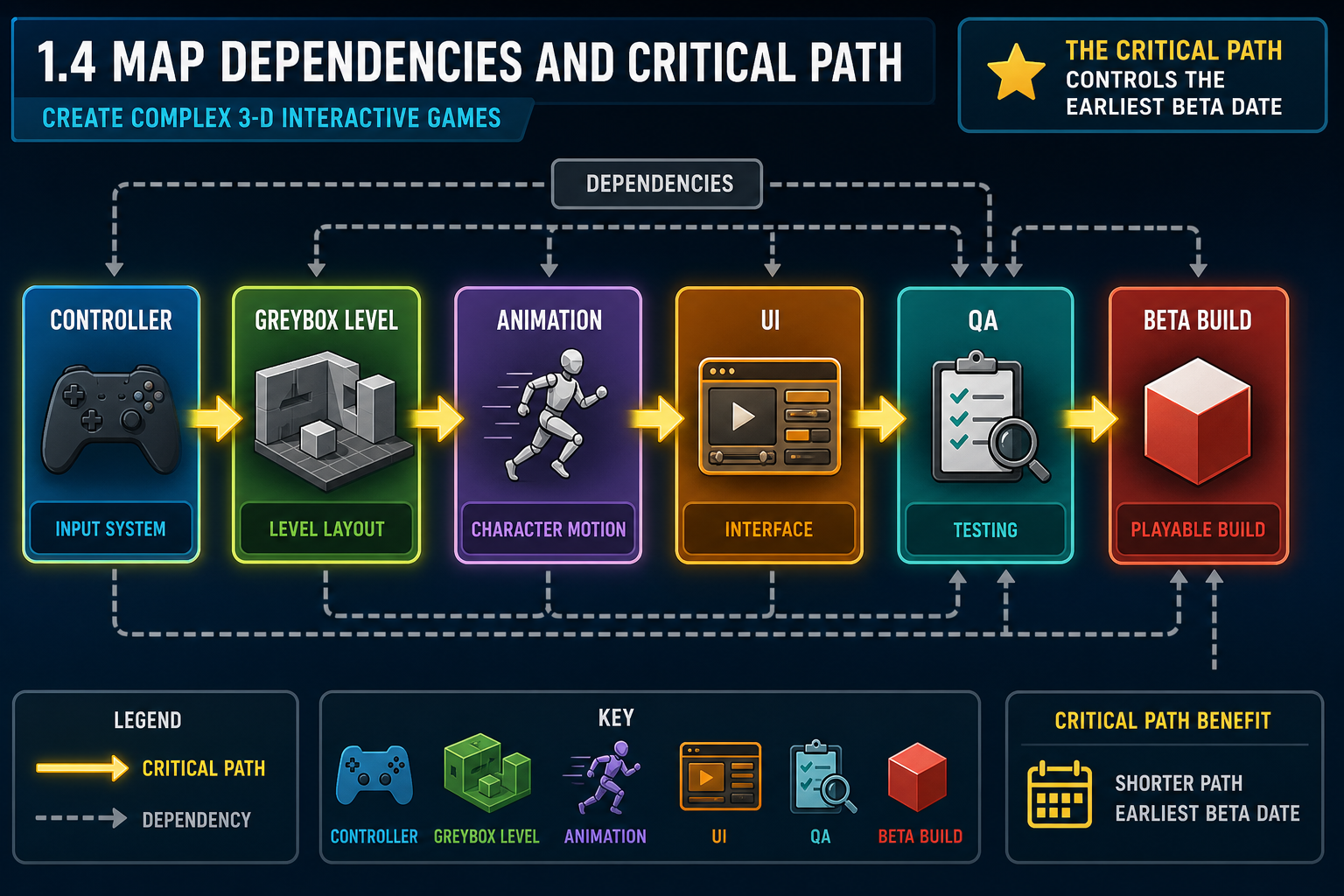
Dependencies in game development
A dependency exists when one task cannot start or finish until another task is completed. Sequencing a beta prototype means arranging work so dependencies are respected and blockers are reduced. In game development, dependencies cross disciplines. A combat animation may depend on a character rig. Enemy AI may depend on navmesh setup and level collision. UI prompts may depend on input mapping and interaction scripts.
Mapping dependencies helps determine the critical path: the chain of tasks that controls the earliest possible completion date. If any task on the critical path slips, the beta date slips unless scope, resources or sequencing change.
Steps to map the sequence
- List beta deliverables and success criteria.
- Break each deliverable into tasks.
- Identify prerequisites for each task.
- Mark high-risk or uncertain tasks.
- Estimate task duration using team input.
- Arrange tasks in dependency order.
- Identify the critical path and near-critical tasks.
- Add review and testing points.
- Check whether the sequence fits the required beta date.
Typical beta sequence
A practical sequence often follows this pattern:
- confirm requirements and technical setup
- establish project repository and engine project
- build greybox test environment
- implement input and player controller
- implement core interaction or combat system
- integrate representative character and camera
- add enemy, puzzle or challenge system
- implement feedback: UI, audio, VFX and animation
- add progression, fail and success states
- integrate representative final assets
- optimise and stabilise
- run internal QA and external playtest
- fix priority bugs and prepare beta build.
The exact order depends on the game. A narrative exploration game may prioritise dialogue and interaction systems; a racing game may prioritise physics, camera and track feel.
Risk-first sequencing
Start high-risk work early. If multiplayer synchronisation, VR comfort, procedural generation or complex physics is central to the game, do not leave it until the end. A schedule that completes low-risk art first while an unproven core system waits is dangerous. Risk-first sequencing may feel uncomfortable because early builds look rough, but it gives the team time to adjust.
Workplace example
A Hobart team plans a 3-D kayaking game. The critical path runs through water physics, boat controller, camera comfort, river collision, checkpoint logic and controller input. Character clothing variants are not on the critical path. The producer sequences water and boat prototypes in week one because if the kayak does not feel controllable, the whole game concept must change.
Common mistakes
Avoid sequencing by department convenience only, such as “artists finish everything, then programmers integrate everything”. That creates late discovery of incompatibilities. Use vertical slices and test imports to connect disciplines early.
1.4 Build the beta development sequence
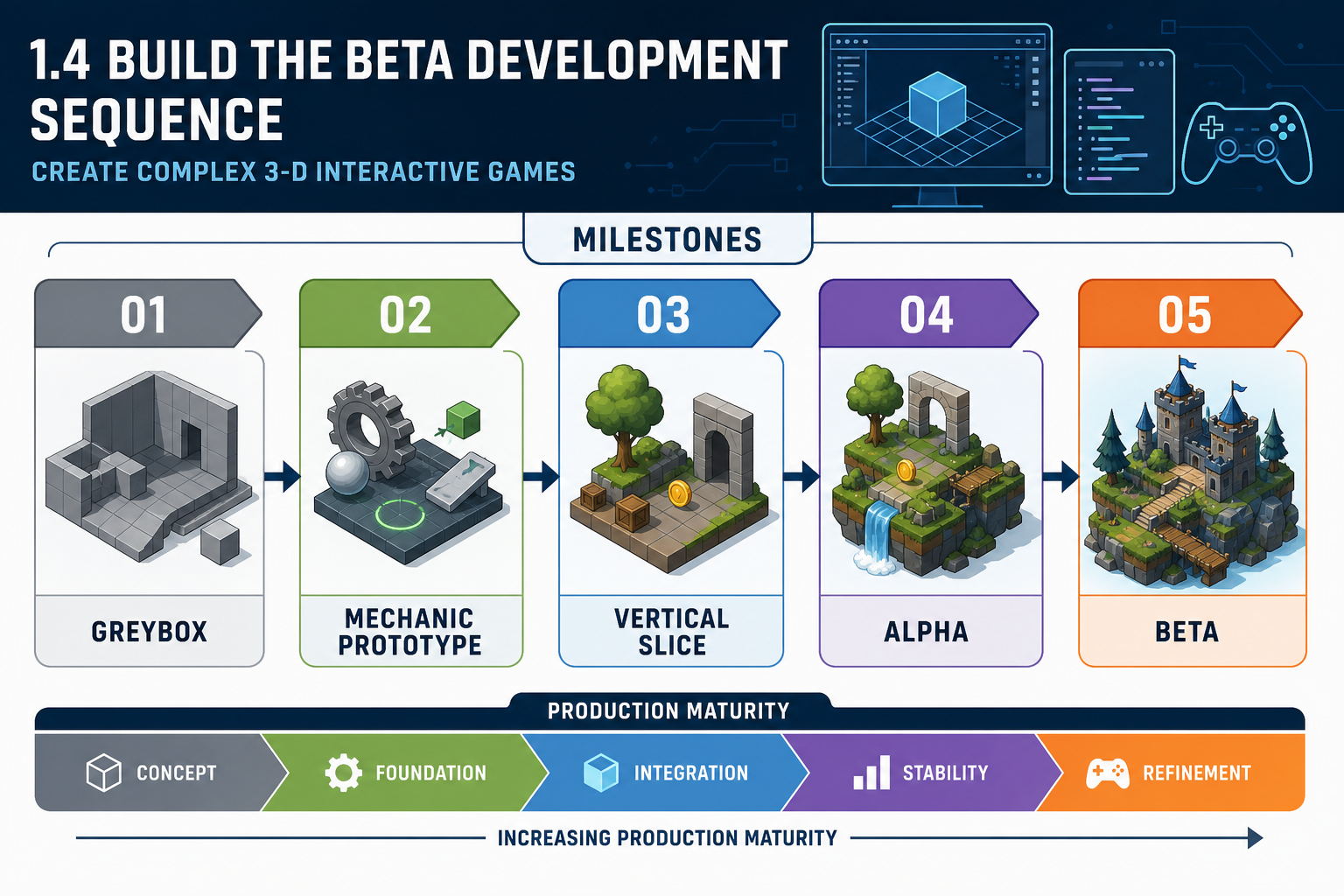
Milestone terminology
Game development uses milestone terms to describe production maturity. Terms vary by studio, so confirm definitions, but common meanings include:
- Concept: early idea, pitch and feasibility thinking.
- Pre-production: design, planning, prototypes, pipeline setup and risk analysis.
- Greybox/blockout: simple geometry used to test layout, scale and interaction.
- Vertical slice: a small section that demonstrates the intended final quality across art, audio, code and game play.
- Alpha: major features are implemented, but content may be incomplete and bugs remain.
- Beta: features and required assets are complete or known exceptions, with testing focused on defects, balance, performance and polish.
- Release candidate: a build that may be released if no blocking issues are found.
For PC 1.4, you determine the sequence for development of the beta-version prototype. You are not yet producing the whole final game; you are planning how the beta will be built for game-play testing.
Progressive integration
A useful principle is keep the build playable. Instead of creating many isolated pieces and combining them at the end, integrate progressively. This supports continuous QA and lets the team find fun, usability and performance issues early.
A sequence might use these milestones:
- Technical foundation: repository, engine project, input system, build settings, coding conventions.
- Core loop greybox: movement, camera, one test space, placeholder interactions.
- Mechanic prototype: implement the central mechanic using placeholder assets.
- Representative asset pass: replace key placeholders with approved assets.
- Feedback pass: add animation, UI, audio and VFX required for player understanding.
- Content pass: create the test level or scenario required for beta.
- Stability and performance pass: fix blockers, profile, optimise and prepare build.
- Beta test pass: distribute, collect feedback, triage defects.
Programming techniques in the sequence
Basic programming planning matters. Use modular scripts or components where possible so placeholder assets can be swapped for final assets. Separate data from code when practical, such as using configuration files, ScriptableObjects or DataTables for tuning values. Use version control branches for experimental features so unstable work does not break the beta build.
Example
For a 3-D stealth game beta, the sequence starts with player movement and camera, then a greybox corridor, guard patrol AI, vision detection, hiding spots, alert UI and fail state. Only after detection is testable does the team integrate final guard models, animations, footstep audio and lighting. This ensures art supports the game-play test rather than hiding an unproven mechanic.
Common mistakes
Do not create a sequence that reaches beta without formal testing milestones. Do not schedule polish before the feature is playable. Do not allow the build to remain broken for long periods; a broken build prevents testing and masks progress.
1.4 Plan iteration and beta readiness
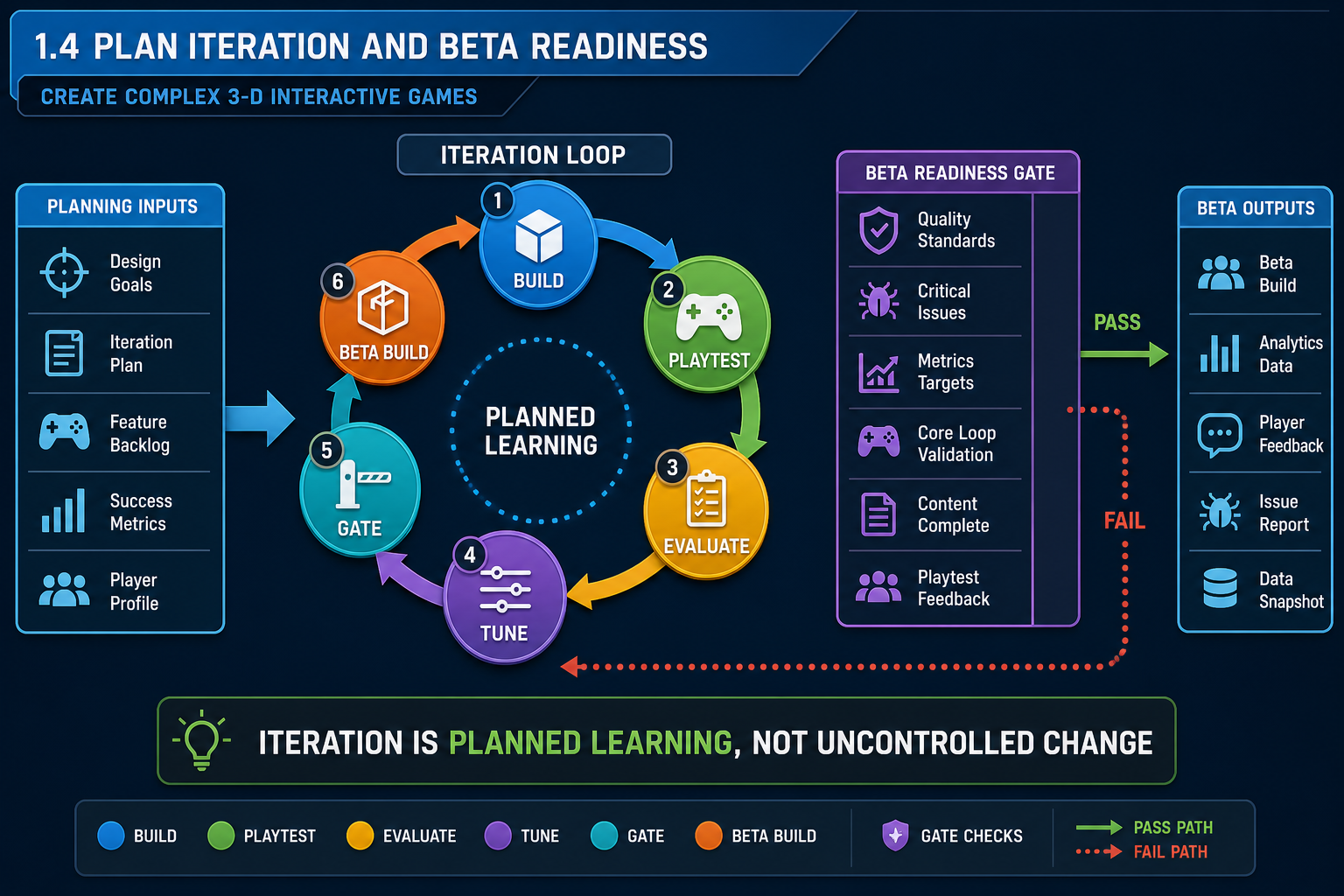
Iteration in the development sequence
Games differ from many traditional software projects because the team cannot always know in advance what will feel fun. Mechanics that seem strong in a document may feel slow, confusing or unfair in play. Your beta development sequence must therefore include iteration: build, test, evaluate, adjust and retest.
Iteration does not mean uncontrolled change. It means planned learning cycles. Each cycle should have a purpose, such as testing jump feel, combat readability, puzzle difficulty or camera comfort. The sequence should allow time for tuning and rework based on feedback.
Beta readiness gates
A readiness gate is a checkpoint where the team decides whether the prototype can move to the next stage. For beta, gates may include:
- core game-play path complete
- required assets integrated or approved exceptions recorded
- no critical crashes in the test path
- controls and camera functional on target hardware
- user interface communicates goals and feedback
- build process documented and repeatable
- test plan approved
- bug database reviewed and high-priority issues triaged.
Some industry descriptions treat beta as having critical and high-severity issues at zero before proceeding. Your project may define this differently, but the principle remains: beta should not begin with known blockers that invalidate game-play testing.
Managing scope during iteration
When testers suggest changes, classify them:
- Defect: something does not work as intended.
- Usability issue: players cannot understand or use the feature effectively.
- Balance issue: values or difficulty need tuning.
- Enhancement: a new or expanded feature.
- Out of scope: useful idea but not needed for beta.
This protects the schedule. If every suggestion becomes a new feature, the beta may never stabilise.
Workplace example
A Newcastle team tests a 3-D platformer beta. Players miss jumps because depth perception is poor. The issue is not solved by adding more levels. The sequence allows a tuning iteration for camera angle, shadow placement, landing indicators and jump arc. Once retested, the team records the change and keeps the beta scope stable.
Contingencies
If the beta readiness gate fails, decide whether to delay, reduce scope, use a controlled exception, or change the test goal. For instance, if final enemy animation is late but placeholder animation still supports combat timing, the beta may proceed with a documented exception. If hit detection is unreliable, testing combat feel may be invalid and the beta should not proceed.
WHS note
Iteration can create deadline pressure. Avoid planning that depends on excessive overtime. Fatigue increases errors, reduces creativity and can create psychosocial risk. Sustainable sequencing is a production quality issue, not just a wellbeing preference.