Week 6 — Elements 2–3
3.1 Establish environment for project that supports sharing of project assets produced by team members
3.1 Plan the shared asset environment
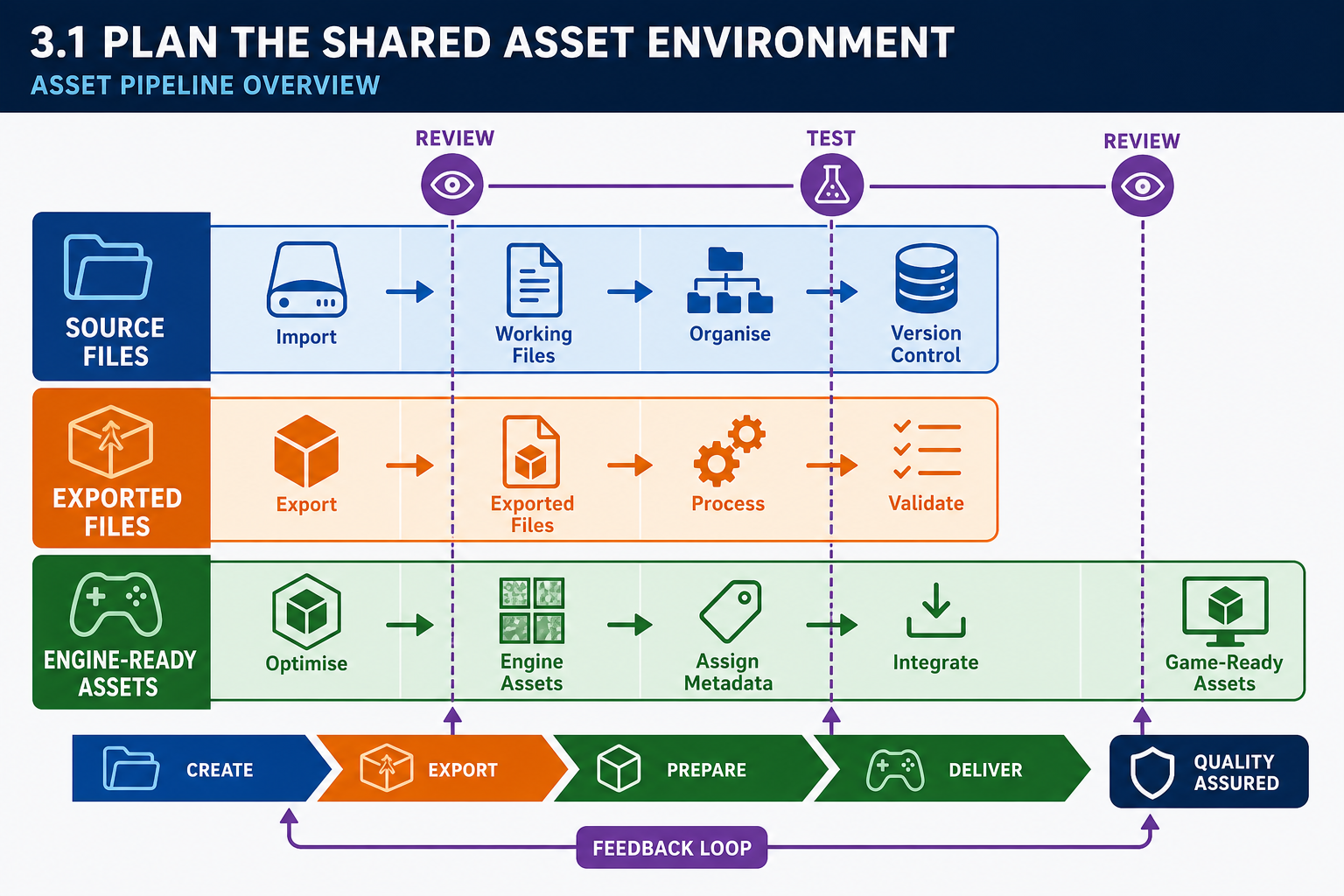
Establish the environment before asset production accelerates
A shared project environment is the combination of repositories, folders, naming rules, permissions, tools and communication routines that allow team members to produce and use game assets without losing work. In a student or small studio project this may seem simple, but 3-D game assets quickly become complex: a single hero character may include sculpt files, retopologised mesh files, UV layouts, texture source files, exported FBX files, material instances, animation clips, physics assets and engine prefabs or Blueprints.
Begin by mapping the asset pipeline. A pipeline is the agreed sequence for moving work from design requirement to engine-ready asset. For example:
- Asset is listed in the asset register from the game design document.
- Artist creates source work in a digital content creation tool such as Blender, Maya, Substance 3D Painter or similar.
- Asset is exported to an agreed interchange format such as FBX, glTF or PNG/TGA texture files.
- Asset is imported into the game engine.
- Engine-specific attributes are configured.
- The asset is tested in a representative scene.
- The asset is approved, revised or rejected.
The environment must separate source assets from exported assets and engine assets. Source assets are editable production files, such as `.blend`, `.psd` or Substance project files. Exported assets are files prepared for import, such as `.fbx`, `.gltf`, `.png` or `.exr`. Engine assets are files created or referenced by the engine, such as Unreal `.uasset` files or Unity prefabs, materials and meta files. Keeping these categories clear prevents accidental editing of exported files as if they were the master source.
Workplace example
An Australian indie team developing a stylised 3-D exploration game may use Blender for modelling, Git LFS or Perforce for version control, and Unreal Engine for the game. The producer creates an asset pipeline document that says: “All modular building pieces are modelled in metres in Blender, exported as FBX using the project export preset, imported into Unreal with centimetre scale verified, and stored under `Content/Environment/Architecture/Modular`.” This short rule prevents confusion when another team member builds levels from those pieces.
Common mistakes
- Letting each artist invent their own folder system.
- Saving only engine-imported files and losing editable source files.
- Mixing temporary experiments with approved production assets.
- Starting asset creation before deciding how files will be shared and reviewed.
Good preparation is a risk control. It reduces rework, supports scheduling, and lets the team test assets progressively rather than discovering integration problems near the end of production.
3.1 Choose version control for asset sharing
Why version control is essential
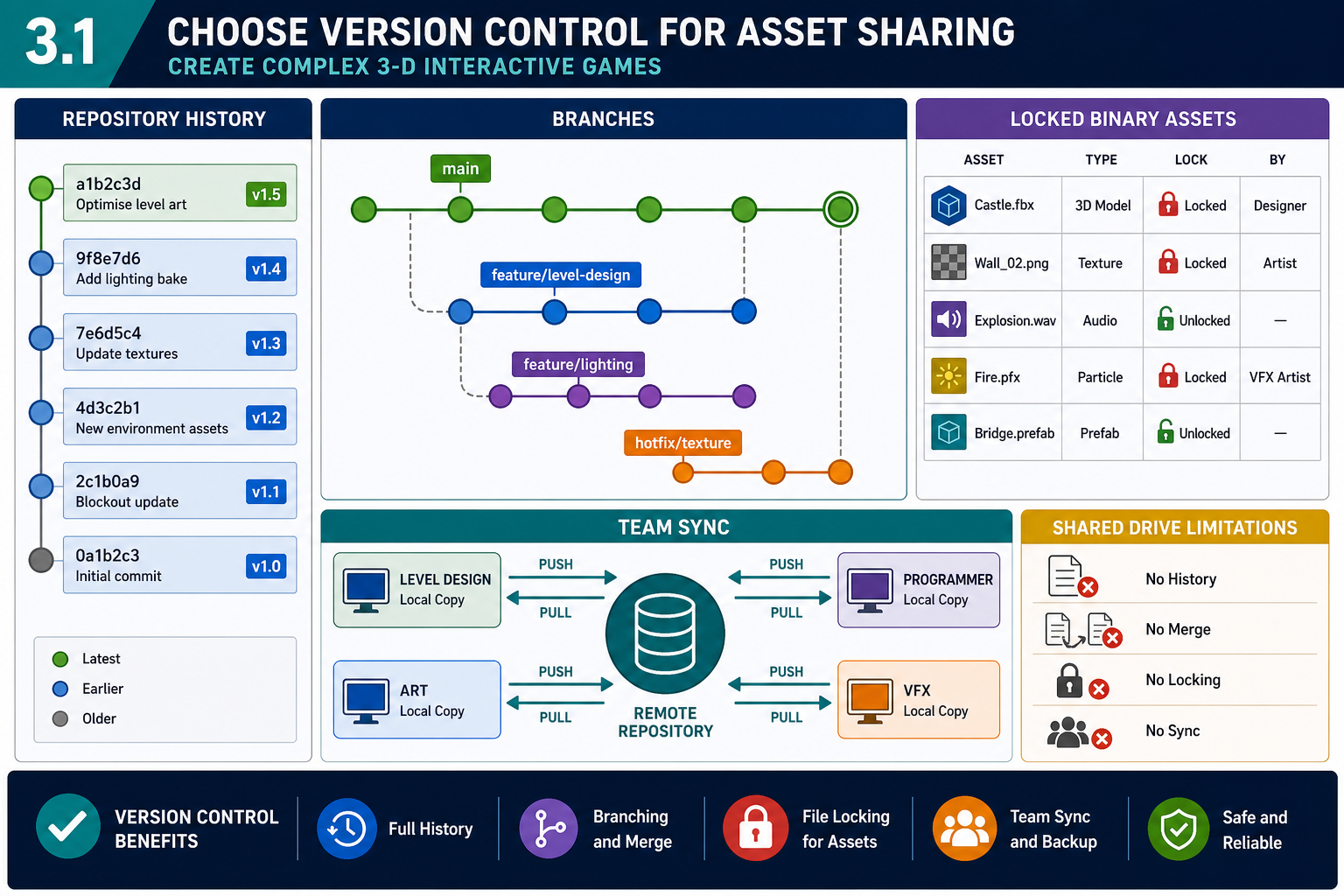
A shared drive alone is not a reliable production environment. Game teams need version control so they can track changes, recover previous versions, coordinate team work and build from a known state. This is especially important for online learners and distributed teams because no one is sitting beside the person who overwrote a file.
Game asset versioning differs from programming versioning because many assets are binary files. Code files are text and can often be merged line by line. A 3-D model, texture, animation clip or engine asset may not merge safely. If two people edit the same binary file, the later save can overwrite the earlier work. For this reason, asset-heavy teams often use systems that support file locking, large file storage and good metadata handling.
Common industry approaches include:
- Perforce Helix Core, widely used in game development for large binary assets and locking workflows.
- Git with Git LFS, which stores large files outside the normal Git object database and can suit smaller teams if configured carefully.
- Engine or studio asset-management tools that track previews, dependencies, tags and approval status.
The correct choice depends on team size, budget, internet reliability, engine requirements and file volume. For a Diploma project, the important skill is not brand loyalty; it is selecting and configuring a system that supports the way the team actually works.
Set up the repository
A practical setup process is:
- Decide what must be version controlled: engine project files, source art, exported assets, documentation and scripts.
- Decide what must be excluded: temporary caches, generated build folders, local user settings and derived data that can be recreated.
- Configure large file support or file locking for binary assets.
- Create branch or stream rules if the team uses parallel development.
- Test the workflow with two users before production begins.
- Record the process in a short team guide.
Australian workplace scenario
A Melbourne studio is producing a training simulation in Unity. Programmers use Git branches for code. Artists use Git LFS for FBX and texture files, and the team agrees that Unity `.meta` files must always be committed because they preserve asset identifiers. When an artist updates a forklift model, the level designer pulls the change and the prefab retains its references. Without the `.meta` files, materials and prefab links could break.
Contingencies
If a team member has limited internet bandwidth, avoid forcing them to download unnecessary high-resolution source files every day. Use clear repository structure, selective sync where available, and scheduled large updates. If a file conflict occurs, do not guess which file is correct. Contact the owners, compare timestamps and review notes, then restore or reapply work from version history.
From a WHS perspective, remote production should include reasonable work practices: planned breaks, ergonomic setup, secure passwords and reduced stress from clear procedures. Poor file management often becomes overtime pressure later.
3.1 Organise folders, names and metadata
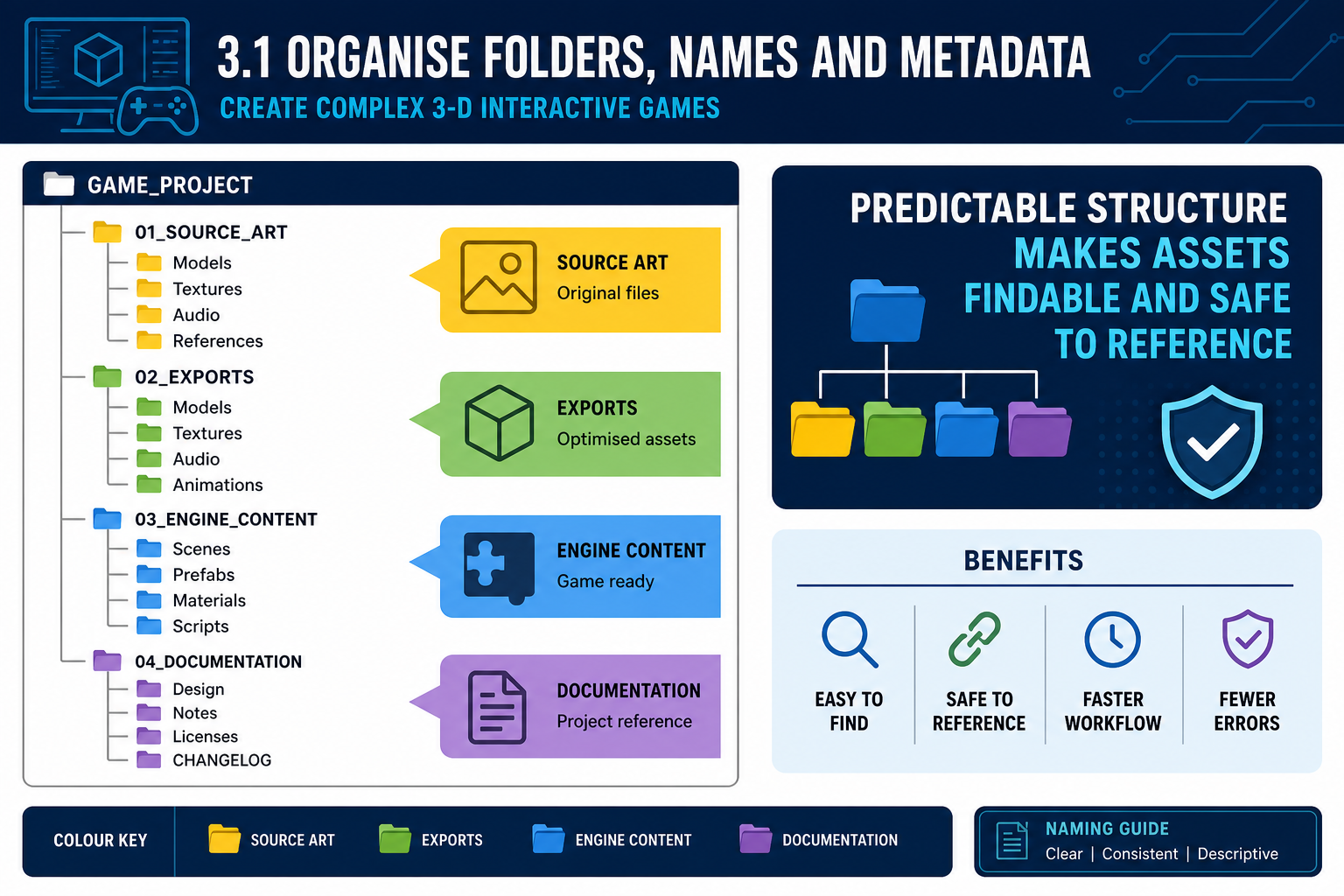
Folder structure is a production tool
A folder structure is not just housekeeping. It controls how quickly team members can find assets, whether references remain stable, and how safely assets can be moved or renamed. Engines such as Unreal and Unity build internal references to assets. Moving files casually inside or outside the engine can break references or create duplicate assets.
A useful structure groups assets by purpose and type. For example:
- `Art/Source/Characters/Hero`
- `Art/Exports/Characters/Hero`
- `EngineProject/Content/Characters/Hero`
- `EngineProject/Content/Environment/Props`
- `EngineProject/Content/Materials`
- `EngineProject/Content/Textures`
- `Docs/AssetRegister`
Some studios organise by feature, level or downloadable content instead. The best structure is the one that matches the project’s production method and reduces cross-team confusion. For a game with many modular environments, grouping by environment kit may be better than grouping every mesh in one large `Meshes` folder.
Naming conventions
Names should be readable, searchable and consistent. Industry practice often uses type prefixes and PascalCase or clear separators. Examples include:
- `SM_RockLarge_A` for a static mesh
- `SK_Hero` for a skeletal mesh
- `T_Hero_Body_BaseColor` for a texture
- `MI_Rock_Mossy` for a material instance
- `AN_Hero_RunForward` for an animation
The exact prefixes vary between engines and studios. The key rule is to define them and use them consistently. Avoid vague names like `final`, `newnew`, `test2`, `copy` or `really_final`. These names create risk because other team members cannot tell which file is approved or what it affects.
Metadata and asset registers
A complex game needs an asset register or tracking board. This may be a spreadsheet, Jira board, Trello board, ShotGrid-style tool or LMS project tracker. Useful fields include:
- asset ID and name
- asset type
- owner
- source location
- engine location
- status, such as planned, in progress, review, approved or deprecated
- target platform or quality level
- dependencies, such as skeleton, materials or scripts
- licensing notes if acquired externally
- performance notes, such as LOD required or collision required.
Common mistakes
Do not rename engine assets outside the engine unless the engine documentation says it is safe. Do not duplicate textures because you cannot find the original. Do not store licensed third-party assets without their licence documents. Do not delete “unused” files until dependency checks are complete.
A well-structured environment supports sharing because team members can locate, update and review assets without constant direct supervision. That is the standard expected in para-professional game production work.
3.1 Control access, reviews and project risk
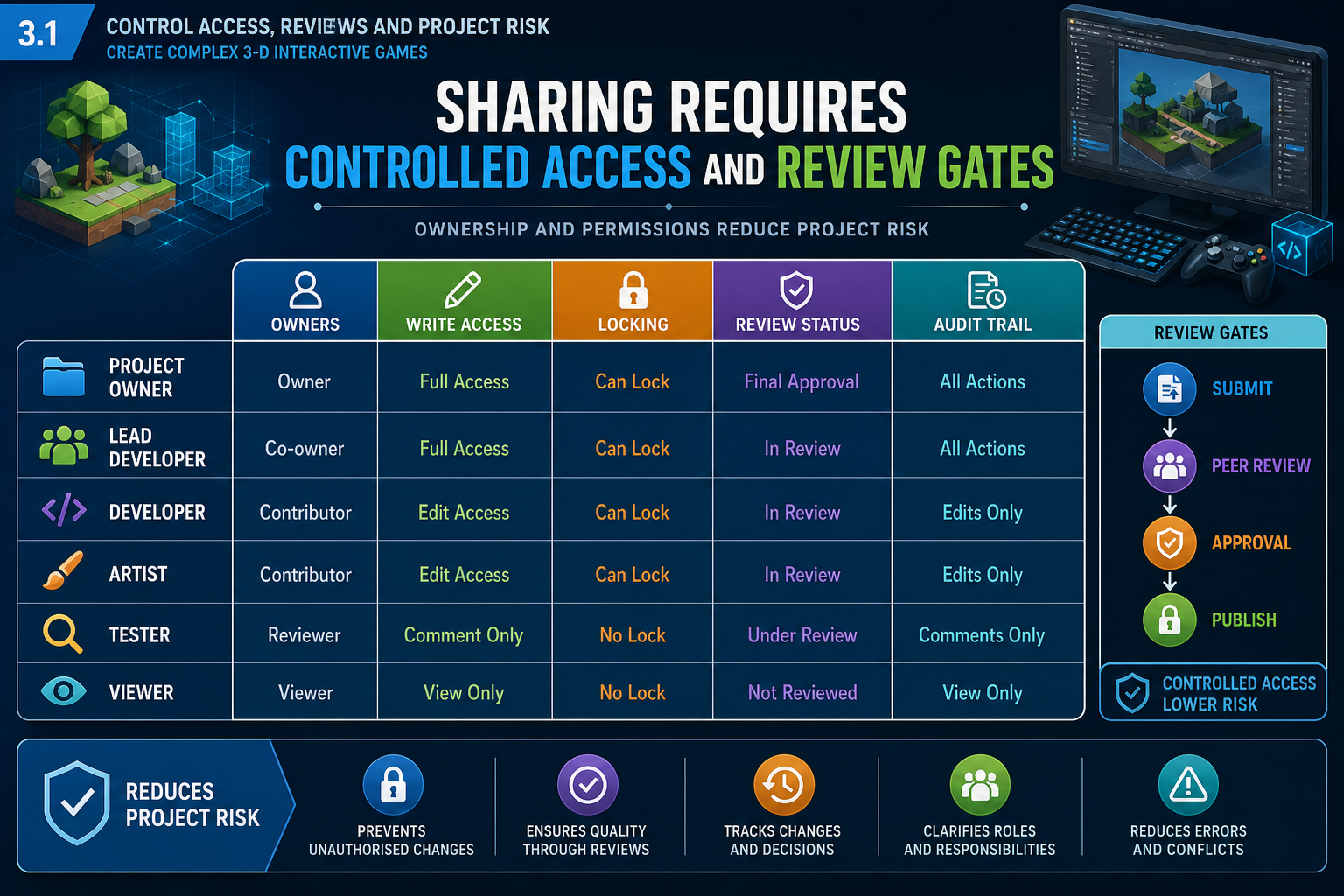
Sharing requires control, not open chaos
A project environment supports sharing when it gives the right people the right access at the right time. Asset sharing fails when everyone can change everything without review, or when people cannot access the files they need to complete scheduled work.
Set practical access rules:
- Assign asset owners for major asset groups such as characters, environments, UI or vehicles.
- Give write access only where team members are expected to contribute.
- Use file locking for high-risk binary files.
- Require review before assets move from “work in progress” to “approved”.
- Keep an audit trail through commits, changelogs or review comments.
This does not mean creating bureaucracy for its own sake. It means reducing production risk. If a level designer changes collision on a shared door mesh, every level using that door may change. Ownership and review help the team understand consequences before the change is committed.
Scheduling and critical path
Asset sharing must connect to production scheduling. A critical path is the sequence of tasks that directly controls the finish date. For example, gameplay testing of an enemy encounter cannot occur until the enemy rig, animations, collision and placeholder AI hook-up exist. If the animation source files are not shared or the skeleton is renamed without warning, the critical path slips.
Use short review cycles:
- daily or twice-weekly sync for active asset blockers
- sprint planning for asset priorities
- milestone gates such as prototype, vertical slice, alpha and beta
- scheduled integration tests in engine, not only visual reviews in art tools.
Scrum and Kanban are common in game development because they allow teams to prioritise visible work and respond to change. For asset preparation, Kanban columns such as “To do”, “In progress”, “Exported”, “In engine”, “Performance checked” and “Approved” are simple and effective.
Legal, ethical and WHS context
In Australia, the Copyright Act 1968 is central to asset handling. Do not share, adapt or publish models, textures, photographs, scans or concept art unless the team has the right to use them. Keep licence records inside the project documentation. Respect moral rights by retaining required attribution where licences demand it. When working with First Nations cultural content, follow appropriate consultation and permissions processes; do not treat cultural motifs, language or stories as generic decorative assets.
For online work, WHS duties still matter. Encourage ergonomic workstation setup, safe screen habits, reasonable work hours and clear communication to reduce stress during asset deadlines. Security also matters: use strong authentication for repositories and avoid placing confidential client assets in public repositories.
By the end of this step, the team should have a functioning repository, agreed structure, naming rules, access controls, asset register and review process. That is the environment required to support shared asset production.