Week 7 — Element 3
3.2 Review attributes of assets required in a game project related to game engine
3.2 Read the game design into asset requirements
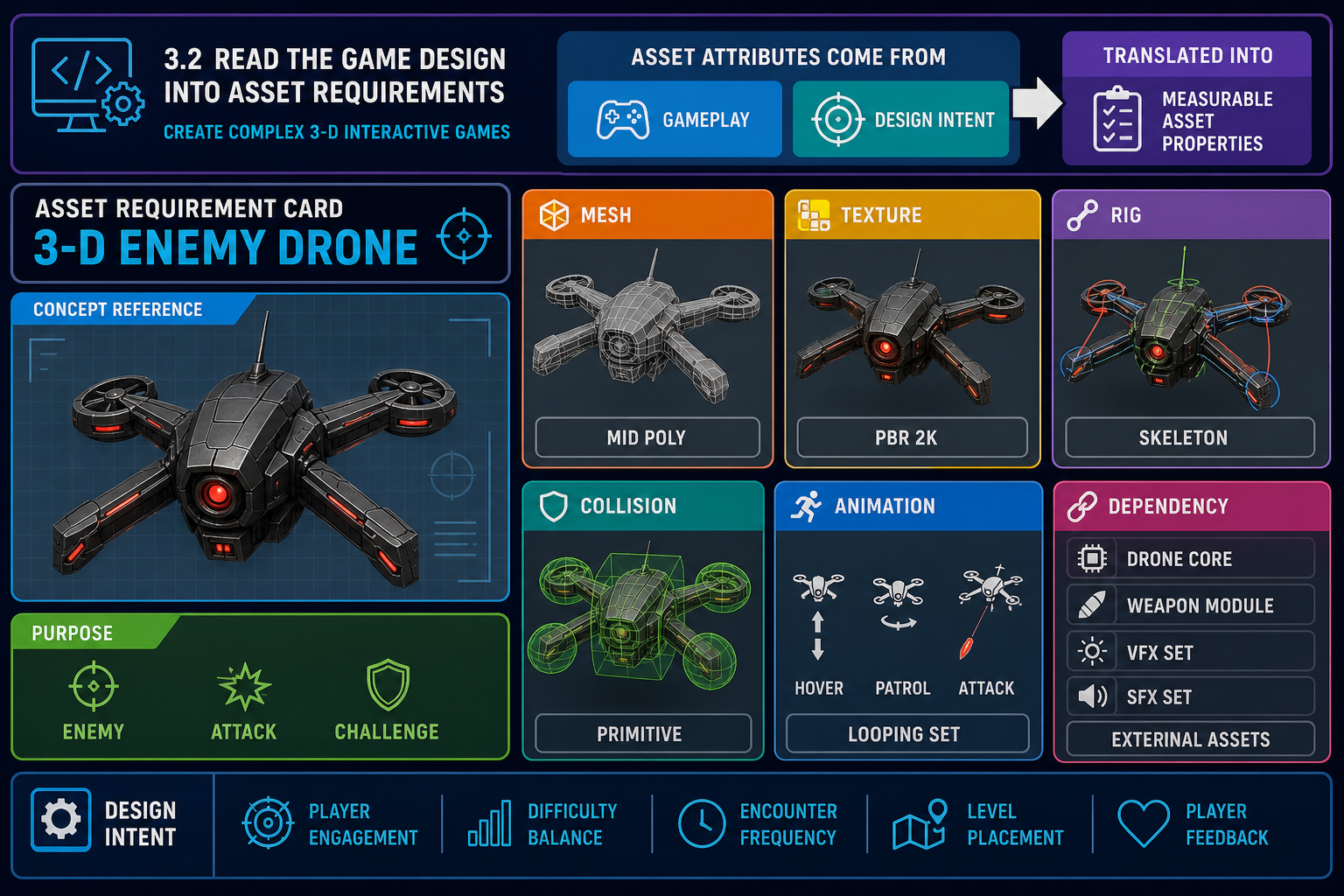
Asset attributes begin with design intent
To review attributes of assets required in a game project, first understand what each asset must do in the game. Attributes are the technical and creative properties that define whether an asset is suitable. They include visual style, dimensions, polygon density, texture size, material type, rig requirements, collision behaviour, animation requirements, naming, file format, LOD needs, platform target and engine import settings.
Start with the game design document, art bible, technical specification and current prototype. Ask:
- What is the asset’s gameplay function?
- How close will the camera get?
- Is it interactive, destructible, animated or static?
- How many copies may appear at once?
- Which platform and input hardware will the game target?
- Does the asset need collision, navigation, physics, sockets or attachment points?
- Does it need to work in multiplayer, VR, mobile, desktop or console-style controller play?
A background mountain seen from far away has different requirements from a weapon held close to the camera. A crate used for cover needs collision that supports gameplay. A decorative bottle on a shelf may use simple collision or none at all. A VR hand tool needs correct scale and grip orientation because player comfort and interaction accuracy depend on it.
Turn design into measurable requirements
Use an asset brief or register entry for each important asset. A good entry might include:
- Asset ID: `CHR_EnemyDrone_01`
- Purpose: flying enemy in level 2 combat loop
- Visual style: worn industrial sci-fi, readable silhouette
- Engine: Unreal Engine project
- Mesh type: skeletal mesh with simple rig
- Animation: idle hover, move, attack, hit reaction, death
- Materials: metal body, emissive eye, damaged variant
- Collision: gameplay capsule plus weapon hit zones if required
- Performance: must support multiple drones in one encounter
- Dependencies: AI Blueprint, projectile VFX, audio cues, health component
- Review milestones: blockout, first art pass, in-engine test, optimisation pass.
This is more useful than “make enemy drone” because it tells the artist and technical implementer what “done” means.
Workplace example
A Brisbane serious-games developer is building a warehouse safety simulation. The forklift asset is not only a visual prop. It requires correct scale, wheel placement, collision, animated forks, seated camera position, sound attachment points and simplified physics. If the team only reviews the forklift as a model, integration will fail later when the interaction designer needs working controls.
Common mistakes
- Reviewing assets only for appearance, not gameplay function.
- Ignoring how often an asset appears in scene.
- Forgetting dependencies such as skeletons, materials, scripts or UI icons.
- Failing to record requirements, causing repeated verbal clarification.
At this stage, your goal is to convert creative and gameplay intent into attributes that can be checked against the chosen engine.
3.2 Review file formats and import attributes
Match asset formats to engine pipelines
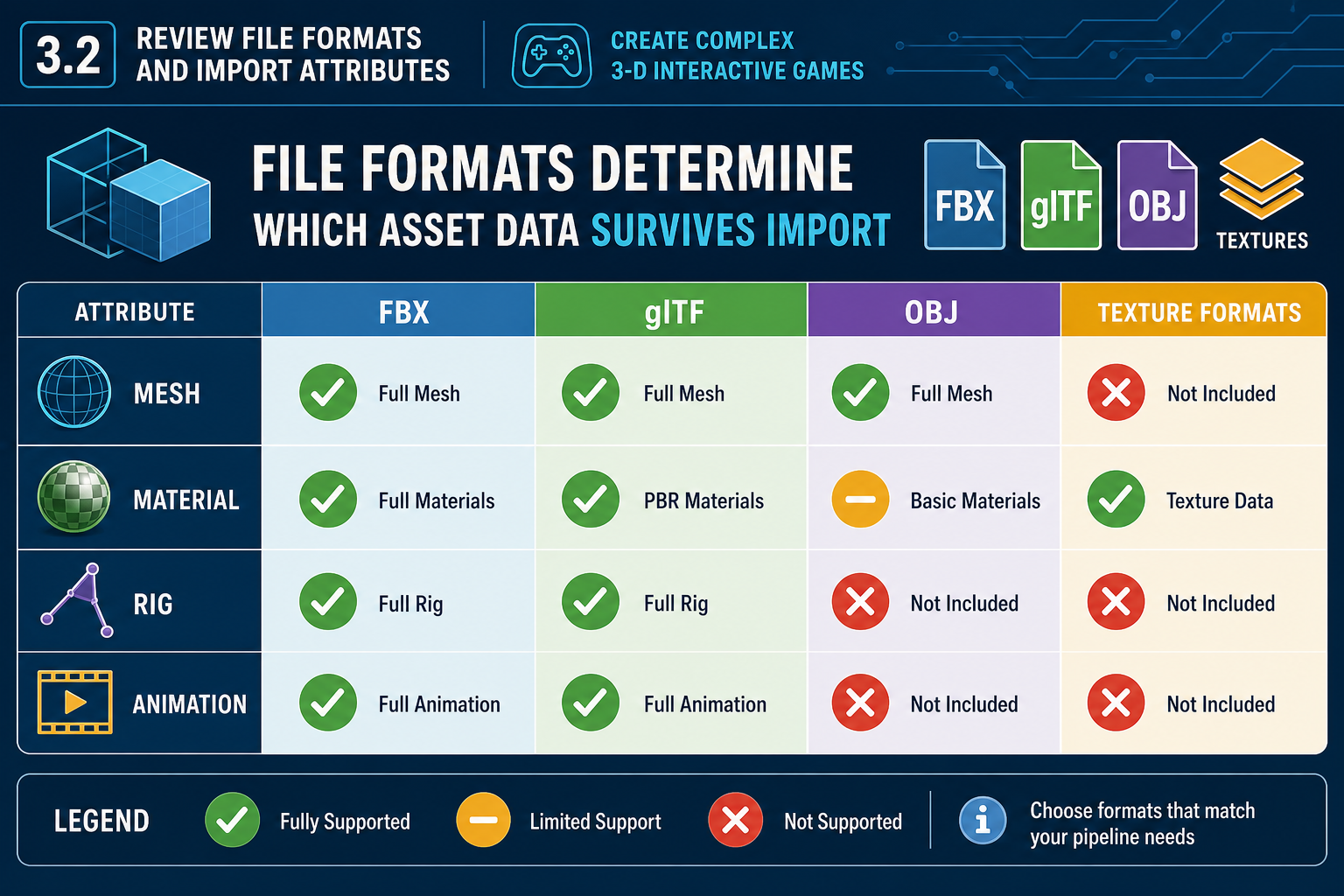
Asset integration depends heavily on format. A file format controls what information can be transferred from a digital content creation tool to the engine. A suitable format for one purpose may be poor for another.
Common visual asset formats include:
- FBX: widely used for meshes, skeletons, animations, LODs and morph targets across many game tools.
- glTF/GLB: useful for efficient transmission of 3-D scenes and PBR-style materials, depending on engine support.
- OBJ: simple static geometry format, but limited for animation and complex material data.
- PNG, TGA, TIFF or EXR: texture formats used at source or import stage, with different quality and channel needs.
- Engine-native assets: such as Unreal `.uasset` files or Unity prefabs, materials and controller assets.
Review what must survive import: mesh topology, normals, tangents, smoothing, UV channels, material slots, vertex colours, skeleton, animation clips, blend shapes, sockets, collision meshes and LOD groups. For example, an FBX for a game character should bring in the skeletal hierarchy and animation data correctly. An OBJ would not be suitable for that full requirement.
Units, axes and scale
Scale errors are among the most common asset integration issues. Blender commonly works in metres. Unreal Engine uses centimetres as its default unit convention. Unity uses metres, but FBX export/import settings can still create unexpected scale factors if the pipeline is not controlled. Axis orientation can also differ between tools. An asset that imports lying on its side or at 100 times the expected size is not engine-ready.
To review scale and orientation:
- Confirm the project’s unit convention.
- Create a reference object, such as a 1-metre cube or human mannequin.
- Export using the agreed preset.
- Import into the engine test scene.
- Compare against known scale and camera/player height.
- Record the correct export and import settings.
Mesh and UV attributes
For 3-D meshes, check:
- clean transforms applied before export
- sensible pivot location for placement or animation
- correct normals and smoothing
- non-overlapping UVs where required for baked lighting or unique textures
- material slots named consistently
- topology suitable for deformation if animated
- collision approach identified.
Engine import presets
Many teams create import presets so repeated assets use consistent settings. This reduces human error. For example, environment props might import with static mesh settings, generated lightmap UVs if required, and default collision disabled until custom collision is added. Characters might import with a shared skeleton and animation settings.
Do not assume import success means the asset is correct. An engine can import a file that is oversized, too dense, missing UVs or unsuitable for the target platform. Review must be deliberate and documented.
3.2 Review engine and hardware constraints
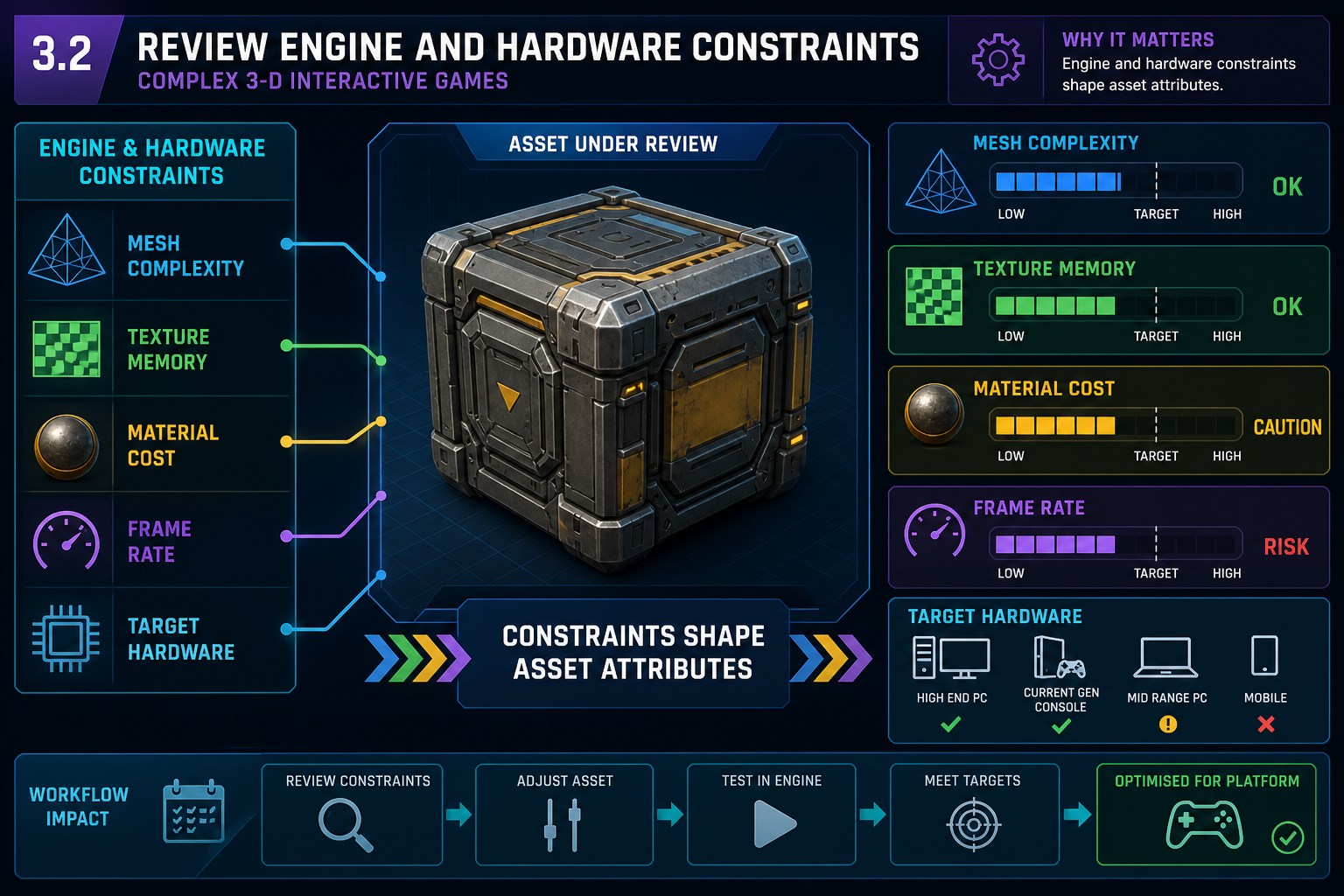
Engine capability shapes asset attributes
A game engine is not a neutral container. Its rendering pipeline, physics, animation system, scripting model, lighting approach and build targets all affect asset requirements. Reviewing attributes means asking whether the asset suits the chosen engine and the intended hardware.
For example, Unreal Engine 5 may support features such as Nanite virtualized geometry and advanced real-time lighting workflows. These features can change how teams think about geometry density for suitable static meshes. However, they do not remove all constraints. Material complexity, transparency, skeletal meshes, platform support, memory, shader cost and scene composition still matter. Unity projects may require careful choices around render pipeline, batching, shader variants, LOD Groups, texture compression and device quality tiers. Both engines can produce excellent 3-D games, but they reward different asset decisions.
Hardware and software product constraints
Target hardware affects:
- graphics memory available for textures, meshes and render targets
- CPU budget for animation, physics and scripts
- GPU budget for materials, lighting, post-processing and geometry
- storage and download size
- input method, such as keyboard/mouse, controller, touchscreen or VR controllers
- display resolution and frame-rate expectations.
A high-detail desktop scene may not be suitable for an entry-level laptop used by online learners, a mobile device or a standalone VR headset. A VR asset also needs extra attention to scale, collision and frame stability because discomfort can occur when interaction and visual motion are inconsistent.
Review technical constraints
When reviewing an asset, check it against project targets rather than personal preference. Useful questions include:
- Does the mesh have more detail than the camera can show?
- Are texture dimensions appropriate for screen size and viewing distance?
- Are materials using expensive transparency or complex shader features unnecessarily?
- Will many copies be rendered at once?
- Does the asset require runtime physics or can it use simple collision?
- Does it need LODs, impostors, occlusion, batching or instancing?
- Does the engine feature used by the asset work on the target platform?
Example
A Sydney education studio develops a museum exploration game for school laptops. The art team purchases a photorealistic statue scan with extremely dense geometry and very large textures. It looks impressive in isolation, but it causes slow loading and poor frame rate on the target machines. The review identifies that the asset needs retopology, reduced texture sizes, baked normal maps and LODs before it can be accepted.
Risk and critical path
High-risk assets should be reviewed early. A hero character, vehicle controller or modular building kit can block many later tasks. If the chosen engine cannot handle the asset approach efficiently, the project may need redesign or technical rework. Schedule a proof-of-concept test for any asset type that pushes engine features or hardware limits.
The professional habit is to profile and test. Do not rely on “it should be fine”. Use engine statistics, preview tools, test builds and agreed acceptance criteria.
3.2 Review assets through scheduled tests
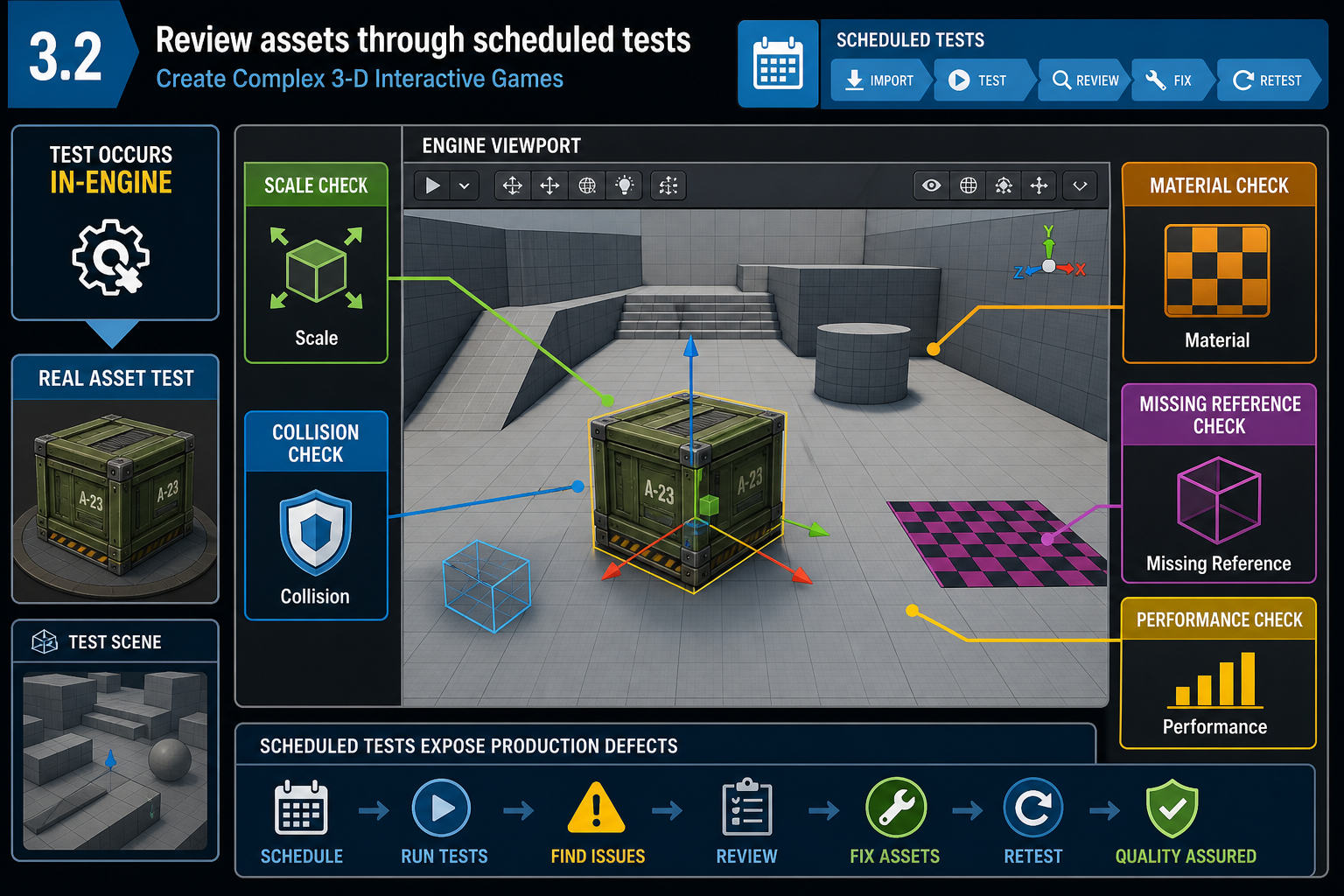
In-engine review is the real test
An asset is not ready because it looks good in Blender, Maya, Substance or an asset-store preview. It is ready when it works in the game engine under project conditions. Reviewing asset attributes therefore requires a repeatable test process.
Create a simple asset review checklist. For a static environment prop, the checklist might include:
- correct file name and folder location
- correct scale and orientation
- pivot suitable for placement
- material slots assigned correctly
- textures imported and connected
- no missing references
- collision appropriate to gameplay
- LODs or optimisation plan present if required
- acceptable appearance under project lighting
- performance acceptable in a representative scene
- licence and attribution recorded if acquired.
For a character, add skeleton compatibility, animation clips, root motion requirements, ragdoll or physics asset needs, sockets, hit zones and animation blueprint dependencies.
Schedule reviews across production
Testing should not be left to the end. Asset reviews fit naturally into game development milestones:
- Pre-production: define asset standards, naming rules, art style and technical budgets.
- Prototype or proof of concept: test risky asset types, scale, controls and engine features.
- Vertical slice: prove final-quality asset pipeline for a small but representative part of the game.
- Alpha: ensure required assets are present and functional.
- Beta: fix defects, optimise, finalise integration and reduce content risk.
- Release candidate: verify no missing assets, licensing gaps or build-breaking references.
Agile teams can attach asset acceptance criteria to tasks. A task is not “done” until the asset imports, appears correctly, meets basic performance requirements and is committed with notes.
Defect recording
When an asset fails review, record the defect clearly. A useful defect report says: “`SM_WarehouseShelf_A` imports at correct scale, but collision blocks player movement 20 cm beyond visible mesh. Repro: open `L_TestWarehouse`, walk along aisle 3. Required fix: replace auto convex collision with simplified custom collision.” This is far better than “shelf collision broken”.
Basic programming awareness
Even visual assets often connect to scripts, prefabs or Blueprints. A door mesh may need an animation curve and trigger volume. A collectible may require a socket, tag or component reference. A modular wall may need metadata so procedural placement code can read its dimensions. You do not need to be the lead programmer to review these dependencies, but you must understand enough terminology to ask whether the asset exposes the data the game logic needs.
Common contingencies
If an imported asset breaks materials, check texture paths and material slot names before remaking the asset. If animation retargeting fails, check skeleton hierarchy and bone naming. If performance is poor, test whether the problem is geometry, texture memory, material cost, lighting or too many instances.
A disciplined review process protects quality and schedule by finding integration issues when they are still cheap to fix.