Week 5 — Element 2
2.3 Discuss considerations for selection of game-engine software with required personnel and confirm selection will meet specified outcomes
2.3 Identify required personnel and their decision needs
Who are the required personnel?
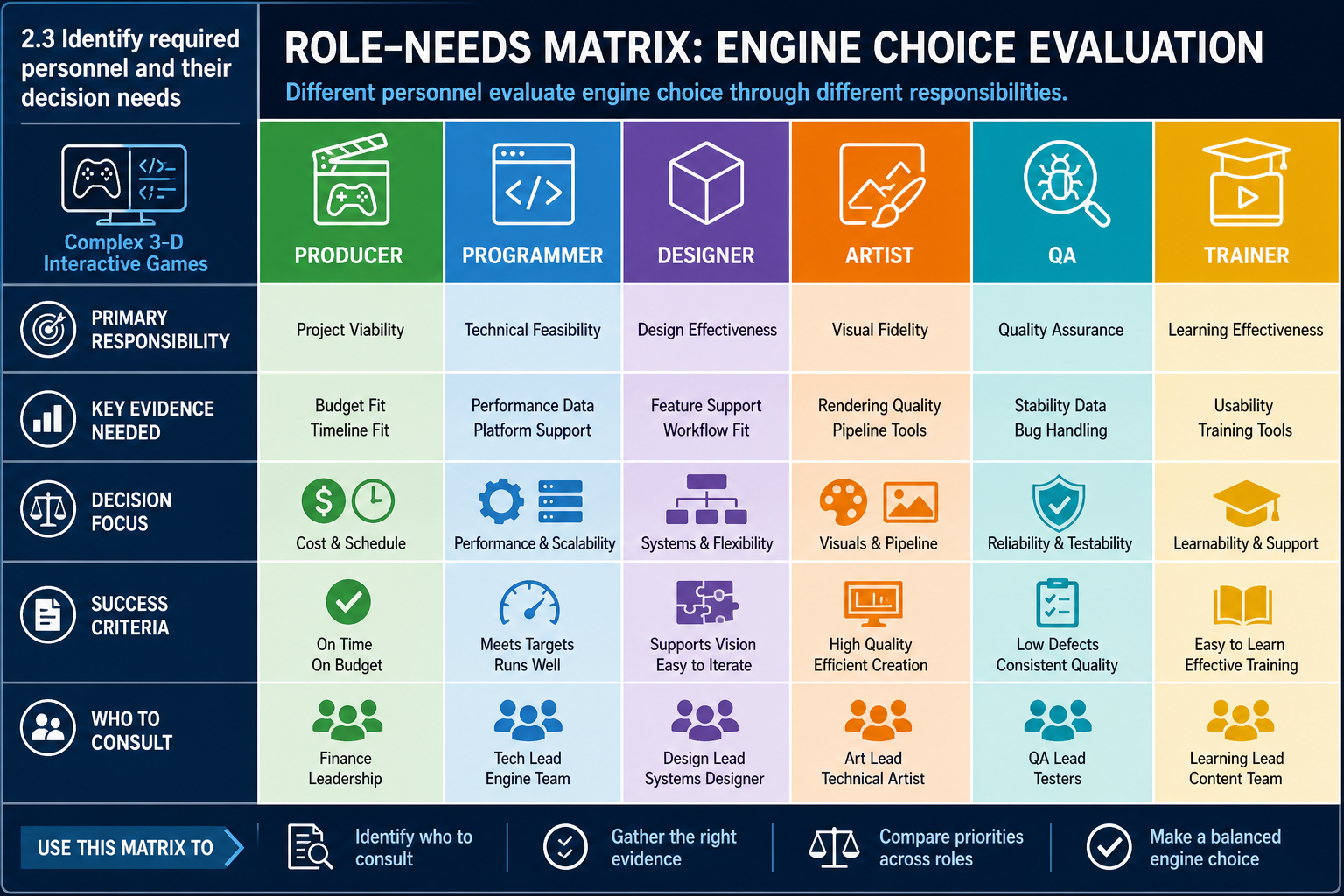
Performance Criterion 2.3 requires you to discuss considerations for selection of game-engine software with required personnel and confirm that the selection will meet specified outcomes. Required personnel are the people whose work, approval or expertise is needed for the decision. In a student project this may be a trainer, technical mentor, project lead and team members. In a workplace it may include discipline leads, producer, technical director, art director, QA lead, IT/security staff, publisher representative or client.
Each role looks at engine selection differently:
- Producer/project manager: schedule, budget, staffing, licensing, milestone risk and delivery evidence.
- Technical lead/programmer: architecture, scripting language, performance, debugging, build pipeline and maintainability.
- Design lead: prototyping speed, visual scripting, level editing, iteration and gameplay system flexibility.
- Art lead/technical artist: import pipeline, materials, lighting, animation, VFX and asset optimisation.
- Audio lead: spatial audio, middleware support, mixing and platform output.
- QA/test lead: automation, build stability, bug tracking, platform coverage and profiling.
- IT or systems support: hardware requirements, installation, accounts, storage, backups and security.
- Client/publisher/trainer: specified outcomes, assessment requirements, platform expectations and legal compliance.
Preparing for the discussion
Before meeting, provide a concise evidence pack:
- game concept and prioritised requirements
- comparison matrix of candidate engines and tools
- key risks and assumptions
- proof-of-concept findings if available
- cost and licence summary
- recommended option and alternatives.
This preparation keeps the discussion focused on outcomes rather than opinions. It also lets people prepare questions from their own discipline. For example, an art lead can test an asset import assumption, while the producer can check whether training time has been included in the schedule.
Example
A student team proposes Unity for a 3-D escape-room game because all programmers know C#. The art lead raises concerns about lighting quality and importing assets from Blender. The producer raises a schedule concern about learning Unreal. The trainer asks whether the chosen tools meet the unit requirement for complex 3-D interactivity. The team tests a representative room scene in Unity, documents lighting settings and confirms that the target interactions can be built within the schedule.
Common mistakes
Do not consult only people who agree with your preference. Do not present a decision as final before discussing constraints. Do not overload non-technical stakeholders with raw feature lists; translate capability into production impact. For example, "engine supports behaviour trees" becomes "enemy patrol and alert states can be implemented using built-in visual debugging, reducing AI troubleshooting risk."
Another mistake is treating consultation as a single meeting after all decisions are made. For non-routine 3-D development, consultation is iterative: initial review, risk testing, decision confirmation and later review if requirements change.
2.3 Confirm the choice will meet specified outcomes
What confirmation means
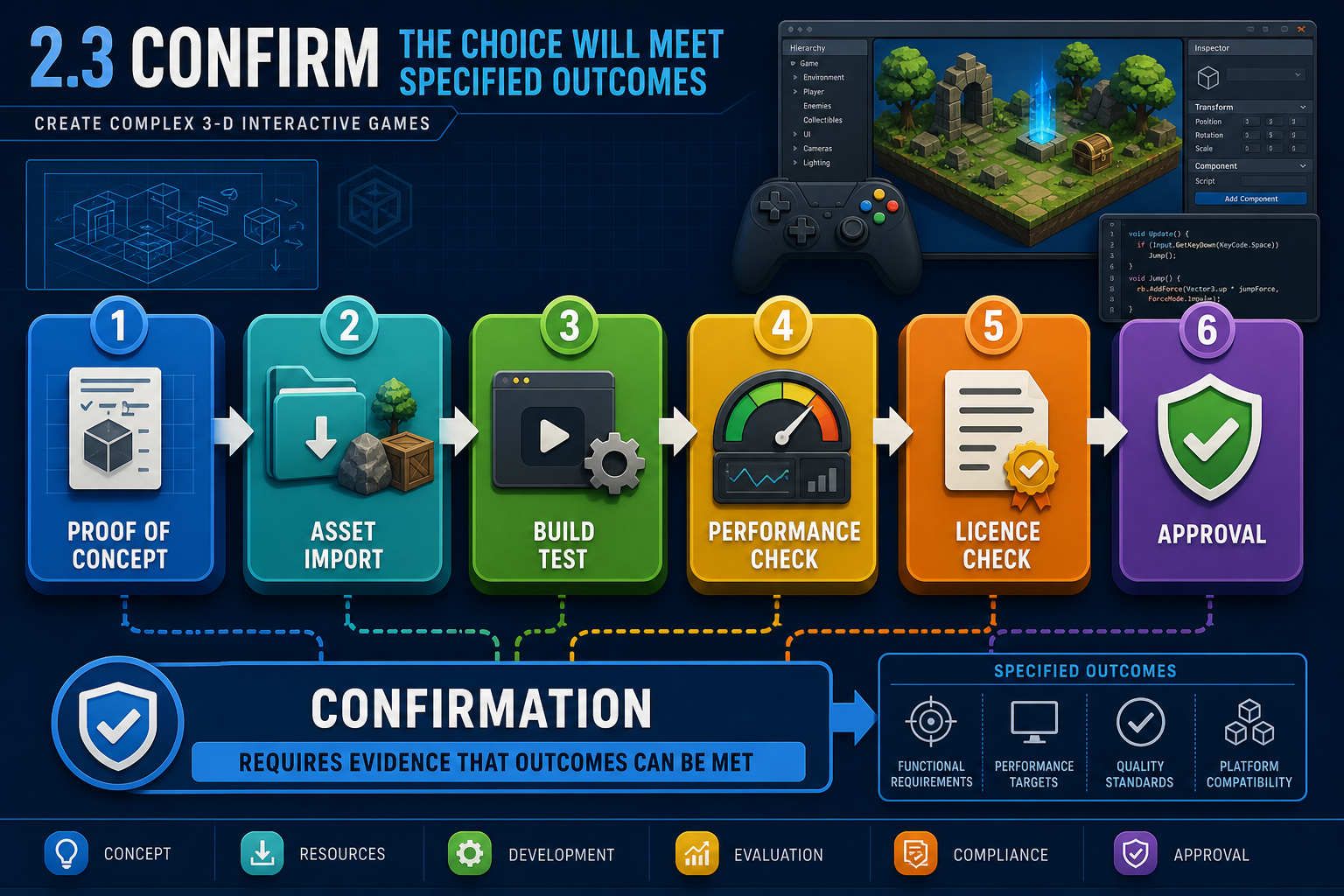
To confirm selection will meet specified outcomes, you need more than verbal agreement. Confirmation means the required personnel accept, based on evidence, that the chosen engine and tools can support the required game outcomes within known constraints. It may still include risks, but those risks must be understood and managed.
Specified outcomes may come from a client brief, assessment brief, production plan, publisher milestone or internal prototype goal. They might include a playable 3-D level, specified platforms, target visual style, interaction systems, performance expectations, accessibility needs or documentation requirements.
Evidence for confirmation
Useful evidence includes:
- a completed requirements-to-engine mapping
- comparison matrix with weighted scores
- proof-of-concept prototype results
- sample asset import tests
- target hardware performance notes
- licence and cost review
- build/export test
- risk register and mitigation plan
- meeting minutes or approval record.
Proof of concept
A proof of concept should test the riskiest assumptions, not build the whole game. Examples:
- one playable room with final-style lighting and interactable props
- one networked character moving between two clients
- one imported rigged character with animation blend and controller input
- one VR scene running at a stable comfort-focused frame rate on target headset
- one build exported to the required platform.
Acceptance criteria
Define how you will know the engine is acceptable. For example:
- The engine imports the representative character, materials and animations with no blocking defects.
- The greybox level runs on the target laptop without severe stutter during normal play.
- The team can create, commit, pull and resolve changes through version control.
- The engine licence and asset licences allow the planned assessment or release use.
- Required personnel agree that remaining risks have owners and mitigation steps.
Confirmation should also state any conditions. A conditional approval might say the engine is approved only if the project uses a specific render pipeline, avoids unsupported plugins, or limits the first release to Windows. Conditions are not weaknesses; they are controls that keep the selection aligned with outcomes.
Example
A Canberra studio is developing a small 3-D serious game for emergency response training. They prefer Unreal for visual realism. Before confirmation, the QA lead requests a Windows build, the art lead requests an asset import test, and the producer requests a licence and hardware check. The proof of concept shows acceptable performance on the client's machines after disabling expensive lighting features. The team confirms Unreal with a condition: lighting must use the tested scalable settings, not unrestricted cinematic settings.
Common mistakes
Do not treat "we can probably make it work" as confirmation. Do not ignore negative prototype results. If evidence shows the engine struggles with a must-have requirement, either change the engine, change the requirement through approved scope control, or plan a credible mitigation.
2.3 Manage disagreement, risk and change
Handling conflicting views
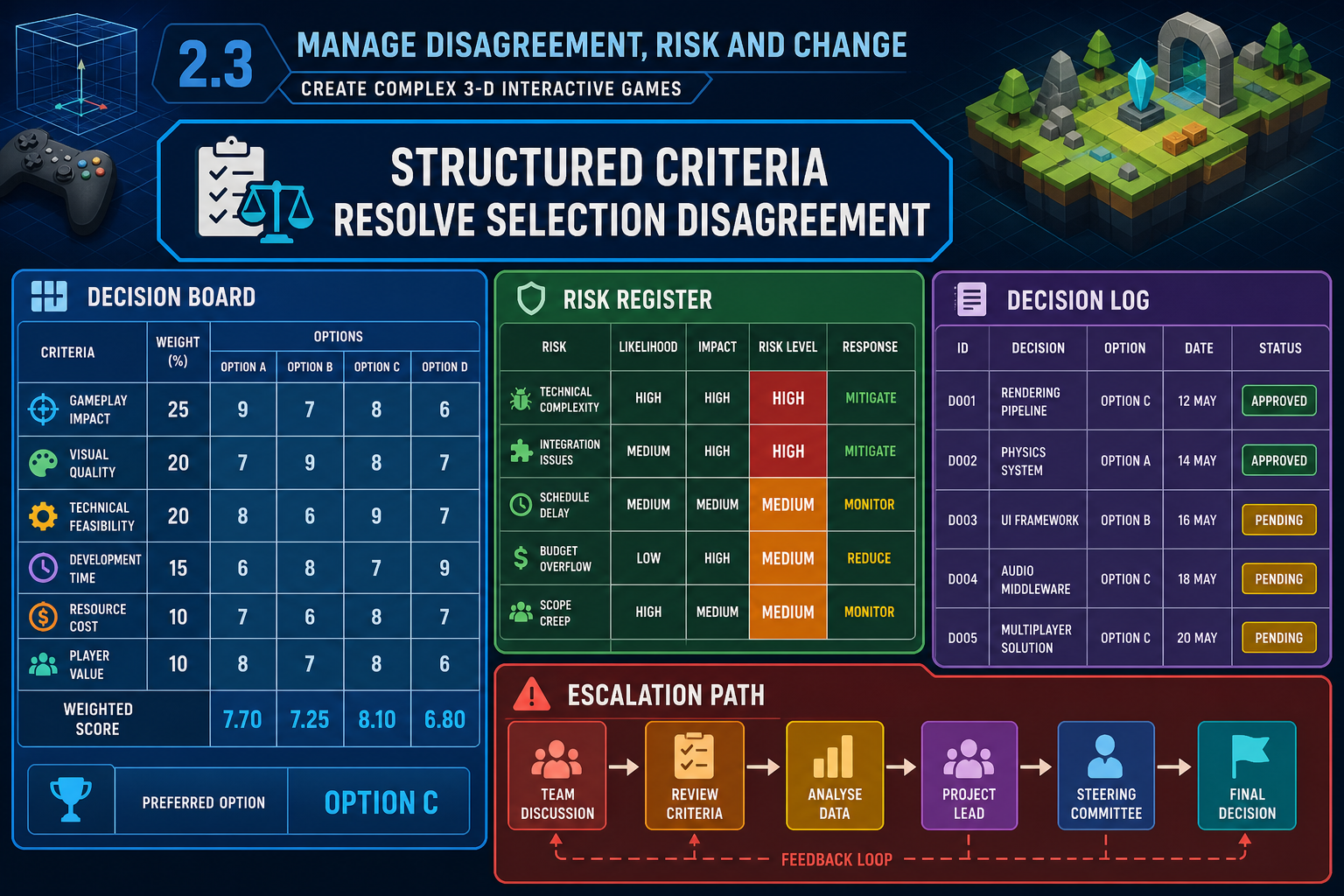
Engine selection often creates disagreement because each role values different outcomes. A technical artist may prioritise material workflow, a programmer may prioritise debugging, and a producer may prioritise schedule certainty. Your role is to keep the discussion tied to the specified game outcomes and documented criteria.
Decision techniques
Use structured methods such as:
- Weighted decision matrix: score each engine against agreed criteria, with higher weight for must-have requirements.
- Risk register: record likelihood, impact, mitigation, owner and review date for each risk.
- Decision log: record what was decided, who approved it, evidence used and conditions attached.
- Prototype gate: require a proof of concept before final approval where risk is unresolved.
- Change control: if requirements change after selection, reassess whether the engine still fits.
Example conflict
A small Hobart team is split between Unreal and Unity for a stylised 3-D action game. The artist wants Unreal's lighting and material tools. The programmer wants Unity because the team already knows C#. The producer worries about schedule. The team agrees on weighted criteria: core gameplay implementation 30%, asset pipeline 25%, performance on target laptops 20%, team skill 15%, licensing/cost 10%. A two-day prototype shows Unity can achieve the required stylised look and faster iteration. The team selects Unity, while documenting a risk that advanced VFX may need asset store packages or custom shaders.
Contingencies
If no engine clearly meets all outcomes, you have options:
- Reduce scope with approval, such as fewer dynamic lights or simpler AI.
- Add tools or middleware, such as FMOD for audio or a networking solution.
- Increase schedule or training time if the project can support it.
- Change target platform or minimum hardware.
- Select a different engine and accept retraining cost.
Each option must be discussed with required personnel because it changes production commitments. If the change affects a client contract, assessment brief or publisher milestone, it may require formal approval rather than an informal team agreement.
Documentation expectations
For VET assessment and workplace practice, keep evidence of consultation. This may include meeting notes, comments in a shared document, LMS discussion posts, signed-off comparison tables or project management tickets. The aim is not bureaucracy for its own sake. Documentation protects the project by showing why the decision was reasonable at the time.
Common mistakes
Avoid consensus by silence. If an art lead or programmer has not reviewed the decision, do not assume agreement. Also avoid locking the choice permanently when major requirements are still unknown. Complex 3-D games are non-routine projects; good teams make decisions based on current evidence and revisit them when new evidence changes the risk profile.