Week 3 — Element 1
1.5 Create schedule for production and testing
1.5 Create a production schedule
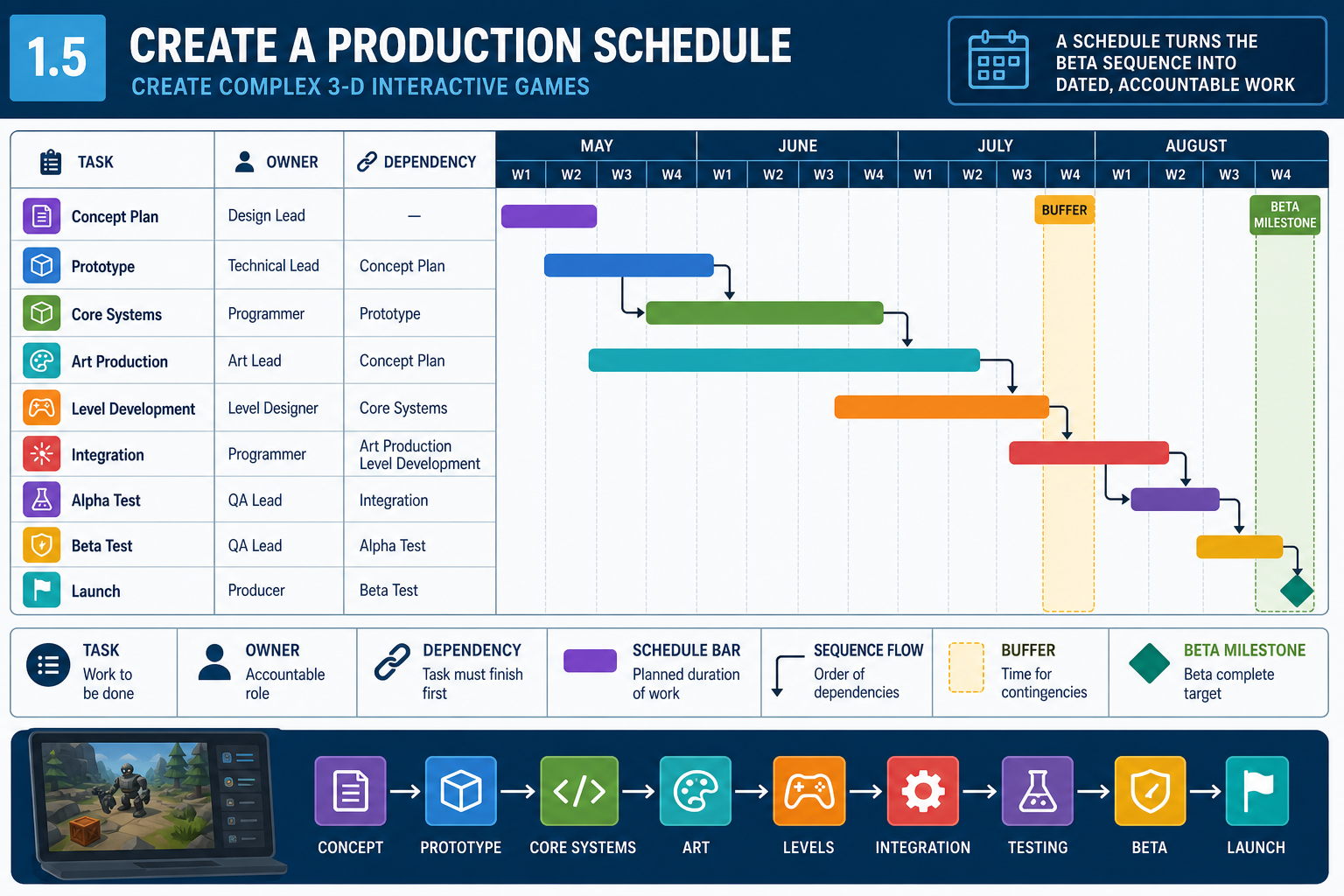
What a production schedule does
A production schedule converts the development sequence into dated work. It shows what will be done, when, by whom, and in what order. For a beta-version prototype, the schedule must include production and testing, not just asset creation.
At Diploma level, you should create a schedule that is realistic enough to guide work and detailed enough to monitor. It does not need to be perfect, because game development changes through iteration, but it must make assumptions visible.
Scheduling inputs
Use the documents and planning outputs already created:
- project brief and beta deadline
- GDD and technical specification
- asset register
- format and integration decisions
- development sequence and dependencies
- team availability and skill levels
- organisational procedures and review requirements
- known risks and critical path.
Work breakdown
Start with a work breakdown structure. Break large deliverables into manageable tasks. “Create player character” is too broad for scheduling. Better tasks include concept approval, model, rig, idle/run/jump animations, controller integration, material setup, collision capsule, audio hooks and QA check.
For each task, estimate effort and duration. Effort is the amount of work; duration is calendar time. A task may take eight hours of effort but span three days if the person is part-time or waiting for review.
Scheduling techniques
Common scheduling tools include:
- Gantt charts for tasks, dates and dependencies
- Kanban boards for workflow status, such as To Do, In Progress, Review and Done
- Scrum sprint plans for time-boxed iterations
- milestone plans for major review points
- critical path analysis for tasks that drive the completion date.
For an online cohort, a simple shared spreadsheet or project board may be enough if it shows dates, owners, dependencies and status clearly.
Workplace example
A Darwin remote team has six weeks to produce a beta combat arena. The schedule sets week one for engine setup and greybox movement, week two for enemy AI prototype, week three for player and enemy representative assets, week four for UI/audio/VFX feedback, week five for balance and performance, and week six for beta QA, bug fixing and delivery. Each week includes review checkpoints and build uploads.
Common mistakes
Do not schedule only the exciting creation tasks. Include setup, reviews, integration, bug fixing, build time, documentation, meetings, testing and contingency. Do not estimate alone when specialists are available; the animator knows animation effort better than the programmer.
1.5 Schedule asset production and integration
Scheduling asset production
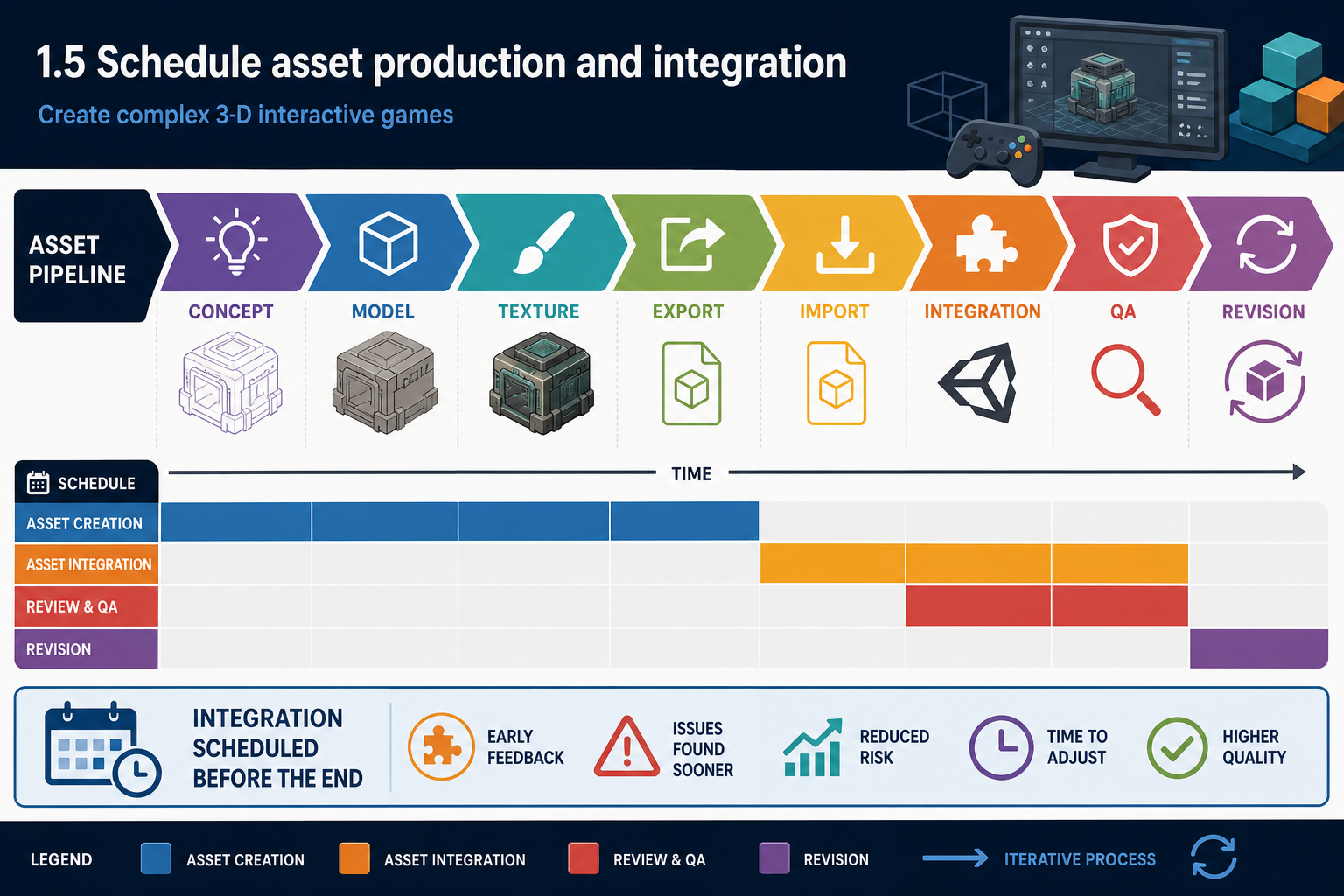
Asset production scheduling must cover the full asset pipeline, not only the time spent creating files. A 3-D environment prop may require concept, modelling, UVs, texturing, collision, LODs, export, import, material setup, placement, lighting check and QA. If you schedule only modelling time, the plan will understate the work.
For each asset or asset group, schedule:
- requirement confirmation
- source creation or acquisition
- internal review
- technical preparation, such as LODs or collision
- export using agreed settings
- engine import and prefab/setup
- in-game integration
- QA against acceptance criteria
- revision time.
Grouping assets
Scheduling every tiny asset individually can become unmanageable. Group low-risk assets, such as minor props, while separately scheduling high-risk or beta-critical assets. For example, “environment clutter set” may be one task group, but “player character rig and animation controller” should be detailed because it has many dependencies.
Integration timing
Integrate representative assets early. If the team produces all assets in isolation and imports them in the final week, issues with scale, shader compatibility, performance or missing collision will surface too late. Progressive integration lets the schedule absorb corrections.
A useful rule is to schedule pipeline validation before bulk production. Create and integrate one sample asset per category: one prop, one animated character, one VFX, one UI element and one audio event. Once the pipeline is proven, production can scale.
Prioritisation
Use the asset register to prioritise beta-critical assets. If the beta tests a puzzle mechanic, pressure plates, doors, state indicators and feedback sounds are more important than decorative wall variation. The schedule should place must-have game-play assets before optional polish.
Workplace example
A Fremantle team is making a 3-D fishing prototype. The schedule places boat controller, water plane, casting animation, fish interaction, catch UI and sound feedback before optional harbour buildings. A representative fish model is integrated early to test animation and collision. Additional fish variants are scheduled only after the catch loop works.
Contingencies
If an asset is delayed, identify whether a placeholder can preserve the test. A greybox enemy may allow AI testing while final art continues. However, placeholders must be tracked; otherwise, the beta may accidentally ship with temporary assets. Mark placeholders in the schedule and asset register with replacement deadlines.
Legal and licensing context
If using third-party assets, schedule time to verify licences, attribution requirements and compatibility with the intended distribution. Marketplace assets can speed production, but licence restrictions, plugin dependencies and style mismatch can create hidden delays.
1.5 Schedule testing throughout production
Why testing must be scheduled
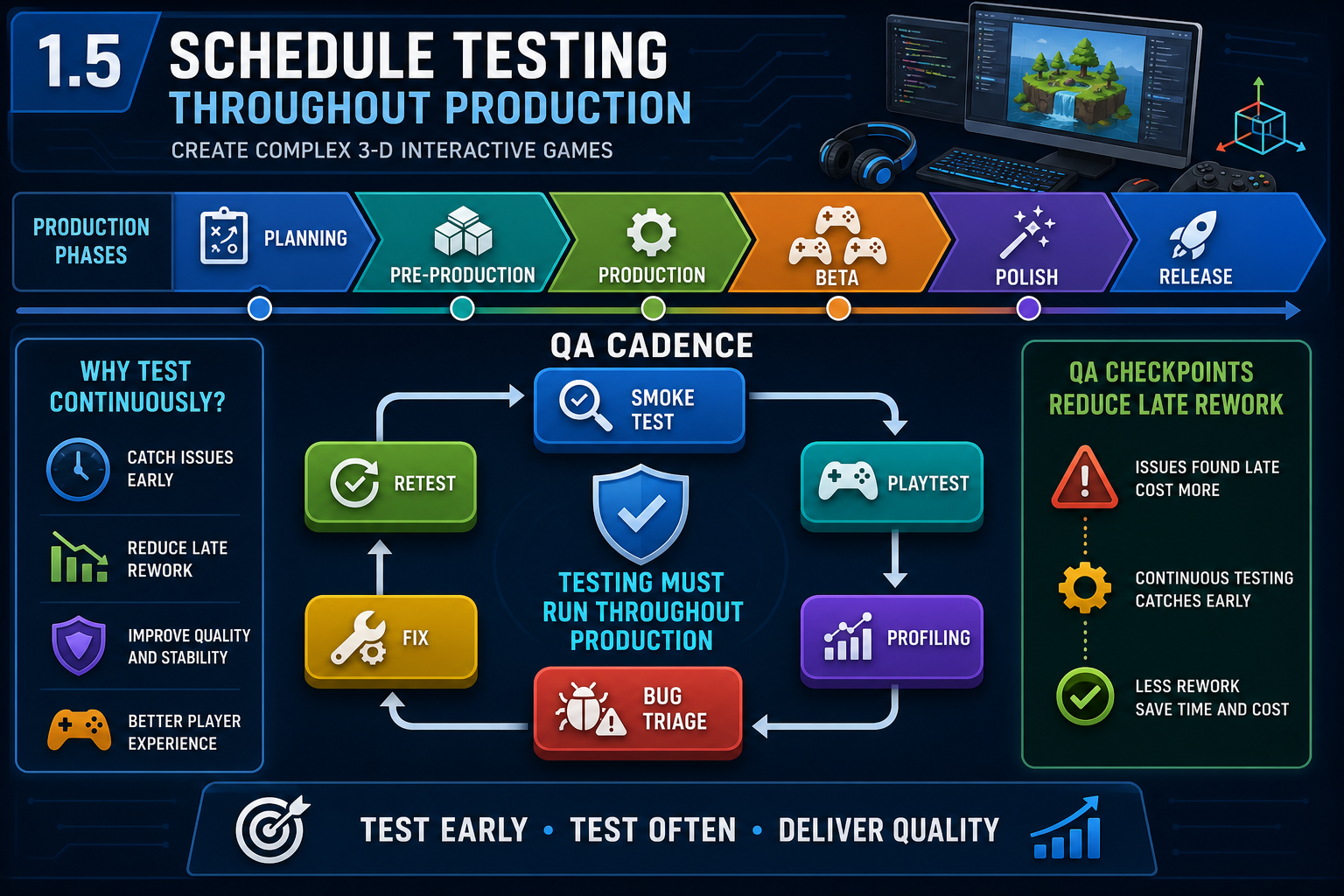
A production schedule for a beta prototype must include testing. Testing only at the end wastes time because defects, usability problems and performance issues are found when there is little capacity to respond. Distributed QA checkpoints throughout production reduce rework and support better game-play decisions.
Testing activities may include:
- unit or component testing of scripts
- smoke testing to confirm a build launches and basic paths work
- integration testing for assets and systems
- playtesting for game feel, usability and fun
- performance profiling on target hardware
- compatibility checks for input devices and screen resolutions
- accessibility checks, such as captions, contrast and remapping where required
- regression testing after fixes
- beta acceptance testing against the test plan.
Scheduling test types
Different tests belong at different stages. Early greybox builds are useful for mechanics, layout and camera. Mid-production builds test integrated assets, feedback and system interactions. Later builds test stability, performance, balance and beta readiness.
For each test, schedule:
- build preparation
- test environment or target hardware
- test participants or testers
- test cases or playtest script
- data capture method
- bug reporting process
- triage meeting
- fix allocation
- retesting.
Bug fixing time
Many schedules fail because they include testing but not fixing. After a playtest, the team needs time to triage issues, decide priorities, implement fixes and retest. Serious bugs may affect the critical path. For example, if the player can fall through the level, that defect invalidates most playtest data until fixed.
Workplace example
A Launceston team schedules fortnightly online playtests for a 3-D puzzle beta. Testers receive a build, a task list and a feedback form. The team records bugs in a shared board with severity labels. After each playtest, two days are reserved for triage and high-priority fixes. This prevents feedback from piling up unmanaged.
WHS and privacy
When testing online, consider participant wellbeing and data handling. Avoid collecting unnecessary personal information. If recording gameplay sessions or screen captures, obtain informed consent and store files securely. Schedule reasonable test lengths and breaks, especially for VR or visually intense games where discomfort may occur.
Common mistakes
Do not rely only on developer self-testing. Developers know the intended solution and may miss usability problems. Also do not test on a powerful development PC only if the target audience uses lower-spec hardware. The schedule should include target or representative hardware wherever practical.
1.5 Balance schedule, scope and quality
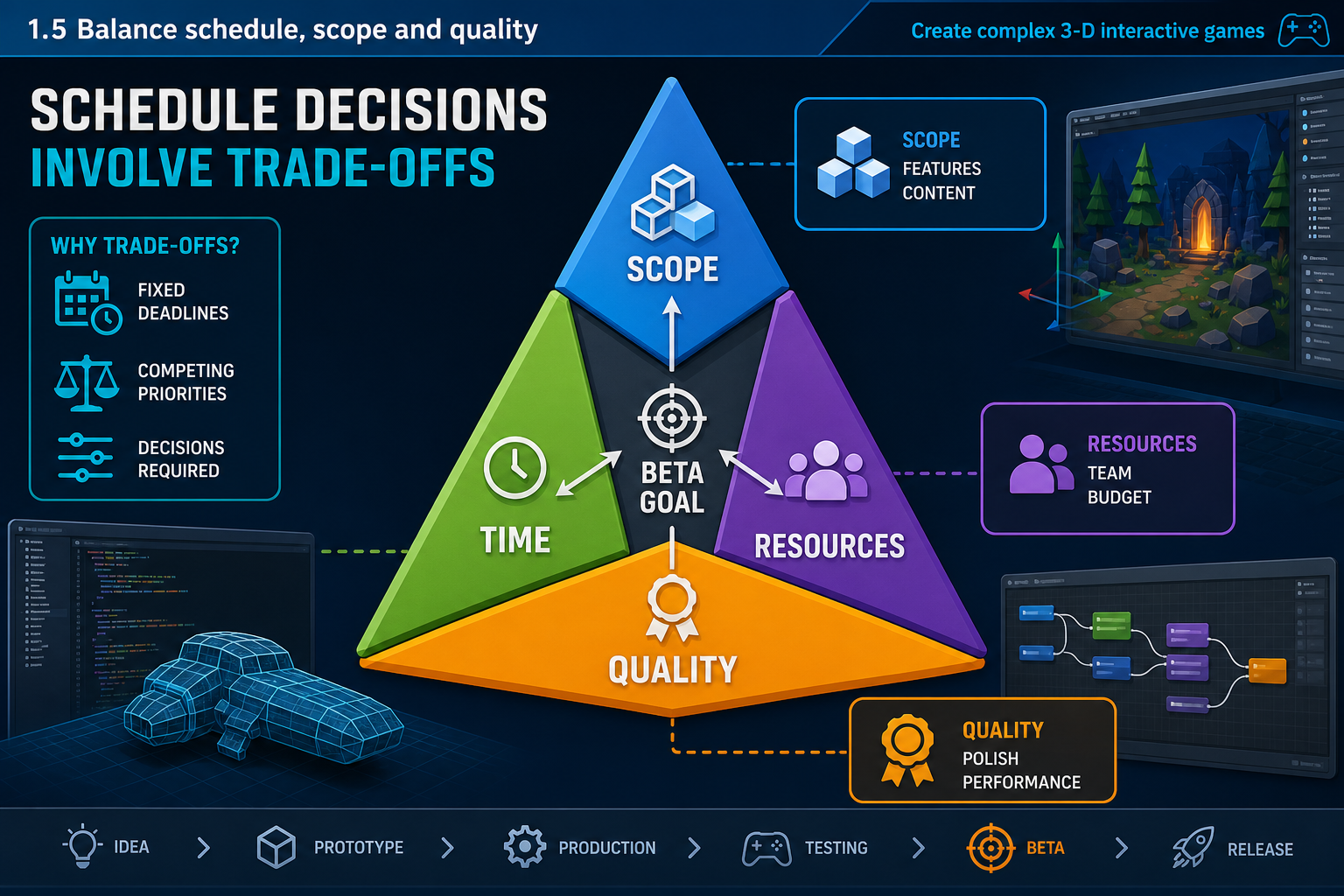
The schedule triangle
Production scheduling involves trade-offs between scope, time, cost/resources and quality. If the beta date is fixed and the team is small, scope may need to reduce. If quality expectations rise, more time or resources may be needed. Ignoring these trade-offs creates unrealistic schedules and unsafe work practices.
For a complex 3-D interactive game, uncertainty is normal. Mechanics may need tuning, assets may fail integration, engine plugins may conflict, and performance may be lower than expected. Your schedule should include contingency and decision points, but it should not hide risk behind vague optimism.
Building contingency
Contingency can be added by:
- scheduling buffer near high-risk tasks
- using placeholders for non-critical assets
- planning scope tiers, such as must/should/could
- reserving time for bug fixing and retesting
- starting critical path tasks early
- setting feature freeze before beta testing.
A feature freeze is a point after which new features are not added unless approved as essential. This helps stabilise the beta. Without a freeze, the team may keep adding ideas while defects remain unresolved.
Critical path management
Review the critical path while creating the schedule. If the critical path is too long, options include reducing scope, simplifying a feature, adding skilled resources, overlapping tasks carefully, or changing the beta success criteria with approval. Be careful with overlapping dependent tasks; starting animation before the rig is stable may create rework.
Maintainable scheduling
A useful schedule is easy to update. For a small project, avoid an overly complex plan that nobody maintains. Each task should have an owner, due date, dependency and status. Milestones should be clear. If using agile sprints, keep sprint goals tied to beta readiness rather than random task completion.
Workplace example
An Australian remote team has a fixed assessment deadline for a 3-D survival beta. Their first schedule includes crafting, weather, hunger, enemies, base building and multiplayer. Critical path analysis shows multiplayer and AI survival systems make the beta impossible in time. The team negotiates a revised beta goal: single-player survival loop with crafting, one enemy type and one weather effect. Quality improves because the reduced scope can be tested properly.
Common mistakes
Do not treat overtime as contingency. Sustained excessive hours increase fatigue, errors and psychosocial risk. Also avoid scheduling all reviews on the final day. Reviewers need time to respond, and rework needs time to be completed.