Week 2 — Element 1
1.3 Discuss formats of assets and issues of asset integration with required personnel
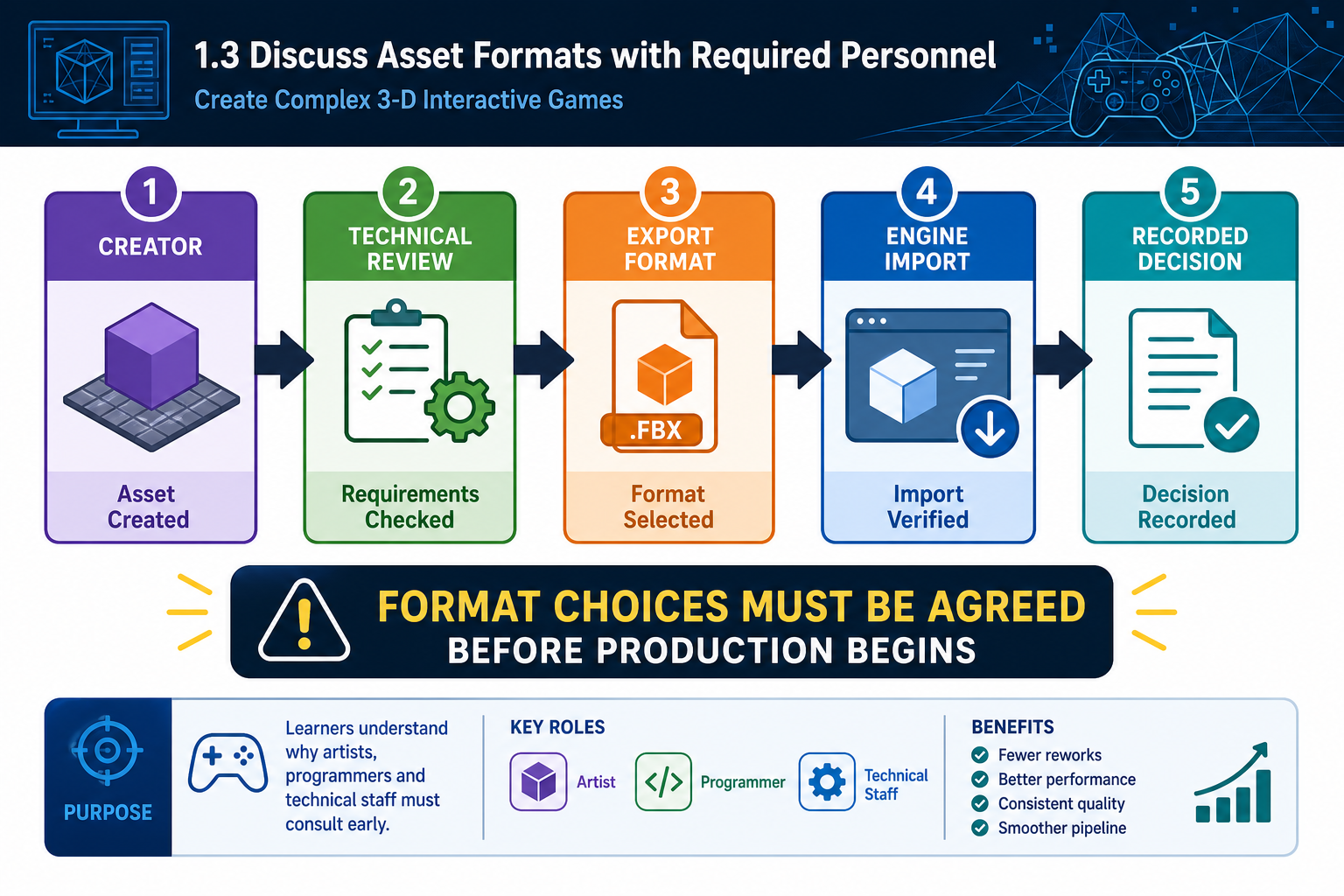
1.3 Discuss asset formats with required personnel
Why format discussions matter
An asset format is the file type and data structure used to create, exchange or import an asset. In a complex 3-D game, format decisions affect quality, performance, editability and integration effort. Discussing formats with required personnel means consulting the people who create, integrate, approve and test the assets.
Required personnel may include:
- producer or project manager
- art director or lead artist
- technical artist
- animator or rigging specialist
- programmer or gameplay engineer
- audio designer
- UI/UX designer
- QA tester
- build engineer or DevOps support
- client or platform representative where relevant.
The goal is to agree on formats that support the pipeline. A modeller may prefer one source format, but the engine may require another export format. A programmer may need data in JSON, CSV, ScriptableObjects, DataTables or engine-native assets. An audio designer may work in a digital audio workstation, while the game uses compressed runtime audio and middleware events.
Common asset formats
Examples include:
- 3-D source files: `.blend`, `.ma`, `.mb`, `.max`
- 3-D interchange: `.fbx`, `.gltf`, `.glb`, `.obj`
- textures: `.psd`, `.png`, `.tga`, `.exr`, `.jpg`
- audio: `.wav`, `.ogg`, `.mp3`, middleware project files
- animation: `.fbx`, engine animation clips, mocap data
- UI: `.psd`, `.ai`, `.svg`, `.png`, engine UI prefabs/widgets
- code and data: `.cs`, `.cpp`, Blueprints, visual scripts, `.json`, `.xml`, `.csv`.
Formats should be selected for the task. A `.psd` may be useful as an editable source file, while a compressed engine texture is used at runtime. An `.fbx` may carry mesh, skeleton and animation data, but export settings must be controlled.
How to run the discussion
- Bring the asset register and technical specification.
- Identify each asset category that needs format decisions.
- Ask creators what source formats they will use.
- Ask integrators what formats and settings the engine accepts reliably.
- Confirm naming, scale, units, orientation and folder destination.
- Document decisions in the pipeline guide or asset register.
- Assign unresolved issues to owners.
Workplace example
A Perth studio creating a 3-D training game agrees that artists may work in Blender, but all character and prop exports must be `.fbx` using metres, Y-up conversion settings checked, applied transforms, named materials and separate collision meshes. The technical artist documents the export preset so every contractor delivers compatible files.
1.3 Discuss integration issues
What asset integration means
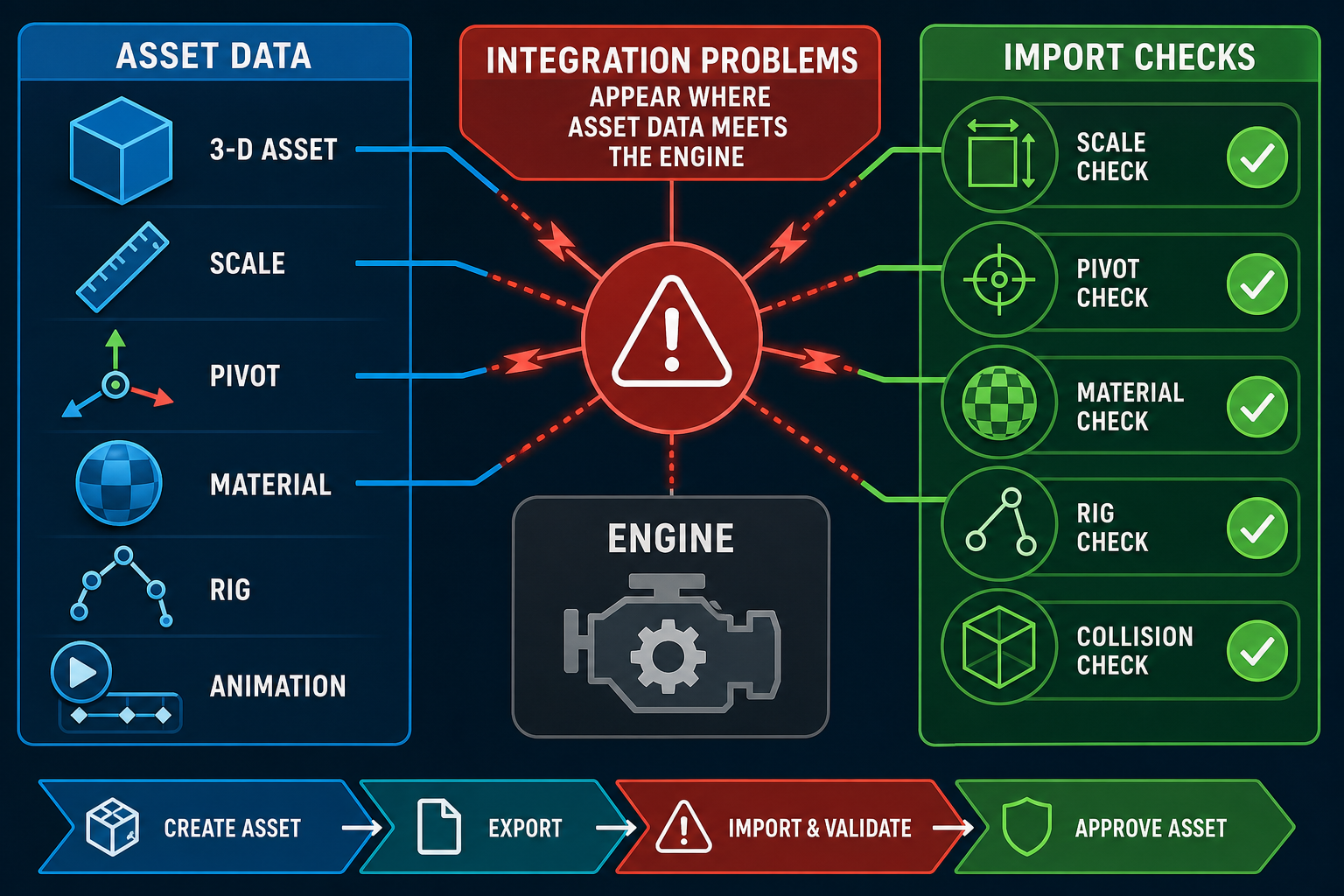
Asset integration is the process of importing assets into the game engine and connecting them to game systems so they function in play. It is not just copying files into a folder. A mesh may need materials, collision, LODs, prefabs, scripts, animation controllers, audio triggers and lighting settings before it is usable.
Integration issues are common because different tools represent data differently. A model that looks correct in a 3-D package may import with wrong scale, rotated axes, missing textures, broken normals, too many materials, incorrect rig hierarchy or unusable collision. A sound effect may be too quiet, not loop cleanly, or use a format unsuitable for streaming. A UI asset may not scale for different resolutions.
Issues to discuss
Discuss the following with relevant personnel:
- Scale and units: Are assets built in metres, centimetres or arbitrary units? Does one engine unit equal one metre?
- Pivots and origins: Does a door pivot at the hinge? Does a vehicle pivot support physics correctly?
- Coordinate orientation: Are forward and up axes consistent between tools and engine?
- Topology and normals: Are meshes clean for deformation, lighting and shading?
- Materials and shaders: Are shader features supported by the target render pipeline?
- Texture channels: Are roughness, metallic, ambient occlusion or masks packed correctly?
- Rigs and skeletons: Are bone names and hierarchy compatible with animation controllers?
- Collision: Is collision simple enough for performance but accurate enough for play?
- Animation states: Are clips named and looped correctly? Is root motion required?
- Audio implementation: Is audio 2-D, 3-D, looping, streamed or event-driven?
- Code/data links: Do asset names or IDs match scripts and data tables?
Test imports
A strong workplace practice is to run test imports early. Before producing dozens of assets, import one representative asset through the full pipeline. For example, test one animated enemy from source file to engine prefab, including mesh, textures, rig, animations, AI controller, hit effects and audio. This exposes pipeline problems while they are cheap to fix.
Contingencies
If integration problems appear, decide whether to repair the asset, adjust the pipeline, change engine settings, or alter the requirement. Do not silently patch each asset by hand if the same problem will recur. For instance, if all outsourced props import at 100 times the intended scale, the fix should be an export instruction or automated import preset, not manual scaling in every scene.
WHS and communication
Integration discussions can become stressful when deadlines are close. Use respectful, evidence-based communication. Show screenshots, engine warnings, profiler data or reproduction steps. Blaming individuals wastes time; diagnosing the pipeline protects the schedule and team wellbeing.
1.3 Agree technical budgets and engine constraints
Why technical budgets need discussion
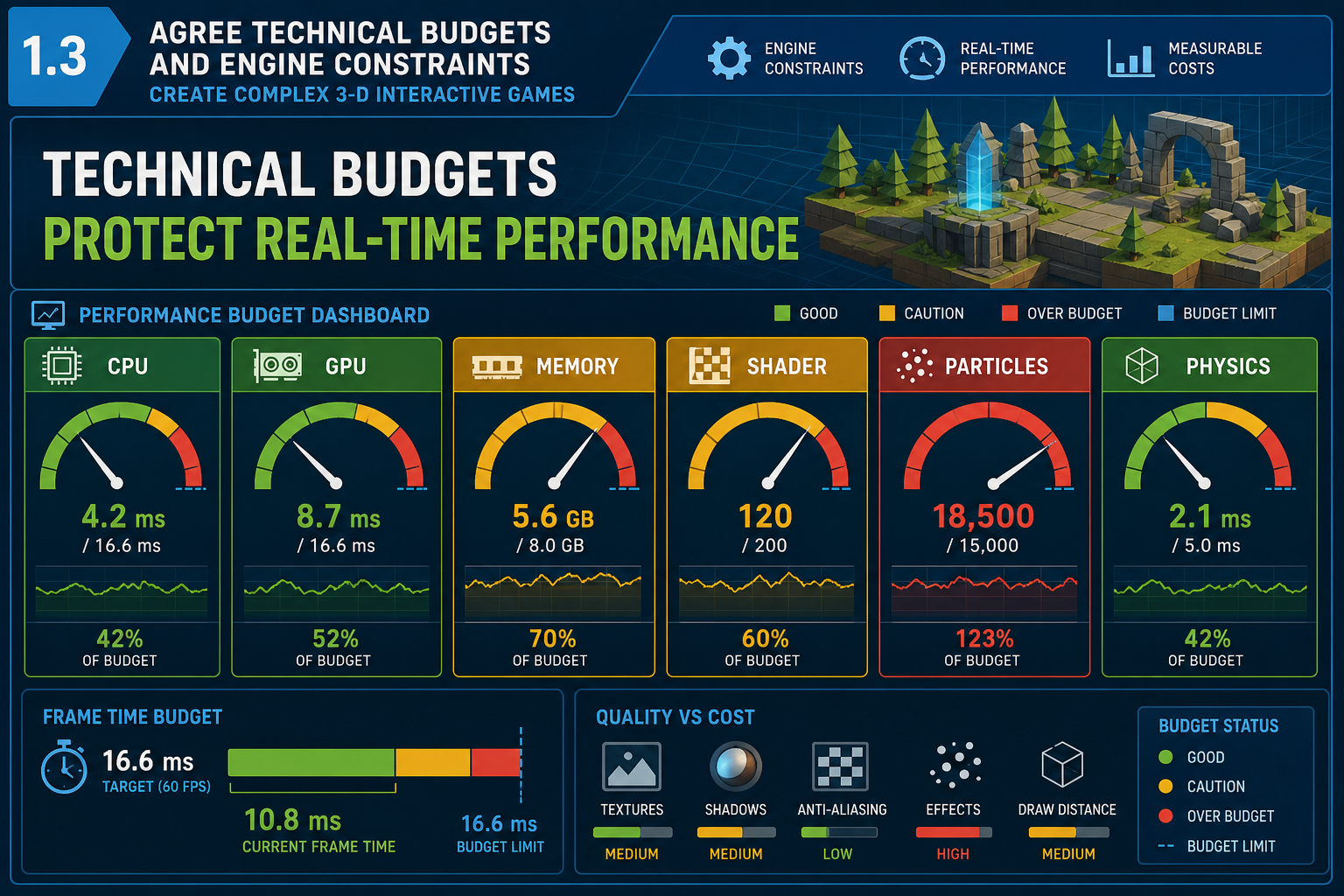
Technical budgets define the allowed cost of assets. They may cover triangle count, texture memory, draw calls, material count, shader complexity, animation bones, audio memory, physics objects, particle counts, AI agents, scene load times and build size. These budgets must be discussed with technical personnel because they depend on the engine, platform, art style and game-play requirements.
A visual effect might look impressive in isolation but consume too much GPU time when combined with enemies, lighting, UI and post-processing. A high-resolution texture may be acceptable for a hero object but wasteful on a small background prop. A complex physics simulation may be fun but unsuitable for low-end hardware or networked play.
Engine capability trade-offs
Game engines provide powerful features, but capabilities are not free. Unity’s lightweight architecture and C# scripting can support rapid iteration, but visual fidelity depends on render pipeline choice, asset quality and optimisation. Unreal Engine can deliver high-end graphics with systems such as Nanite virtualised geometry and Lumen global illumination, but these may demand stronger hardware and careful project configuration. For a small team, the most impressive feature is not always the best production choice.
Discuss questions such as:
- What target hardware must the beta run on?
- What frame rate or responsiveness is expected?
- Are dynamic lights allowed, or should lighting be baked?
- Are high-density meshes acceptable, or are LODs mandatory?
- Which shader features are too expensive for the target platform?
- Are textures streamed, compressed or atlased?
- Are physics interactions simplified for performance?
Defining asset acceptance criteria
Format discussions should produce measurable or observable acceptance criteria. Examples include “asset imports without console errors”, “collision mesh supplied and named correctly”, “LOD group configured”, “uses approved master material”, “animation clips assigned to controller”, or “runs in test scene without causing performance regression”.
Acceptance criteria become part of the Definition of Done. They help QA and technical reviewers reject assets that are visually attractive but technically unfit.
Workplace example
A Gold Coast studio is building a stylised 3-D surfing game for PC and console pitch. The art team wants translucent water, foam particles and wet-sand reflections. The technical artist and programmer discuss budgets and agree to one representative beach scene for beta, limited dynamic lights, shared water material instances, controlled particle emission and profiler checks on target hardware. This lets the beta demonstrate the visual direction without overcommitting production resources.
Common mistakes
Do not wait for final integration to discover that assets exceed budget. Also avoid using “the engine can handle it” as a planning argument. Engines can handle many things in a demo scene; the real test is whether the complete game runs reliably on the required hardware.