Week 15 — Element 6

6.4 Obtain final sign-off from required personnel

6.4 Understanding final sign-off

What final sign-off means

Final sign-off is formal approval from the required personnel that the game is ready to proceed to distribution or submission. It is a release gate, not a casual compliment. Sign-off confirms that the build, documentation and known risks have been reviewed against the agreed requirements.

Required personnel vary by organisation and project. They may include:

  • producer or project manager;
  • creative director or lead designer;
  • technical lead;
  • QA lead;
  • art or audio lead;
  • client representative;
  • product owner;
  • legal, accessibility, classification or compliance reviewer;
  • learning designer or subject matter expert for training games.

In a student project, required personnel may include the assessor, simulated client, team lead or course coordinator, depending on the assessment instructions.

Evidence needed for sign-off

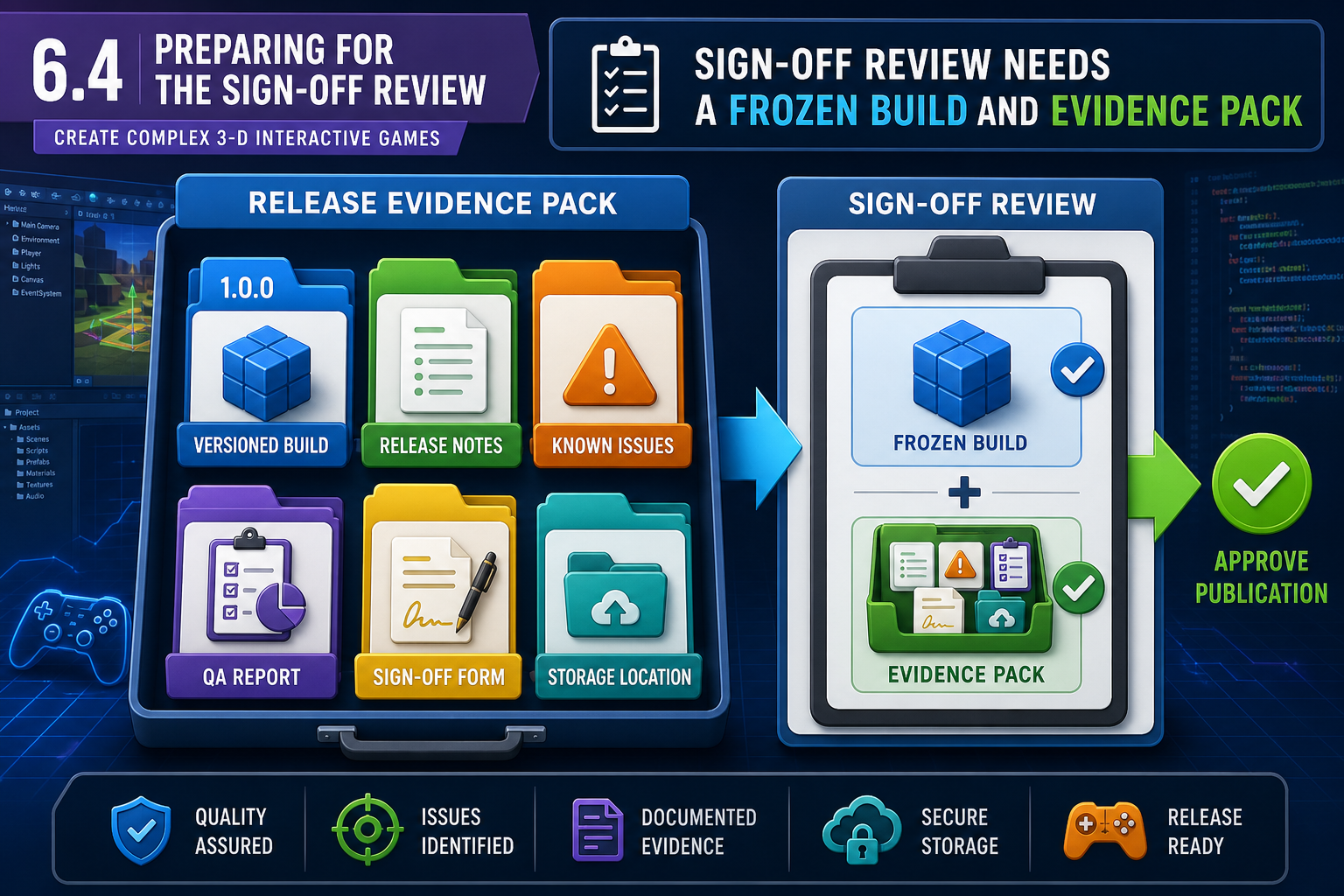
Prepare a release evidence pack. It may include:

  • final build number and download location;
  • specification checklist and gap analysis;
  • user trial change log;
  • final QA report;
  • navigation and sequence test results;
  • unresolved known issues and approved deferrals;
  • performance results on target hardware;
  • asset licence register and credits;
  • privacy or consent records where relevant;
  • classification or platform submission materials if relevant;
  • release notes and installation instructions.

The aim is to help approvers make an informed decision. If the build has a known issue, state it clearly with impact and workaround. Hiding problems damages trust and may create contractual or legal risk.

Sign-off as risk management

Final sign-off connects to risk and critical path management. A producer may approve release with a minor cosmetic issue, but not with a progression blocker. A technical lead may require another build if performance fails on minimum hardware. A client may reject release if required learning content is missing, even if the game is fun.

Matching approver to responsibility

Different people approve different risks. A QA lead can recommend whether testing evidence is sufficient, but may not be authorised to accept a contract scope change. A client representative can accept business requirements, but may rely on the technical lead for engine stability and platform packaging advice. A subject matter expert can validate training accuracy, but may not know whether an asset licence allows redistribution. Good sign-off planning maps each approval to the right role.

Workplace example

A Newcastle studio delivers a 3-D forklift safety game. The QA lead signs off technical stability, the subject matter expert signs off safety procedures, and the client training manager signs off the learning flow. During review, the SME finds that a warning sign uses outdated workplace wording. The game is otherwise stable, but the safety content must be corrected before final sign-off because inaccurate training content could create real-world risk.

Legislative and organisational context

Sign-off should consider copyright, licences, privacy, accessibility, classification and contractual obligations. Australian consumer law, client contracts and organisational quality procedures may all affect release expectations. Do not claim approval unless the required person has actually approved the correct build.

Performance criteria: 6.4

6.4 Preparing for the sign-off review

6.4 Preparing for the sign-off review
illustration6.4 Preparing for the sign-off reviewAI-generated illustration created for this course (no third-party rights).

Preparing the release candidate

Before asking for final sign-off, create a clear release candidate: a specific build that could become the final publication if approved. Avoid sending reviewers a moving target. If developers keep changing files during review, comments and approvals may apply to the wrong version.

Preparation steps:

  1. Confirm all approved user-trial changes are closed or formally deferred.
  2. Confirm all required game elements are integrated.
  3. Run final navigation, sequence and regression checks.
  4. Assign a build number or version label.
  5. Package the build using the intended distribution settings.
  6. Store it in the approved location.
  7. Prepare release notes and known issues.
  8. Notify reviewers of the scope, deadline and approval method.

Acceptance criteria

Reviewers need to know what they are approving. Acceptance criteria may come from the GDD, client brief, technical specification, platform requirements, assessment rubric or organisational definition of done. Criteria should be testable. "Feels good" is not enough. "Player can complete all three levels using keyboard/mouse and controller without progression blockers" is testable.

Communication with reviewers

Use professional communication. Provide:

  • what has changed since the previous build;
  • what reviewers should focus on;
  • where the build and evidence are located;
  • deadline for comments;
  • how to report defects;
  • known limitations;
  • who can approve release.

For online cohorts, this may occur through the LMS, email, Teams, Slack, Git repository releases or a formal submission portal. Keep records. Verbal approval in a video call should be followed by written confirmation.

Building reviewer confidence

Reviewers are more likely to make timely decisions when the evidence is organised. Put documents in one location, use clear file names, and summarise the decision being requested. For example: "Please approve Build 1.0.0 for client pilot distribution, Windows only, with two low-severity known issues listed." This is more effective than sending several unlabelled links and asking, "Can you check if this is okay?"

Common mistakes

Do not request sign-off before QA evidence is ready. Do not send different builds to different approvers without tracking. Do not rely on a file name such as "Final_Final_2_REAL". Use versioning and build numbers. Do not ask a client to approve technical risk they cannot assess; provide the technical lead’s recommendation.

Workplace example

A Darwin developer submits a browser-based 3-D cultural heritage game to a council client. The developer sends a link but no build notes. The client tests an old cached version and reports already-fixed issues. A better process is to provide a versioned URL, cache-clearing instructions, change log, test scope and approval form. This prevents confusion and protects the release schedule.

Performance criteria: 6.4

6.4 Managing feedback during sign-off

6.4 Managing feedback during sign-off
illustration6.4 Managing feedback during sign-offAI-generated illustration created for this course (no third-party rights).

Review comments are not all equal

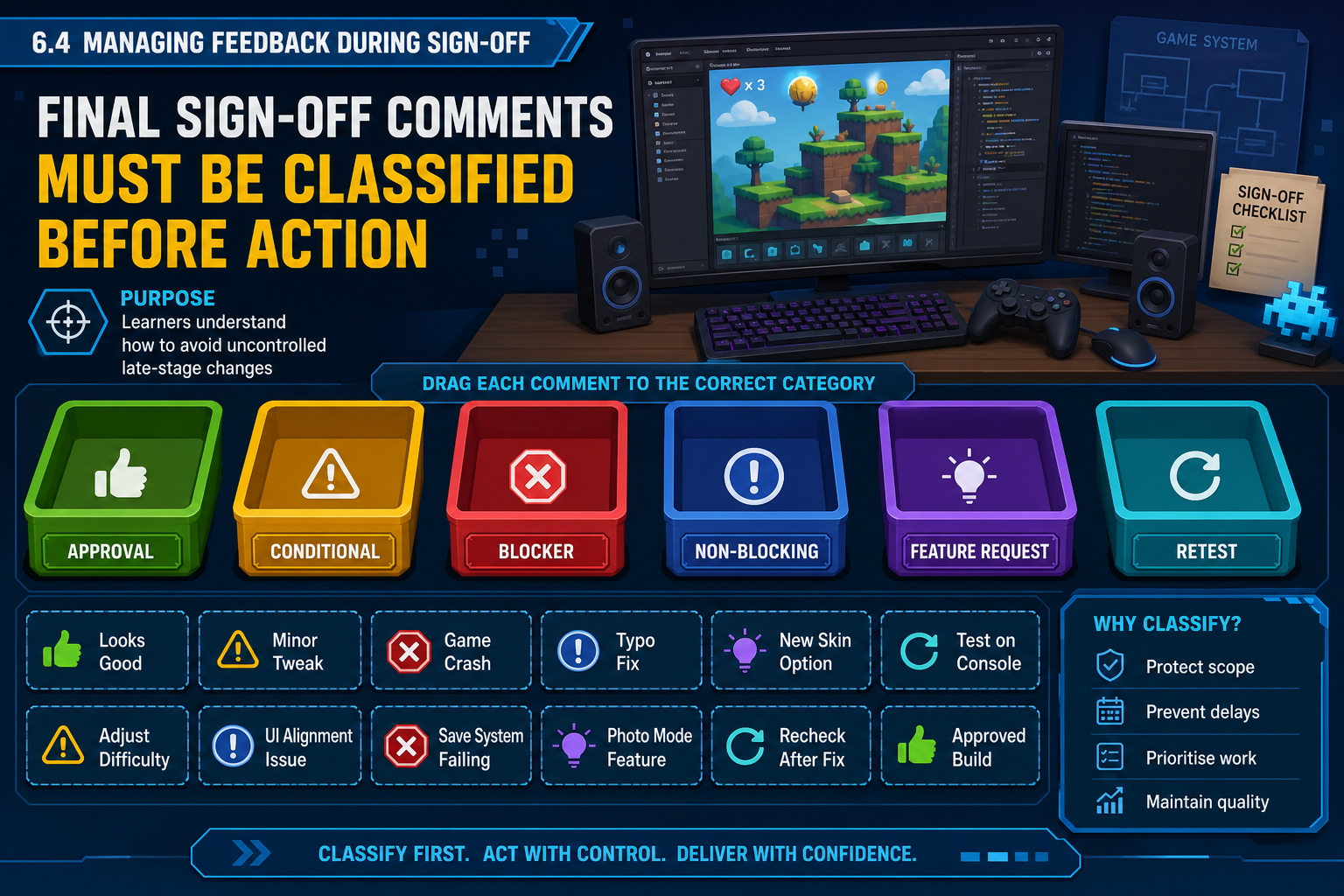
Final sign-off may generate comments. Treat them through the same disciplined change control used after user trials. Classify review feedback as:

  • Approval: no changes required.
  • Conditional approval: release approved if specific conditions are met.
  • Blocking defect: must be fixed before release.
  • Non-blocking issue: may be deferred with approval.
  • New feature request: usually out of scope for final publication unless formally approved.

At this stage, a new idea from a senior stakeholder can be risky. Even small changes may affect navigation, performance, asset integration and testing. Use impact analysis before accepting changes.

Handling required sign-off changes

If a reviewer identifies a blocking issue:

  1. Log it with evidence and reviewer source.
  2. Confirm whether it is within release scope and acceptance criteria.
  3. Estimate impact on schedule and critical path.
  4. Assign an owner.
  5. Implement the smallest safe fix.
  6. Run targeted and regression tests.
  7. Update build number, release notes and evidence pack.
  8. Return the corrected build for approval.

Never patch a sign-off build silently. The approver must know which version they are approving.

Deferrals and conditions

A deferral should state the issue, reason, risk, workaround, future action and approver. Conditional approval should state exactly what must happen before distribution. For example: "Approved for LMS upload only after the credits screen is updated with licensed audio attribution and QA confirms the main menu still navigates correctly."

Balancing respect and control

Stakeholders may have legitimate concerns even when their requested solution is not technically safe. Separate the underlying need from the suggested implementation. If a reviewer says "add a big arrow everywhere", the underlying problem may be weak wayfinding. A safer fix could be to increase objective text clarity and adjust lighting in one confusing area. Record the decision so the team can show that feedback was considered professionally, not ignored.

Workplace example

A Wollongong studio presents a release candidate for a 3-D marine rescue training game. The client requests a new weather system during sign-off. The producer identifies it as a new feature outside the agreed scope and proposes it for a later update. However, the client also finds that the distress radio sequence can be skipped, causing assessment data not to record. That is a blocking defect because it affects the required training outcome. The team fixes and retests only the blocker before seeking final approval.

WHS and professional practice

Sign-off pressure can lead to rushed, undocumented work. Maintain safe work hours and peer review for high-risk changes. For code changes, use version control and review diffs. For content changes, recheck licences and cultural permissions where relevant, especially when using First Nations cultural material or community-approved content.

Performance criteria: 6.4

6.4 Recording final approval

What to record

Final sign-off must be traceable. Record:

  • project name and product title;
  • build number, version and date;
  • distribution target;
  • approving personnel and roles;
  • approval decision;
  • conditions or known issues;
  • date and method of approval;
  • links to evidence pack and final build.

This record may be a signed form, email approval, LMS submission feedback, ticket status, digital approval workflow or meeting minutes confirmed in writing. The key point is that approval applies to a specific build and scope.

Why traceability matters

Traceability protects the organisation. If a client later reports that a feature is missing, the team can check what was approved. If a defect appears after a last-minute change, the team can identify the build history. If asset ownership is questioned, the licence register and credits can be reviewed.

For regulated, training or public-sector contexts, sign-off records may be part of broader governance. A 3-D simulation used for workplace safety training should not be released based solely on a developer’s opinion that it works.

Communicating release status

After sign-off, notify the production team and distribution personnel. State whether the build is approved for:

  • internal testing only;
  • client review;
  • LMS upload;
  • public release;
  • platform submission;
  • staged rollout;
  • release with known issues;
  • release blocked.

This avoids accidental publication of an unapproved build. In online environments, access control matters. Do not leave old builds publicly accessible if they could be mistaken for the approved version.

Secure storage and retention

Store sign-off records in the organisation’s approved repository, not only in a private message thread. If records include personal information, such as names in playtest evidence or assessment results, limit access to people who need it. Retention requirements depend on organisational policy, contracts and training or assessment obligations. The practical rule is to keep enough evidence to prove what was approved while avoiding unnecessary exposure of personal or confidential information.

Common mistakes

Avoid these errors:

  • releasing based on informal chat without confirmation;
  • approving one build but distributing another;
  • losing the final build file or evidence pack;
  • failing to record conditions;
  • allowing unauthorised team members to upload or publish;
  • ignoring organisational procedures for file naming, storage and retention.

Workplace example

A small Victorian studio uses cloud storage to share builds. A junior team member uploads "latest.zip" to the client folder before approval. The client downloads it and encounters debug menus. The organisation changes procedure: only the producer can move builds into the approved release folder, and every release file must include version number, date and checksum or other verification method where required.

Legislative and industry context

Approval records can support contract management, copyright compliance, privacy governance and quality assurance. Where personal data or participant recordings are included in evidence, store them according to privacy and retention procedures. Do not include unnecessary personal information in broad release emails.

Performance criteria: 6.4