Week 11 — Element 5
5.2 Evaluate prototype against criteria including achievement of a creative and user-friendly product
5.2 Define evaluation criteria
Why criteria come first
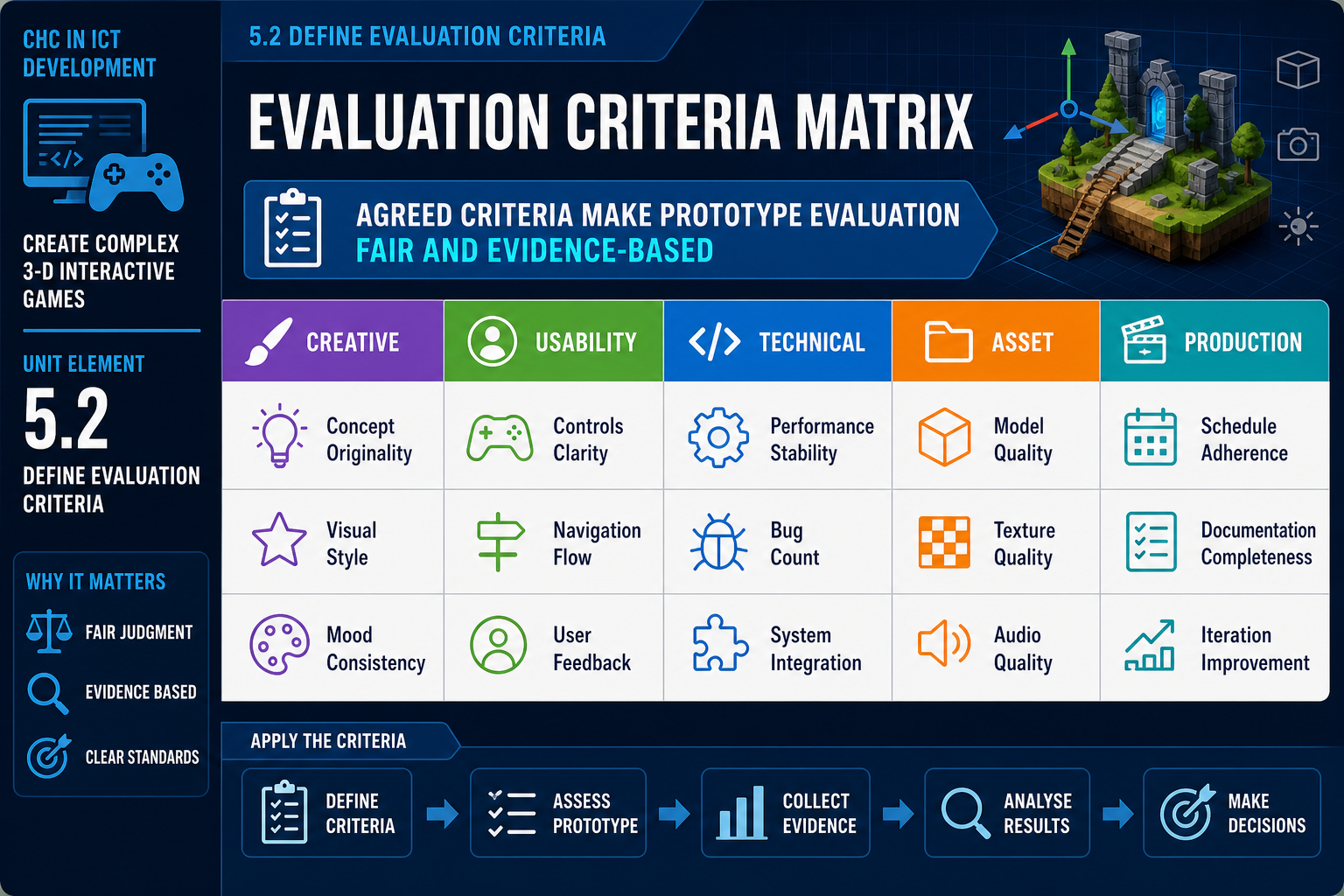
To evaluate a prototype fairly, you need criteria. Criteria are the agreed standards or questions used to judge whether the prototype has achieved its purpose. Without criteria, the loudest opinion in the room can dominate. With criteria, the team can make reasoned decisions based on the brief, intended player, target platform and production constraints.
For a complex 3-D interactive game, criteria should cover more than whether the build launches. The performance criterion specifically requires evaluation including achievement of a creative and user-friendly product. Creativity and user-friendliness can be assessed without pretending the prototype is final. You are evaluating whether the prototype shows enough promise and usability to justify further development.
Typical prototype criteria
Useful criteria may include:
- Core concept: Does the main mechanic work as intended? Is the loop understandable and repeatable?
- Creativity: Does the prototype offer a distinctive interaction, mood, fantasy, visual approach, level structure or combination of systems?
- User-friendliness: Can the intended player understand goals, controls, feedback and consequences without excessive explanation?
- Technical feasibility: Can the engine, code architecture and target hardware support the required systems?
- Performance: Is the prototype within an acceptable direction for frame rate, loading and responsiveness on target hardware?
- Asset integration: Do models, animations, materials, sounds and UI elements import and function reliably in the engine pipeline?
- Production feasibility: Can the team complete the product within likely schedule, skills and resources?
- Risk: Which unresolved issues threaten the critical path?
Make criteria specific
Weak criterion: 'The game should be fun.'
Stronger criterion: 'After five minutes, first-time testers should be able to identify the objective, use the primary movement and interaction controls, and complete the test encounter without developer explanation, unless the test is specifically measuring discovery.'
Weak criterion: 'The art should look good.'
Stronger criterion: 'The prototype should demonstrate a consistent low-poly haunted bushland style, with scale, lighting and colour contrast that support navigation in a third-person camera.'
Workplace example
A Sydney studio is prototyping a 3-D wildlife conservation adventure for school-aged players. The criteria include: the animal tracking mechanic must be understandable without text-heavy instruction; the art style must feel distinct from realistic hunting games; the build must run on mid-range school laptops; and the scope must support a classroom session. These criteria connect creative, usability, hardware and production concerns.
Common mistakes
Do not create criteria after you already know the answer you want. Also avoid criteria that cannot influence decisions. If the team cannot act on a criterion, remove or rewrite it. Evaluation should help decide whether to proceed, change direction or stop.
5.2 Evaluate creativity
What creativity means in prototype evaluation
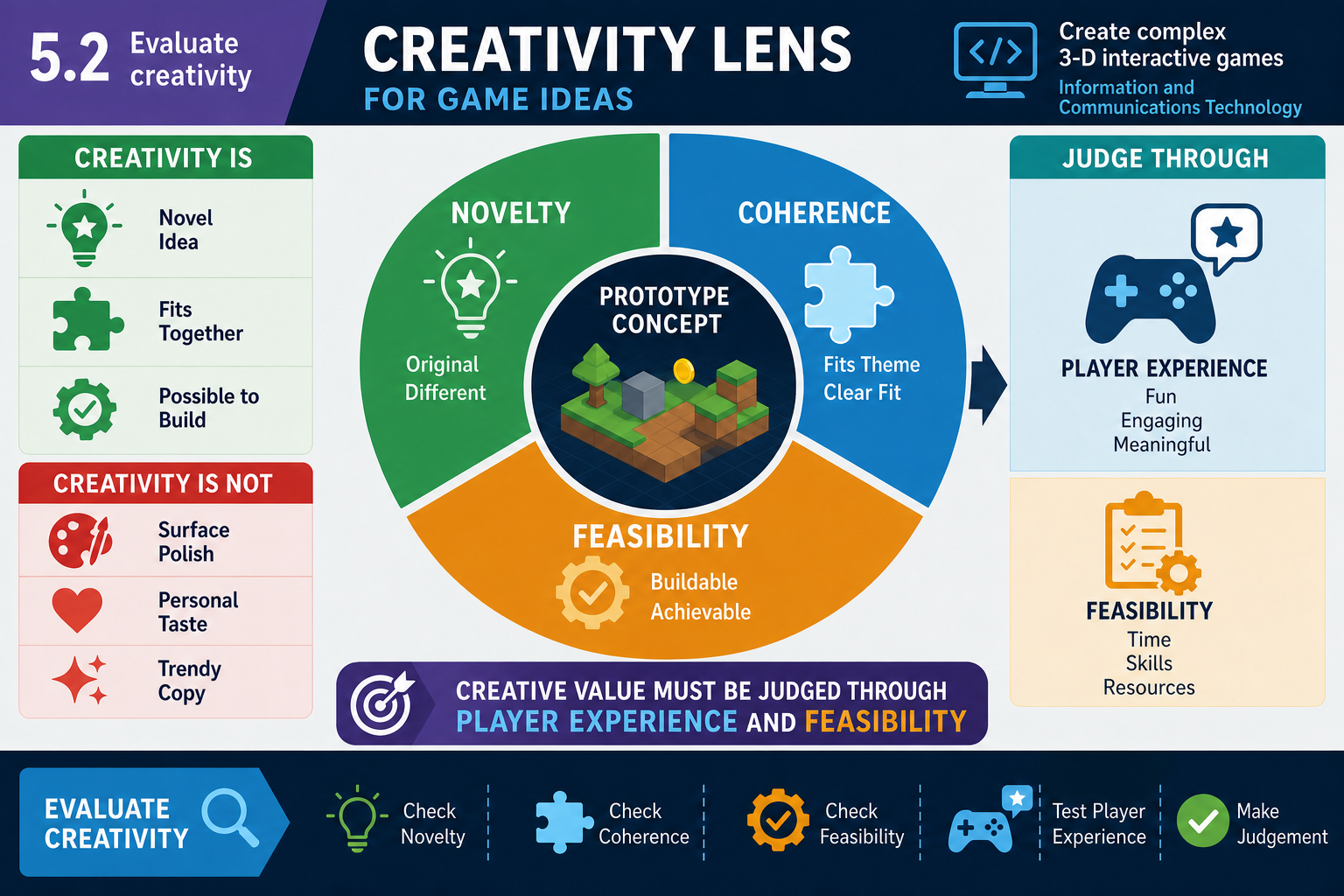
In game development, creativity is not simply unusual art or a surprising story premise. A creative prototype offers an engaging player experience through mechanics, systems, interactions, aesthetics, narrative structure, world design or technical presentation. The key question is: does the prototype demonstrate a distinctive and coherent experience worth developing?
Evaluate creativity through three lenses.
First, assess novelty or freshness. The idea does not need to be completely original; few games are. It may combine familiar features in a fresh way. A 3-D platformer with climbing, gliding and collectible objects is familiar. If the prototype uses wind simulation to turn gliding into a puzzle-solving mechanic with meaningful risk, that may be a creative hook.
Second, assess coherence. Creative elements should support the same design intention. If the prototype combines horror lighting, slapstick physics, realistic tactical shooting and cute farming systems, the result may feel confused unless the contrast is deliberate and readable.
Third, assess feasibility. A creative feature that cannot be built, tested or optimised within the project constraints may need to be simplified. Creativity in production often means finding an elegant design that delivers strong player impact with achievable systems and assets.
Evidence for creative achievement
Look for evidence such as:
- Reviewers can describe the unique appeal after playing.
- The core mechanic creates interesting decisions, not just visual spectacle.
- The 3-D space supports the design rather than acting as decoration.
- Art, audio, camera and interaction reinforce the intended mood.
- The prototype suggests expandable content without requiring impossible asset volume.
Use comparisons carefully. Genre references are useful because they show market and player expectations. However, avoid saying 'This is like Game X' as the whole evaluation. Ask what your prototype adds, changes or focuses.
Example
An Adelaide team prototypes a first-person museum mystery set in a stylised version of old Adelaide buildings. The creative criterion is not whether every building is final quality. The team evaluates whether the spatial audio clues, environmental storytelling and object inspection mechanic create a distinctive investigative feel. Feedback shows that players enjoy using sound to locate hidden stories, but the realistic building scale makes navigation slow. The creative direction is strong, but level scale needs redesign.
Common mistakes
Do not mistake expensive assets for creativity. A prototype using marketplace models can still demonstrate a creative mechanic, while a visually polished scene may have no interesting interaction. Also avoid rejecting familiar ideas automatically. A familiar structure may be commercially appropriate if the prototype delivers a strong user-friendly execution or a clear target niche.
Industry context
Creative evaluation must respect copyright and licences. Mood boards, reference games and temporary assets are useful internally, but final development cannot copy protected expression, music, art, characters or code without rights. Record which assets are placeholder and which are licensed for production.
5.2 Evaluate user-friendliness
User-friendly for whom?
A user-friendly game prototype is one that the intended players can understand and operate with reasonable effort. This does not mean the game must be easy. A difficult game can still be user-friendly if players understand the rules, controls and consequences. A puzzle can be challenging without being confusing. A combat encounter can be demanding without making the camera, UI or input fight the player.
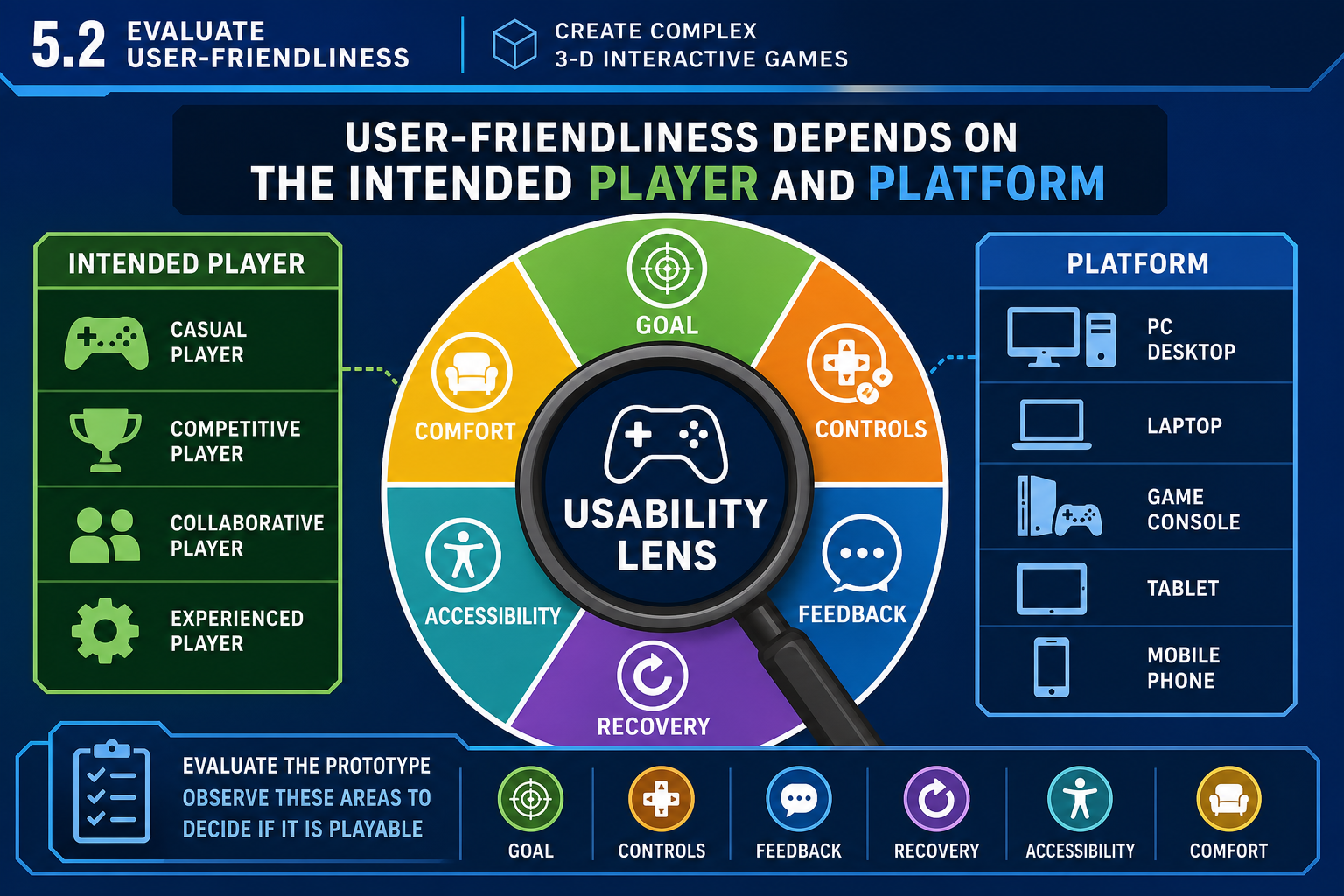
Start by defining the intended user. A prototype for experienced PC action players can assume different knowledge from a prototype for primary school students, museum visitors, aged care residents or VR training participants. The target hardware also changes usability. A small mobile screen, controller, keyboard and mouse, touchscreen kiosk or VR headset each imposes different constraints on input, text size, comfort and feedback.
Usability dimensions
Evaluate user-friendliness across these dimensions:
- Goal clarity: Does the player know what they are trying to do now?
- Control clarity: Can the player discover and remember the controls?
- Feedback: Does the game show when actions succeed, fail or are unavailable?
- Camera and spatial readability: Can the player understand position, direction, hazards and interactable objects in 3-D space?
- Error recovery: Can the player recover from mistakes without frustration or dead ends?
- Interface readability: Are menus, prompts, health, inventory and objective text readable on target displays?
- Comfort: Does movement, camera shake, flashing, audio or session length create avoidable discomfort?
- Accessibility direction: Are there options or design choices that support a wider range of players, such as remappable controls, subtitles, colour-independent cues or adjustable sensitivity?
The Australian games sector commonly works for global platforms, so accessibility and usability expectations are high even for prototypes. You do not need to implement every accessibility feature at prototype stage, but you should identify barriers early because they can affect engine architecture, UI systems and input design.
Observe behaviour
Players often say a prototype was fine while their behaviour shows confusion. Watch for repeated misclicks, camera overcorrection, ignored prompts, long pauses, accidental exits, failure to notice objectives, or reliance on developer hints. Record what happened, not just whether the player liked it.
Example
A Perth student team tests a third-person survival prototype. Reviewers like the atmosphere, but first-time players repeatedly miss the small interact prompt on a dark door. The team initially thinks the door texture is the problem. Observation shows the prompt appears too low on screen and uses a colour similar to the background. The required change is a UI readability and feedback fix, not a full art redesign.
Common mistakes
Do not evaluate usability only with expert developers. Developers know hidden controls and engine quirks. Also avoid assuming that user-friendliness means adding more tutorial text. Often the better solution is clearer level layout, stronger affordances, consistent input mapping or immediate feedback.
5.2 Make the evaluation decision
Evaluate, do not merely describe
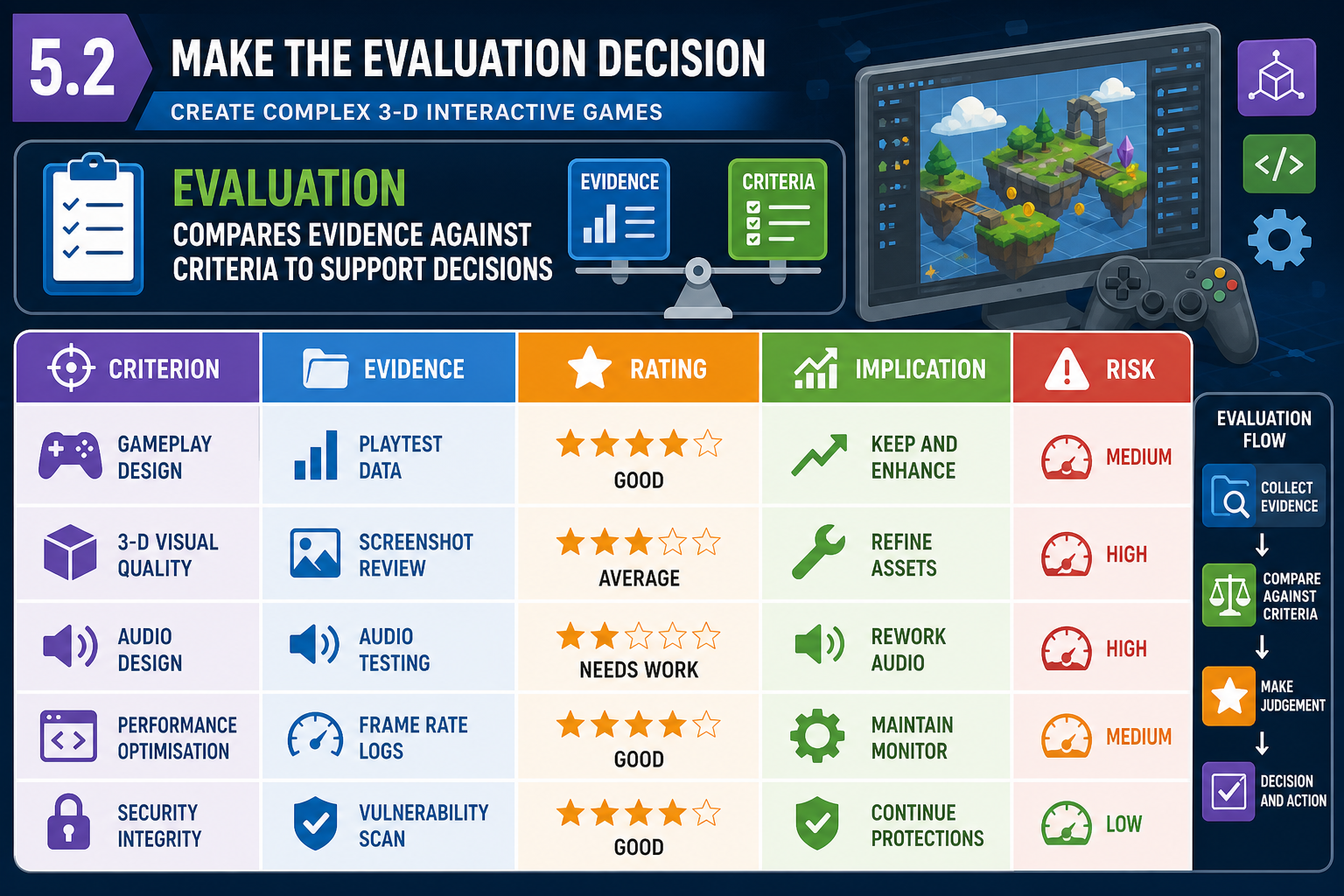
After feedback has been gathered and criteria are defined, you need to make an evaluation. Evaluation means judging the evidence against the criteria and explaining what it means for the project. A descriptive note says, 'Three reviewers found the camera difficult.' An evaluation says, 'The prototype does not yet meet the user-friendliness criterion because camera collision and narrow corridors prevented players from tracking enemies. This is a major issue that must be fixed before endorsement.'
A practical evaluation process is:
- List the agreed criteria.
- Gather evidence from demonstration notes, build tests, user observations and technical measurements.
- Rate each criterion using an agreed scale such as met, partly met, not met, or not yet tested.
- Identify the reason for each rating.
- Decide the implication: proceed, change, retest, defer, or stop.
- Record risks, assumptions and unresolved questions.
Include technical constraints
Complex 3-D games are shaped by engine and hardware constraints. A game engine may provide rendering, physics, animation, audio, scripting, navigation, networking, scene management and platform export tools. These capabilities accelerate production, but they also create constraints. For example, an engine may support advanced real-time lighting, but the target laptops may not. A physics-heavy prototype may be impressive on a developer desktop but unstable or slow on low-end hardware. An asset format may import correctly but produce oversized textures, broken rigs or inefficient collision meshes.
Basic programming knowledge helps you evaluate whether a problem is superficial or structural. A one-line input mapping bug is different from an AI system built entirely with hard-coded scene references. A prototype using visual scripting can be valid, but if graphs are duplicated across objects with no maintainable structure, full production may become risky.
Risk and critical path
Evaluation should identify issues that affect the critical path: the sequence of tasks that determines the shortest possible project duration. If the core networked multiplayer system is unproven, it may block level design, UI, animation and testing. If the main character rig is incompatible with the animation pipeline, many content tasks may stall. Mark these issues clearly.
Example decision
A Canberra team evaluates a 3-D stealth prototype. The creative criterion is met: hiding in dynamic shadows feels distinctive. User-friendliness is partly met: players understand the goal but not enemy vision cones. Technical feasibility is not yet met: dynamic lighting causes unstable performance on target laptops. The decision is not full endorsement. The agreed recommendation is to prototype a cheaper visibility system and retest before expanding levels.
Common mistakes
Do not hide negative findings to protect the idea. Prototype evaluation saves time and money by finding problems early. Also avoid overreacting to a single issue. A serious bug may be easy to fix, while a small repeated confusion may reveal a deep design problem.