Week 4 — Element 2
2.2 Assess software and tools related to specified game concept and play requirements
2.2 Translate the game concept into requirements
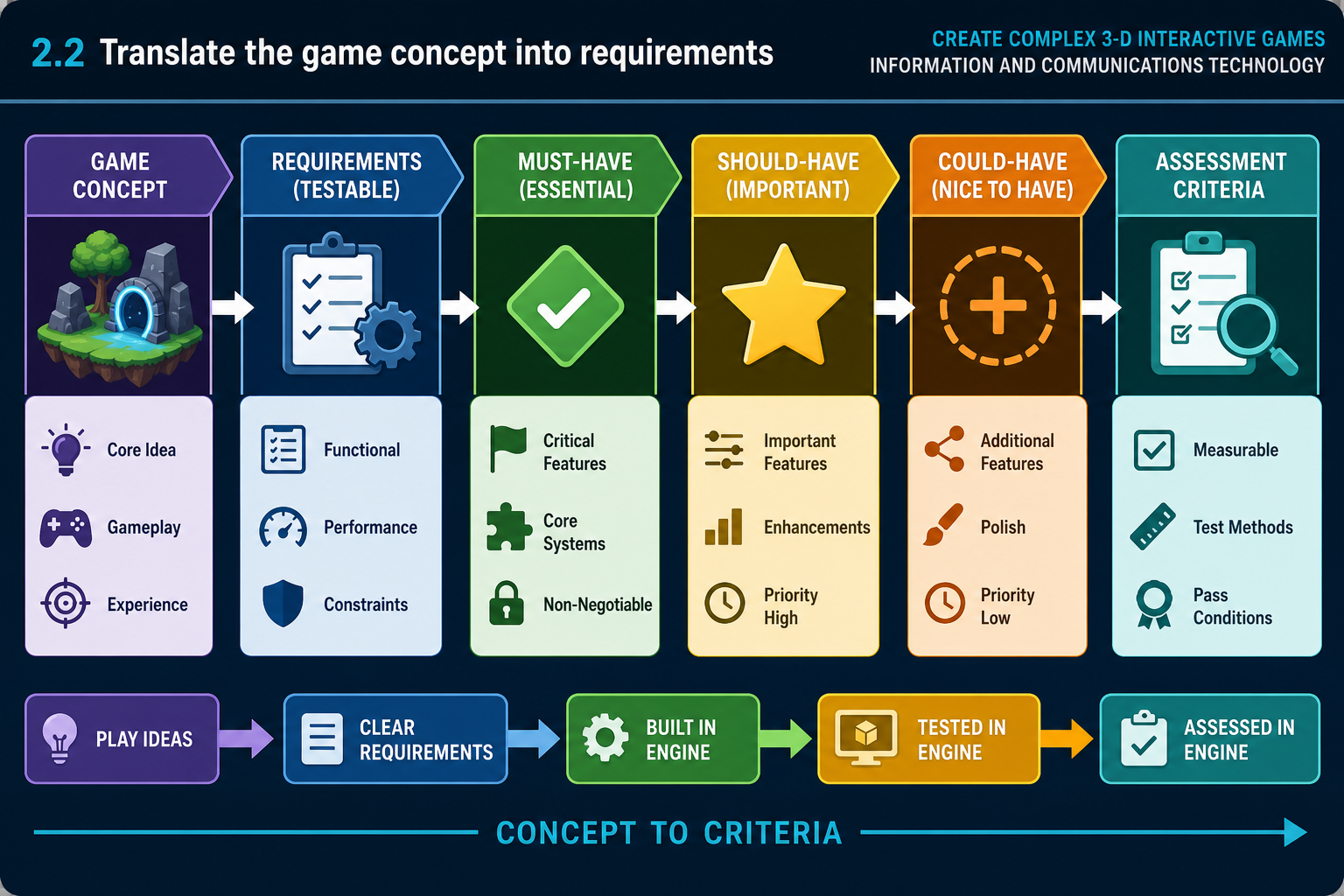
From concept to assessment criteria
Performance Criterion 2.2 requires you to assess software and tools related to a specified game concept and play requirements. This means you do not ask, "Which engine is best?" You ask, "Which engine and tools best support this game, for this audience, on this hardware, with this team and timeframe?"
A game concept should be translated into practical requirements before assessment. For a complex 3-D game, capture:
- Genre and core loop: for example exploration, combat, building, puzzle solving, racing or survival.
- Player perspective: first-person, third-person, top-down, VR or mixed camera.
- Interaction model: movement, camera, physics objects, inventory, combat, dialogue, vehicles or networked co-op.
- Target platforms: Windows PC, macOS, console, mobile, VR, web or cloud streaming.
- Visual target: stylised low-poly, realistic, cinematic, cel-shaded or simulation-focused.
- Performance target: expected frame rate, resolution, loading expectations and minimum hardware.
- Content scale: number of levels, size of world, characters, animations, audio and UI screens.
- Production constraints: team size, skills, budget, available licences and milestone dates.
Requirements language
Use clear, testable statements. Instead of "good graphics", write "supports real-time dynamic lighting for indoor scenes with at least 20 interactable props while maintaining target frame rate on mid-range Windows laptops used by the cohort." Instead of "easy multiplayer", write "supports two-player online co-op prototype with replicated player movement, interactable doors and basic session joining."
A useful pattern is: actor + action + condition + acceptance measure. For example, "The player can pick up and inspect a 3-D evidence object using mouse and keyboard, and return it to the scene without breaking collision." This makes the engine assessment practical because you can test input, physics, camera, UI and asset handling together.
Must-have, should-have and could-have
Classify requirements so trade-offs are visible:
- Must-have: without this, the game cannot meet the brief.
- Should-have: important but can be simplified if schedule or hardware demands it.
- Could-have: desirable polish or extension features.
- Won't-have for this version: deliberately excluded to protect scope.
This is similar to MoSCoW prioritisation and helps prevent feature creep.
Example
A Perth TAFE learner proposes a 3-D museum exploration game for online assessment. Must-have requirements include first-person navigation, interactable exhibits, imported 3-D artefacts, spatial audio, UI prompts and Windows builds. Should-have requirements include dynamic shadows and save progress. Could-have requirements include VR support. This requirement set makes Unity, Unreal and Godot assessable against the same needs.
The learner then turns the list into an engine checklist. They ask whether each candidate supports the input system, the import format for artefacts, audio zones, UI prompts, Windows packaging and performance on their laptop. VR support is not allowed to dominate the decision because it is only a could-have for this version.
Common mistakes
Learners often assess engines against vague ambitions rather than play requirements. Another mistake is copying a high-end commercial game's feature list without considering hardware, team capacity or schedule. At AQF 5, you must show judgement: reduce requirements where needed and explain the production consequences.
2.2 Assess play requirements against engine systems
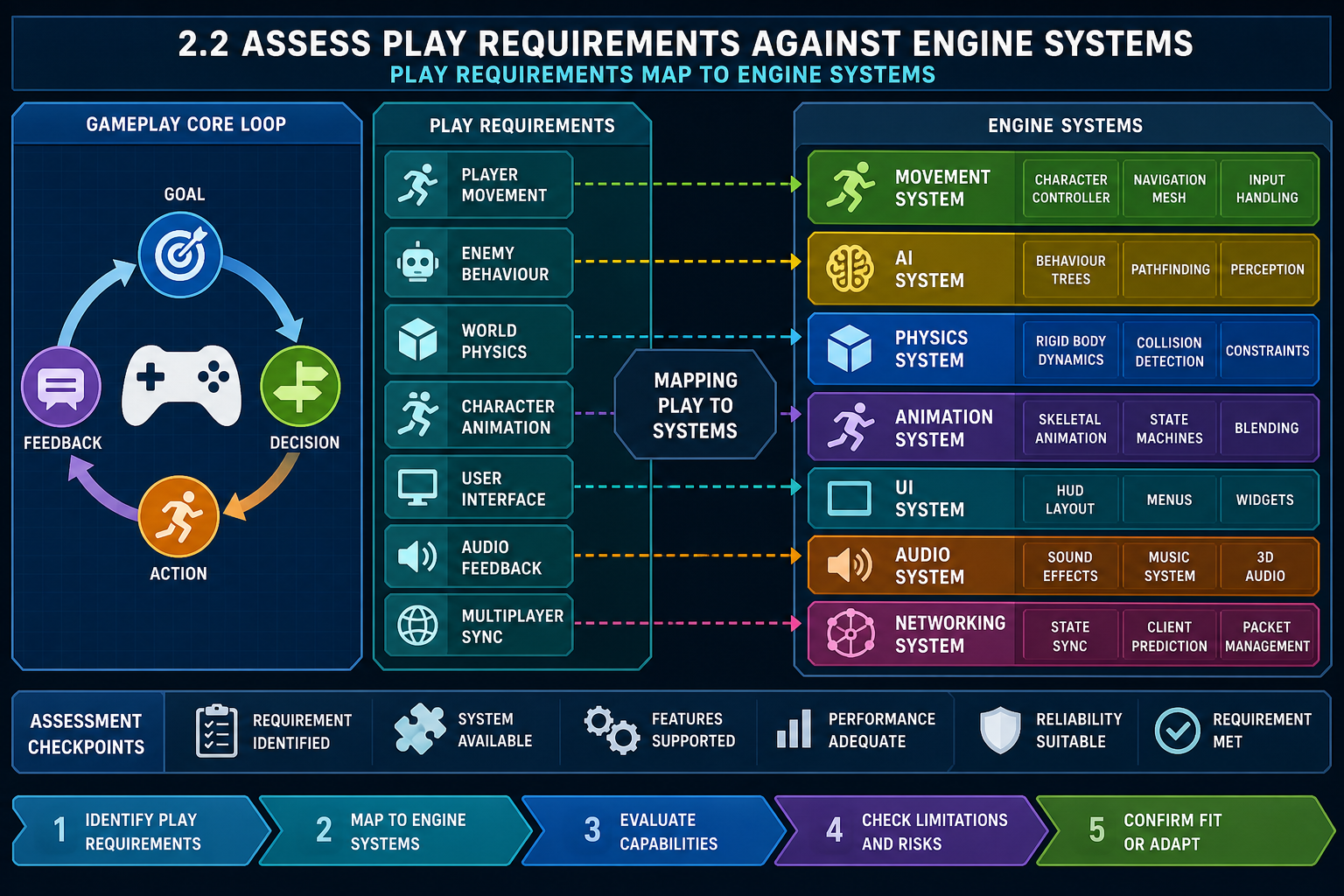
Mapping play to systems
Once requirements are clear, assess how each engine supports the systems needed for play. Play requirements are the rules, interactions and feedback that make the game playable. For complex 3-D work they usually depend on multiple engine systems operating together.
A useful mapping process is:
- Break the core loop into actions. Example: explore, scan object, collect clue, avoid enemy, unlock door.
- Identify the engine systems behind each action. Example: character controller, raycast interaction, inventory data, AI perception, animation state machine, door blueprint/prefab and save system.
- Check whether the engine provides built-in support, a common plugin, or requires custom development.
- Estimate complexity and risk using team skills and available time.
- Prototype the highest-risk interaction before final commitment.
Key engine systems to assess
For a 3-D game, commonly assessed systems include:
- Character movement and camera: first-person or third-person controllers, camera collision, input mapping and controller support.
- Physics and collision: rigid bodies, triggers, constraints, raycasts, layers and performance under load.
- Animation: state machines, blend spaces, inverse kinematics and animation events.
- AI: navigation meshes, pathfinding, behaviour trees, perception and debugging visualisers.
- User interface: HUD, menus, diegetic UI, accessibility options and localisation support.
- Audio: spatial audio, mixers, occlusion, reverb zones and middleware integration.
- Networking: replication, prediction, matchmaking, session management and authority model.
Scripting and debugging fit
Programming approach is central to assessment. Unity commonly uses C#, Unreal combines Blueprint visual scripting with C++ for deeper customisation, and Godot commonly uses GDScript with options for C# and C++. Assess whether the team can structure, debug and maintain the required systems. Visual scripting can help designers iterate, but complex game logic still needs naming conventions, modular design, version control and performance testing.
Example assessment
A Sydney student team is building a third-person creature taming prototype. The play requirements include companion AI following the player, climbing terrain, creature animations, radial command UI and save/load. Unreal is attractive because behaviour trees, animation tools and Blueprint can support designer iteration. Unity is also viable with C# and packages, but may require more custom integration. Godot may be considered if the team values open-source and lightweight workflow, but the team must test navigation and animation complexity early.
Contingencies
If an engine lacks a built-in feature, that does not automatically disqualify it. You can use a plugin, middleware or a simplified design. However, each workaround adds risk. Ask: Is the plugin maintained? Does it support the current engine version? Can we debug it? Does the licence allow release? Does it run on target platforms?
Common mistakes
Do not assess only the editor interface. A clean interface does not guarantee runtime performance or debugging depth. Also avoid assuming visual scripting removes programming complexity. Unreal Blueprint can improve designer access, but complex systems still require architecture, testing and performance awareness.
2.2 Assess hardware constraints and performance fit
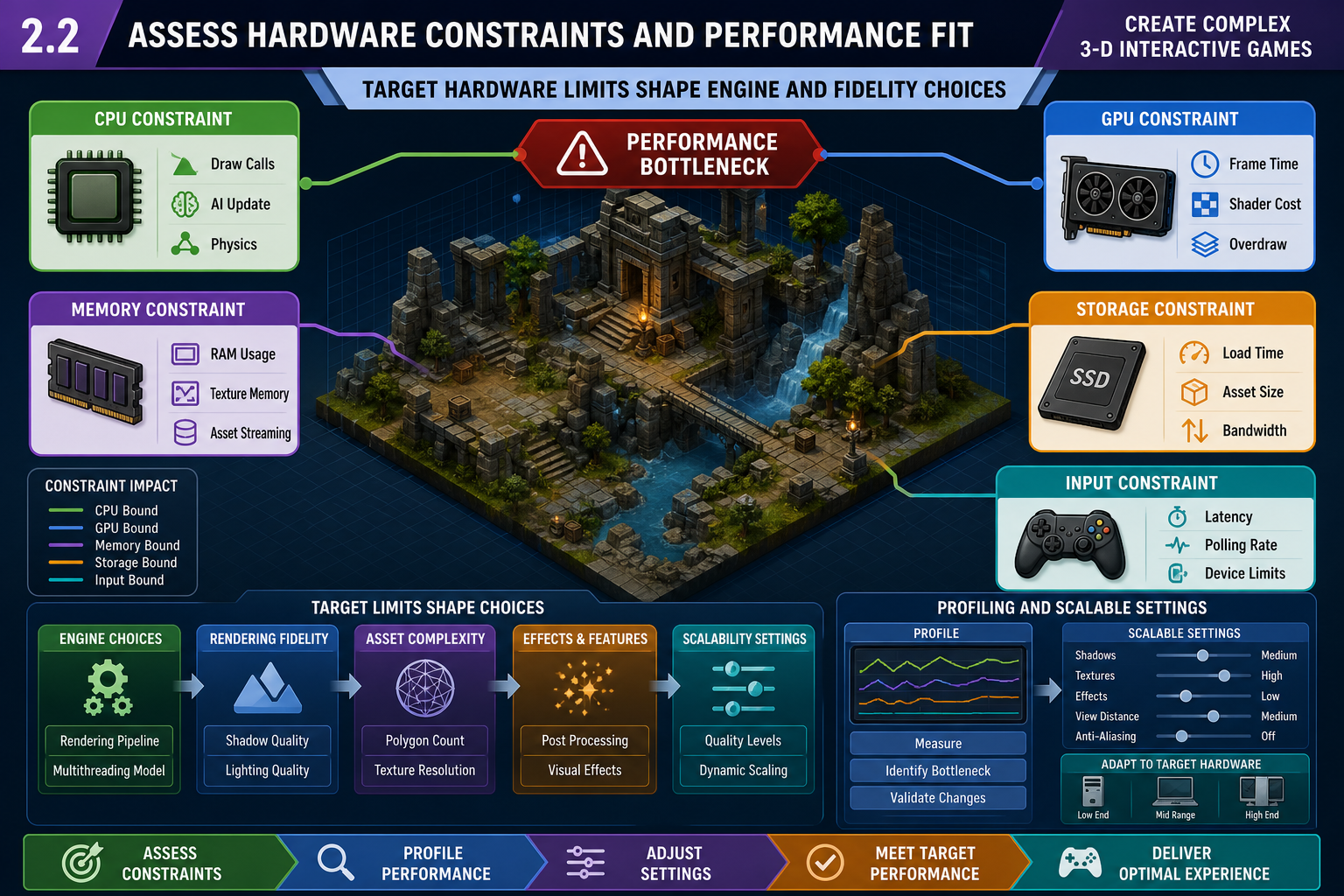
Why hardware is part of engine assessment
Knowledge Evidence requires you to understand technical constraints that hardware imposes on 3-D games. When assessing software and tools, you must ask whether the engine can deliver the specified play experience on the target hardware. A beautiful prototype that only runs on the developer's high-end desktop may fail the brief if the target players use mid-range laptops, mobile devices or VR headsets.
Main hardware constraints
- CPU constraints affect gameplay code, physics, AI, animation updates, networking and scene management. Too many active enemies, physics objects or scripts can create frame spikes.
- GPU constraints affect draw calls, shaders, lighting, shadows, transparency, particles, screen resolution and post-processing. Real-time global illumination and high-resolution shadows can be expensive.
- Memory constraints affect texture resolution, mesh density, animation clips, audio banks, loaded levels and caches. Exceeding memory can cause stutter, crashes or forced asset reduction.
- Storage constraints affect install size, patch size and load time. Large Unreal or high-fidelity asset projects may require more disk space and faster storage.
- Thermal and power constraints affect laptops, handhelds, mobile and VR. Sustained performance may drop if devices throttle.
- Input/display constraints affect controller mapping, accessibility, ultrawide displays, VR comfort and frame rate expectations.
Assessment procedure
- Define target and minimum development hardware. For an online cohort, this includes student-supplied hardware, not just a lab machine.
- Identify the most expensive expected scenes: largest level, most enemies, most lights, highest particle count or busiest UI.
- Compare engine scalability options: quality levels, LODs, occlusion culling, baked lighting, texture compression and platform profiles.
- Check profiling tools. Unity Profiler, Unreal Insights, RenderDoc integration and engine frame debuggers help identify bottlenecks.
- Run a small benchmark or greybox prototype where performance risk is high.
When testing performance, capture the conditions: engine version, build type, hardware, resolution, quality settings and scene content. Editor performance and packaged build performance can differ, so test both where practical. A build that meets performance only after disabling a must-have visual feature may indicate the engine or art direction is not a good fit.
Example
A regional Australian training provider has learners using varied Windows laptops. A learner wants a photoreal forest survival game. Unreal's Nanite and Lumen are attractive, but the assessment must consider whether the learner's laptop can run the editor and whether the final build can maintain playable performance. A stylised art direction in Unity or a simplified Unreal lighting setup may better meet the learning and production outcomes.
Common mistakes
Do not leave optimisation until the end. Engine choice affects performance from the start through asset formats, lighting workflow, scripting model and build pipeline. Also avoid benchmarking only in an empty scene. Test the systems that represent actual play: movement, interaction, UI, audio, AI and target visual density.
2.2 Assess asset integration and production pipeline
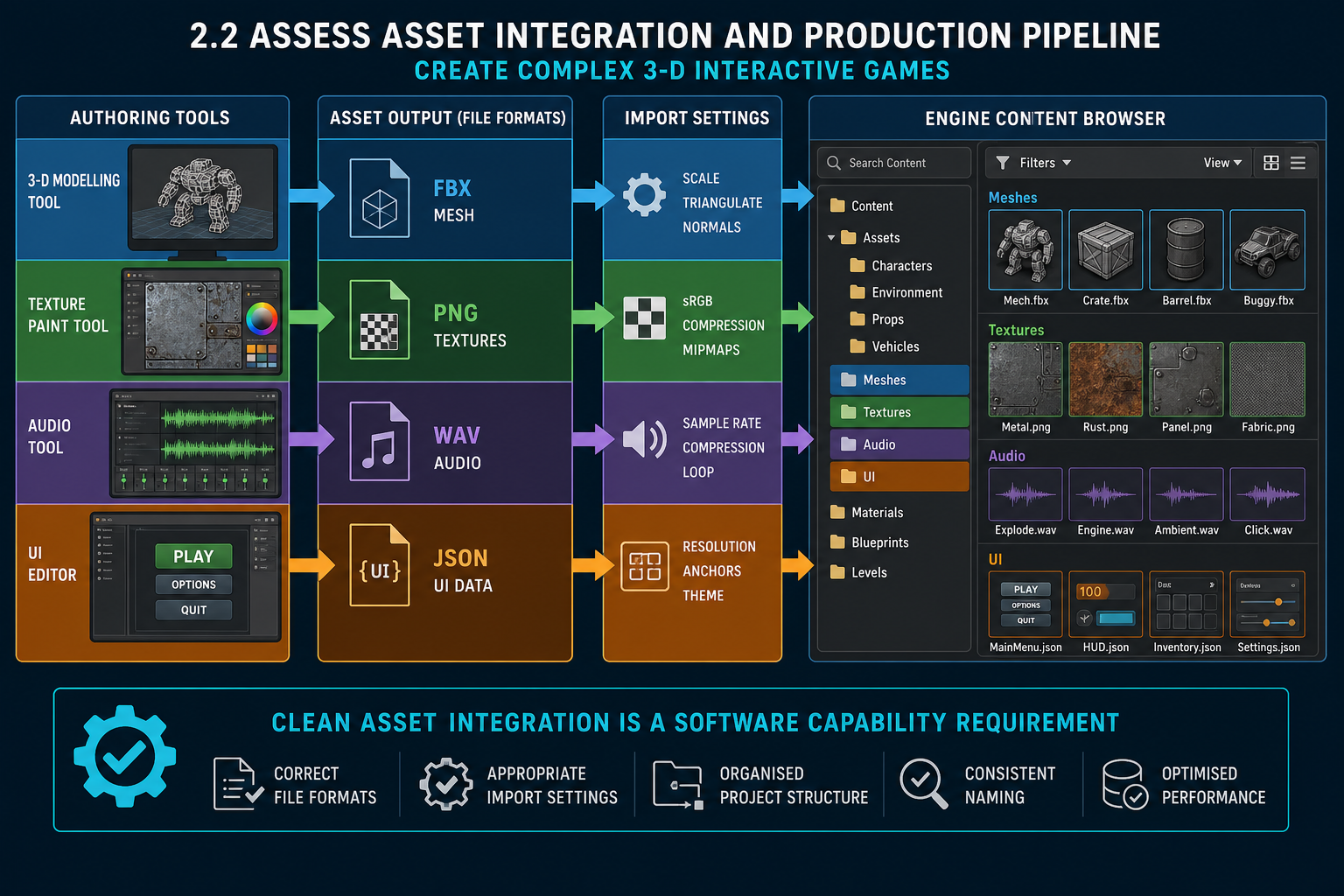
Asset integration is a capability issue
A complex 3-D game depends on reliable game asset integration. If the engine cannot import, organise, optimise and update assets effectively, production slows and quality suffers. Knowledge Evidence specifically requires understanding asset formats and integration issues.
Common 3-D asset formats include:
- FBX: widely used for meshes, skeletal rigs and animation, but can produce differences between DCC tools and engine import settings.
- glTF/GLB: efficient for runtime-style 3-D assets and material transfer, increasingly common but not always ideal for every animation pipeline.
- OBJ: simple static mesh format with limited material and animation support.
- USD: useful in advanced pipelines and scene interchange, but engine support and workflow maturity vary.
- PNG, TGA, EXR, JPEG: texture and image formats, each with compression and quality trade-offs.
- WAV, AIFF, OGG, MP3: audio formats, with engines usually converting to platform-specific compressed formats during build.
Integration issues to assess
Check for:
- incorrect scale or units between Blender/Maya and the engine
- flipped normals, broken smoothing groups or incorrect tangents
- material differences after import, especially complex shader networks
- missing textures due to file path or naming problems
- skeleton mismatch, animation retargeting errors or root motion issues
- high polygon counts, oversized textures or too many material slots
- inconsistent pivots, collision meshes and LOD setup
- version control conflicts with binary files.
Practical pipeline assessment
- Select representative test assets: one static prop, one animated character, one material-heavy object, one audio cue and one UI texture.
- Export using agreed settings from the DCC tool.
- Import into each candidate engine.
- Check scale, orientation, materials, collision, animation and reimport behaviour.
- Optimise and package the asset into a test build.
- Record issues and required workflow rules.
The reimport step is especially important. In real production, assets change many times. If a small mesh edit breaks materials, collision or animation references on reimport, the pipeline will create repeated manual work. A good assessment checks whether the engine preserves references and whether naming conventions prevent accidental overwriting.
Example
An Adelaide studio is building a stylised 3-D platformer. Artists use Blender and Substance Painter. The engine assessment includes testing FBX export of a rigged character, texture import with normal maps, animation retargeting and prefabs/blueprints for collectables. Unity imports the assets quickly but needs a naming convention for materials. Unreal provides strong material tools but requires careful folder structure and asset migration discipline. The decision depends on the pipeline, not only the renderer.
Legal and workplace risks
Marketplace and downloaded assets must be licensed for the intended use. Keep source files, licences and attribution notes in the project repository or production documentation. Do not mix incompatible asset licences. For online collaboration, use version control and backups to avoid data loss and excessive rework.