Week 10 — Elements 4–5

5.1 Demonstrate initial prototype to required personnel and seek feedback

5.1 Identify who must see the prototype
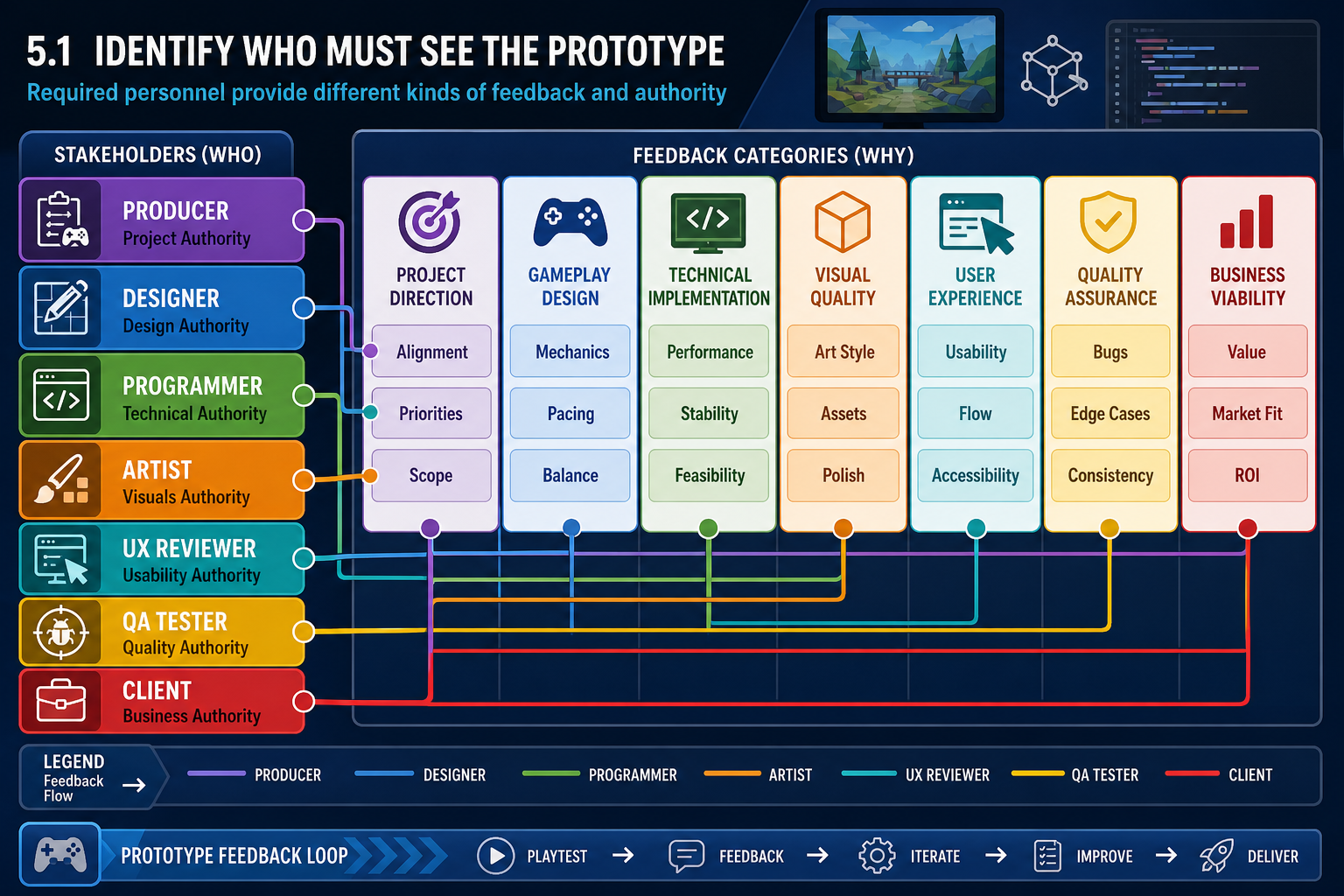
5.1 Identify who must see the prototype
illustration5.1 Identify who must see the prototypeAI-generated illustration created for this course (no third-party rights).

Start with the right audience

Demonstrating an initial prototype is not the same as casually showing a build to a friend. The performance criterion requires you to demonstrate the prototype to required personnel and seek feedback. Required personnel are the people identified by the project brief, workplace process or production lead as needing to review the prototype. In a small Australian studio this may be the creative director, lead programmer, producer and client representative. In a student or online project it may include the trainer, team lead, art lead, technical lead and selected stakeholders.

Before the demonstration, clarify who has authority to give direction and who is providing specialist advice. For example:

  • A producer checks scope, schedule, budget risk and milestone readiness.
  • A game designer checks mechanics, pacing, goals, challenge and player feedback.
  • A programmer checks code structure, engine use, performance, input handling and feasibility.
  • An artist or technical artist checks visual direction, asset integration, scale, lighting and pipeline issues.
  • A UX or accessibility reviewer checks menus, camera control, readability, onboarding and comfort.
  • A client, publisher or product owner checks whether the prototype still matches the intended product and audience.

This mapping helps you ask better questions. A senior programmer may not need a broad opinion prompt such as 'Is it fun?' They may need to know which systems are temporary, which scripts are fragile, which engine features are used, and what technical debt could block production. A creative stakeholder may need to see the intended mood, player fantasy and distinctive hook.

Plan for online delivery

For an online cohort, the demonstration may occur through a recorded video, live screen share, downloadable build, cloud build or engine project walkthrough. Consider what each stakeholder can access. If someone cannot run the build because of hardware or operating system constraints, provide a short capture video and a build report. If the game uses keyboard, mouse, controller, VR device or high-end GPU features, state the requirement early.

Workplace example

A Melbourne independent studio is prototyping a 3-D cooperative puzzle game in Unreal Engine. The producer requires the team to demonstrate the prototype to the creative director, lead programmer, lead artist and external funding partner. Each person receives the same core build, but the team prepares different notes: creative goals for the director, performance and replication notes for the programmer, asset pipeline risks for the artist, and audience positioning for the funding partner.

Common mistakes

Avoid inviting only people who already support the idea. Also avoid asking for feedback from people who have no context, no authority and no way to understand the intended product. Your role is to make sure the right expertise is present, because prototype feedback becomes evidence for later change and endorsement decisions.

Performance criteria: 5.1

5.1 Prepare the demonstration build

Make the prototype demonstrable

A prototype demonstration should be short, focused and reliable enough to support decision-making. It does not have to be polished, but it must reveal the game idea clearly. The most important question is: what must the viewer understand after the demonstration? Usually this includes the core gameplay loop, player goal, challenge, camera behaviour, input method, interaction rules, technical approach and creative promise.

Prepare the build by checking:

  1. Launch path: the build or engine project opens without missing packages, compile errors or broken references.
  2. Controls: input mappings are documented, including keyboard, mouse, controller or touch controls.
  3. Representative scene: the level shows the intended mechanic, scale, player movement, collision, camera and feedback systems.
  4. Known issues: bugs, placeholder assets and incomplete systems are listed so reviewers do not waste time reporting already known items.
  5. Performance baseline: record approximate frame rate, loading behaviour and target hardware used. Do not invent performance claims; report what you measured.
  6. Version identification: label the build with a date, version number, branch or commit so feedback can be traced.

Use a demonstration script

A demo script is not a speech to memorise. It is a structured pathway through the prototype so the required personnel see the intended evidence. A useful script includes:

  • Project title, target platform and intended player.
  • Design intention: the creative hook and player experience being tested.
  • Scope of the prototype: what is included and what is deliberately excluded.
  • Step-by-step play sequence: start, tutorial cue, main interaction, failure state, success state and exit.
  • Feedback prompts: questions for each reviewer group.

For example, instead of saying 'Here is our dungeon prototype', say: 'This build tests whether players can read enemy attack telegraphs in a dark sci-fi corridor while using a third-person dodge mechanic. The character model and sound effects are placeholders, but the camera, collision, stamina rule and enemy wind-up timing are the systems we want feedback on.'

WHS and practical considerations

Computer-based demonstrations can create WHS issues if sessions are long, rushed or physically uncomfortable. In Australia, organisations have duties under model WHS laws, implemented by states and territories, to provide a safe work environment. For online prototype reviews, manage fatigue by scheduling breaks, encouraging ergonomic setups, avoiding excessive session length and warning reviewers about flashing effects, motion discomfort or loud audio where relevant.

Contingencies

Always have a fallback. If the executable fails, show a recorded capture. If the network drops, provide screenshots, a bug list and a short video. If an engine update breaks the scene, demonstrate from a tagged stable build rather than the latest experimental branch. The goal is to obtain useful feedback, not to prove that everything is finished.

Performance criteria: 5.1

5.1 Run the demonstration professionally

Structure the review session

A professional prototype demonstration normally has three stages: context, demonstration and feedback capture. The context stage prevents reviewers from judging the prototype against the wrong standard. Tell them the intended platform, audience, genre, prototype goal, systems under test and known limitations. Be explicit about what feedback you want. If the prototype is testing navigation and combat feel, do not let the session become only a discussion of final art style.

During the demonstration, show the core loop without over-explaining every decision. Prototype reviews are valuable because they expose what the build communicates by itself. If you constantly tell reviewers what they should be feeling, you may hide usability problems. A good method is:

  1. Introduce the design intent and scope.
  2. Play through the scripted sequence once without interruption.
  3. Invite required personnel to ask clarifying questions.
  4. Allow hands-on interaction where possible.
  5. Ask targeted feedback questions.
  6. Summarise the feedback aloud and confirm your understanding.

For online sessions, appoint one person to drive the build and another to take notes if possible. Use an issue tracker, spreadsheet, shared document or project management board. Record the source of each comment, the build version, date and category. This matters later when you evaluate feedback from user trials and agree on required changes.

Seek active feedback

Seeking feedback means more than asking 'Any thoughts?' Use prompts that encourage actionable responses:

  • What was the player goal at each moment?
  • Which control felt least natural and why?
  • What mechanic seemed most distinctive?
  • Which part looked technically risky for full production?
  • Did the prototype support the intended mood or fantasy?
  • What must be changed before user trials?

Ask follow-up questions such as 'What evidence led you to that conclusion?' and 'Is this a blocker for endorsement or an improvement for later?' This helps separate preference from requirement.

Australian workplace example

A Brisbane serious-games company demonstrates a 3-D training prototype for emergency response. The client likes the visual style but the WHS consultant notices that the simulated evacuation path teaches an unsafe shortcut. Because the reviewer is required personnel with compliance expertise, the team records this as a critical design issue, not a cosmetic opinion.

Common mistakes

Do not defend every criticism immediately. Defensive behaviour can stop stakeholders from sharing concerns. Also avoid losing feedback in chat messages that are never transferred to the project record. At Diploma level, you should maintain a traceable feedback log because later decisions must show why changes were accepted, deferred or rejected.

Performance criteria: 5.1

5.1 Turn comments into usable feedback
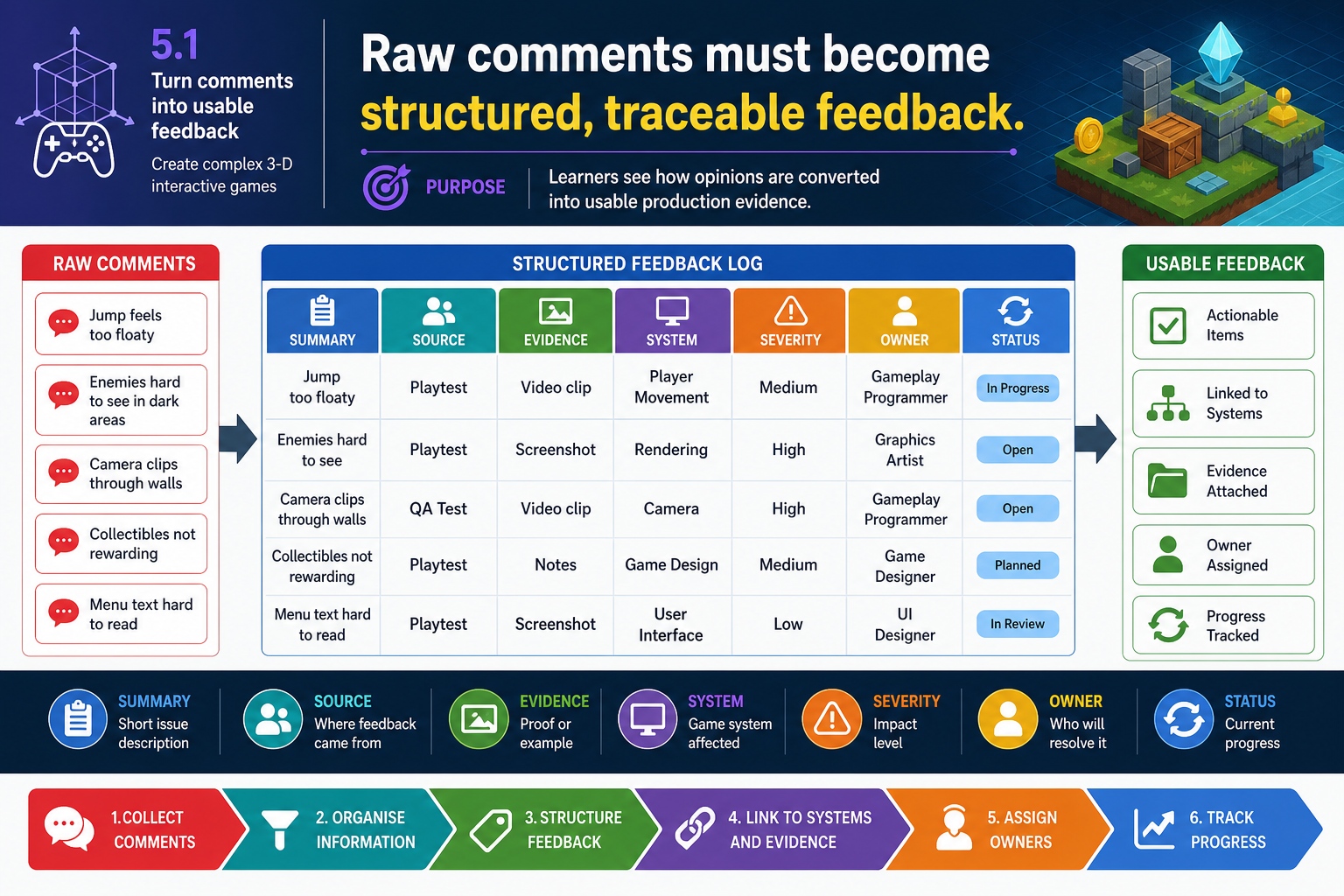
5.1 Turn comments into usable feedback
illustration5.1 Turn comments into usable feedbackAI-generated illustration created for this course (no third-party rights).

From opinion to evidence

Feedback is only useful when it can guide action. After the demonstration, convert raw comments into structured feedback items. A practical feedback item includes: summary, source, evidence, affected system, severity, suggested action, owner and status. For example, 'Camera feels bad' is weak. A stronger item is: 'During the corridor combat section, the third-person camera clips through the wall when the player dodges left near pillars. Observed by lead designer on build 0.3. Severity: high because it affects readability and comfort. Suggested action: adjust camera collision radius and test narrower field of view.'

Classify feedback into categories such as:

  • Gameplay: rules, challenge, pacing, rewards, level flow and player choice.
  • Usability and UX: controls, interface, onboarding, readability and feedback.
  • Technical: performance, bugs, engine limitations, platform compatibility and code maintainability.
  • Creative: theme, tone, art direction, audio, narrative and player fantasy.
  • Production: scope, schedule, staffing, dependencies, costs and critical path.
  • Compliance and risk: privacy, accessibility, classification, copyright, WHS or client obligations.

Severity helps the team prioritise. A simple scale may be blocker, major, moderate and minor. A blocker prevents endorsement or testing. A major item significantly harms the core experience or feasibility. A minor item can wait.

Clarify before closing the session

Ambiguous comments create rework. If a stakeholder says the prototype is not user-friendly, ask what specific behaviour led to that view. Was the control mapping unclear, the camera disorienting, the objective missing, the menu unreadable or the feedback timing poor? Each cause has a different fix.

Legislative and industry context

Prototype feedback records may contain personal information if they identify participants, include contact details, record voice or video, or link comments to individuals. Australian organisations covered by the Privacy Act 1988 and Australian Privacy Principles must handle personal information appropriately. Even when a small project is not legally covered, good practice is to collect only necessary information, store it securely and tell reviewers how it will be used.

Respect intellectual property. Do not distribute a build containing unlicensed marketplace assets, music, fonts or third-party code outside the permitted licence terms. Copyright is protected under the Copyright Act 1968. Prototype status does not remove licensing obligations.

Common mistakes

A frequent mistake is treating all senior comments as equal requirements. Another is merging contradictory comments into one vague task. Keep the evidence clear so the later discussion can decide what change is actually required.

Performance criteria: 5.1