Week 4 — Element 2
2.1 Identify and review range of industry-standard game-engine software and development tools available
2.1 Build a current view of industry-standard engines
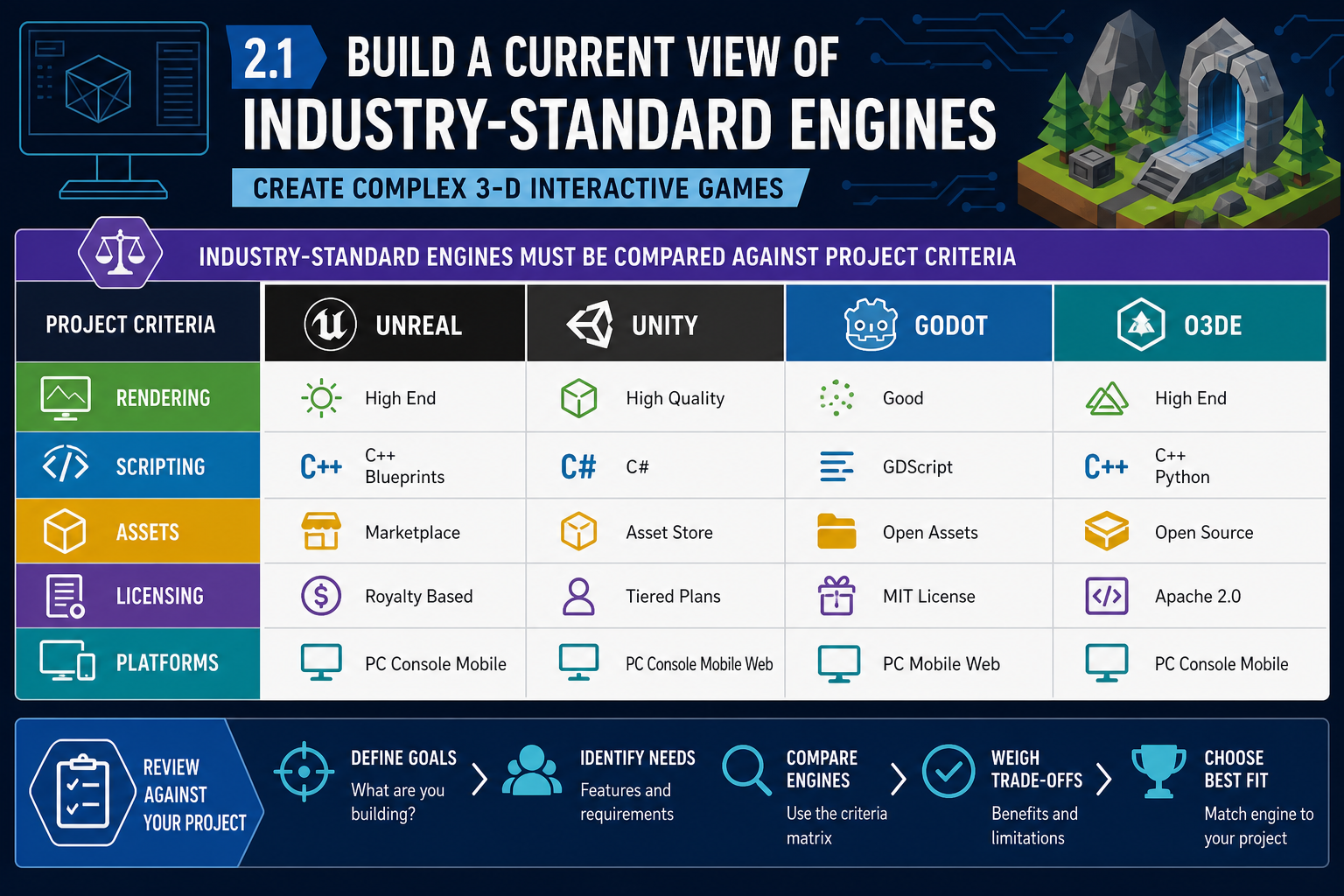
What counts as industry-standard
To identify and review a range of industry-standard game-engine software, begin by looking at engines that are actively used in commercial or serious independent development, have current documentation, support common 3-D workflows, and have a viable ecosystem of tools, plugins, training and community support.
Current industry discussions commonly place Unity and Unreal Engine as the most prevalent engines. The research brief notes State of the Game Industry 2024 reporting that Unity and Unreal each represented 33% of developers' primary tool choice. That does not mean they are automatically the best choice for every project. It means they must usually be included in a serious review because employers, contractors and publishers recognise them and because their pipelines are mature.
A useful engine review for complex 3-D games should usually include:
- Unreal Engine: strong high-fidelity 3-D rendering, Blueprint visual scripting, C++ extensibility, Nanite virtualised geometry, Lumen lighting, mature cinematic tools and a large marketplace.
- Unity: broad platform support, C# scripting, extensive Asset Store ecosystem, strong mobile, VR and indie production history, and flexible 3-D workflows.
- Godot: open-source engine with GDScript, C# support, lightweight installation and improving 3-D capability, but with different limits in tooling maturity and high-end 3-D pipelines.
- Open 3D Engine (O3DE): open-source, modular 3-D engine with enterprise-style architecture, worth reviewing where source access and customisation are major requirements.
- Specialist tools: for example GameMaker is not normally the main choice for a complex 3-D game, but may appear in a broader tool scan when comparing why a 2-D-focused tool is unsuitable.
Practical review procedure
- Define the review scope: complex 3-D interactive game, target devices, intended visual quality, network needs, team size and delivery timeline.
- List candidate engines and versions. Always review the current official documentation, not only old tutorials.
- Capture evidence in a comparison matrix: rendering, physics, animation, scripting, asset formats, platform export, licensing, build pipeline, collaboration support and performance profiling.
- Separate engine capability from team capability. An engine may technically support a feature, but the team may not have time or expertise to use it well.
- Record assumptions and risks so the review can be challenged by required personnel later.
A good review also identifies where information came from. Use official engine manuals, release notes, licence pages, platform holder documentation where you have access, and current production evidence such as a prototype or prior studio project. Community articles and comparison blogs can be useful starting points, but they should not be your only evidence because they may lag behind engine updates or reflect a different project type.
Australian workplace example
A Melbourne indie studio is pitching a third-person environmental puzzle game for PC and PlayStation. The technical designer reviews Unreal, Unity and Godot. Unreal scores strongly for high-fidelity outdoor lighting and cinematic tools. Unity scores well for team familiarity and asset store availability. Godot is attractive for open-source licensing but is flagged as a risk for the studio's advanced console pipeline and photoreal 3-D target. The review does not yet decide the answer; it creates evidence for the next assessment step.
Common mistakes
Do not choose based on a favourite YouTube tutorial, a single impressive demo, or a forum argument. Do not assume a feature shown in a tech demo is production-ready for your project. Also avoid ignoring licensing: licence terms, royalties, subscription conditions and asset store rules can change, so use current official engine and marketplace documents before committing.
2.1 Review the broader development toolchain
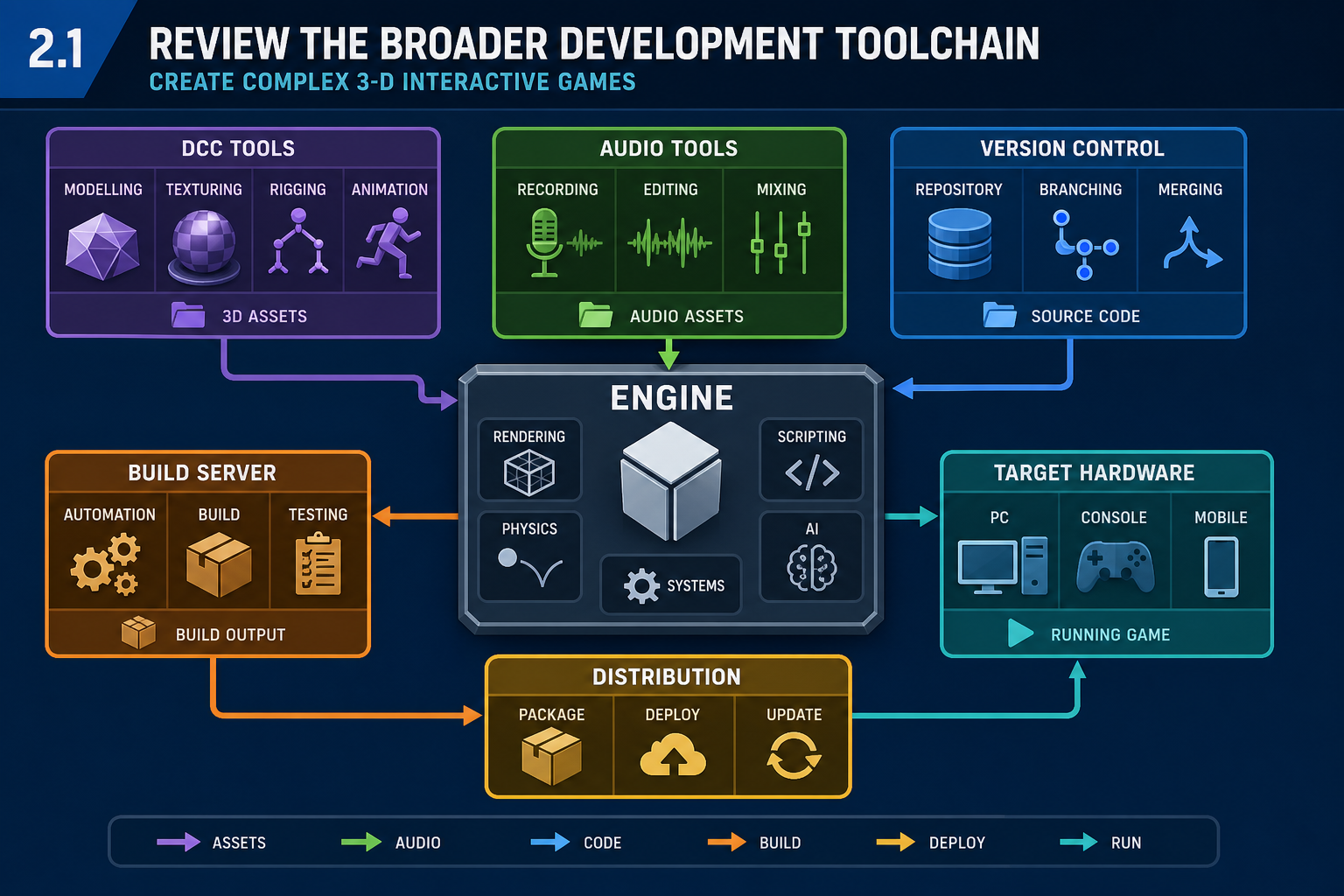
Development tools around the engine
Performance Criterion 2.1 requires you to review game-engine software and development tools. A professional review must therefore include the wider toolchain, not just the executable engine editor. Complex 3-D games rely on many tools that create, convert, manage, test and package content.
Key tool categories include:
- Digital content creation (DCC) tools: Blender, Maya, 3ds Max, ZBrush, Substance 3D Painter/Designer and similar tools for modelling, sculpting, UVs, materials and animation.
- 2-D and texture tools: Photoshop, Krita, Affinity tools, GIMP and texture compression utilities.
- Audio tools: Reaper, Pro Tools, Audacity, FMOD Studio or Audiokinetic Wwise for sound design, mixing and interactive audio implementation.
- Integrated development environments: Visual Studio, Visual Studio Code, Rider or engine-specific script editors.
- Version control: Git, Git LFS, Perforce Helix Core or Plastic SCM/Unity Version Control, selected according to binary asset size and team workflow.
- Project and issue tracking: Jira, Trello, Azure DevOps, GitHub Issues or similar systems.
- Build and test tools: engine build systems, continuous integration services, platform SDKs, profiling tools, crash reporting and automated test frameworks.
How to review tools professionally
For each tool, check:
- Compatibility: Does it export formats the engine imports reliably, such as FBX, glTF, USD, WAV, PNG, EXR or engine-native material formats?
- Pipeline fit: Can artists, designers and programmers move work through the pipeline without excessive manual conversion?
- Collaboration: Does the tool handle large binary assets, file locking, branching and remote team workflows?
- Licensing: Are licences legal for education, commercial release, contractors and remote devices?
- Support and maintainability: Is documentation current, and can the team solve issues without relying on one specialist?
Also check the failure points in the toolchain. A modelling tool may export FBX, but the engine may interpret scale, materials or animation roots differently. A version control system may work for scripts but struggle when multiple artists edit large binary files. An audio middleware tool may be powerful but add build complexity and specialist training. Reviewing tools means identifying these practical friction points before they become production delays.
WHS and workplace context
Game development is computer-based work, so Australian workplaces must manage risks under applicable WHS laws, such as the model Work Health and Safety framework adopted in most jurisdictions. Tool selection can affect work health and safety: unstable tools, excessive build times and poor workflow design can contribute to fatigue, stress and repetitive rework. Safe practice includes ergonomic workstation setup, planned breaks, realistic scheduling and avoiding crunch as a normal production method.
Example
An online Diploma learner developing a 3-D stealth prototype chooses Unreal Engine. Their review also selects Blender for modelling, Substance Painter for textures, Reaper for audio, Git LFS for source control and Trello for task tracking. During review, they identify a risk: Git LFS may become cumbersome for very large binary assets. Their contingency is to evaluate Perforce if the asset library grows or if multiple artists need file locking.
Common mistakes
A frequent mistake is choosing an engine but leaving the asset pipeline undefined. Another is using unlicensed software or marketplace content because it is convenient. In Australia, copyright is governed by the Copyright Act 1968 (Cth). You must only use software and assets under terms that allow your intended use, including assessment submission, portfolio display and commercial release where relevant.
2.1 Compare engine capabilities using evidence
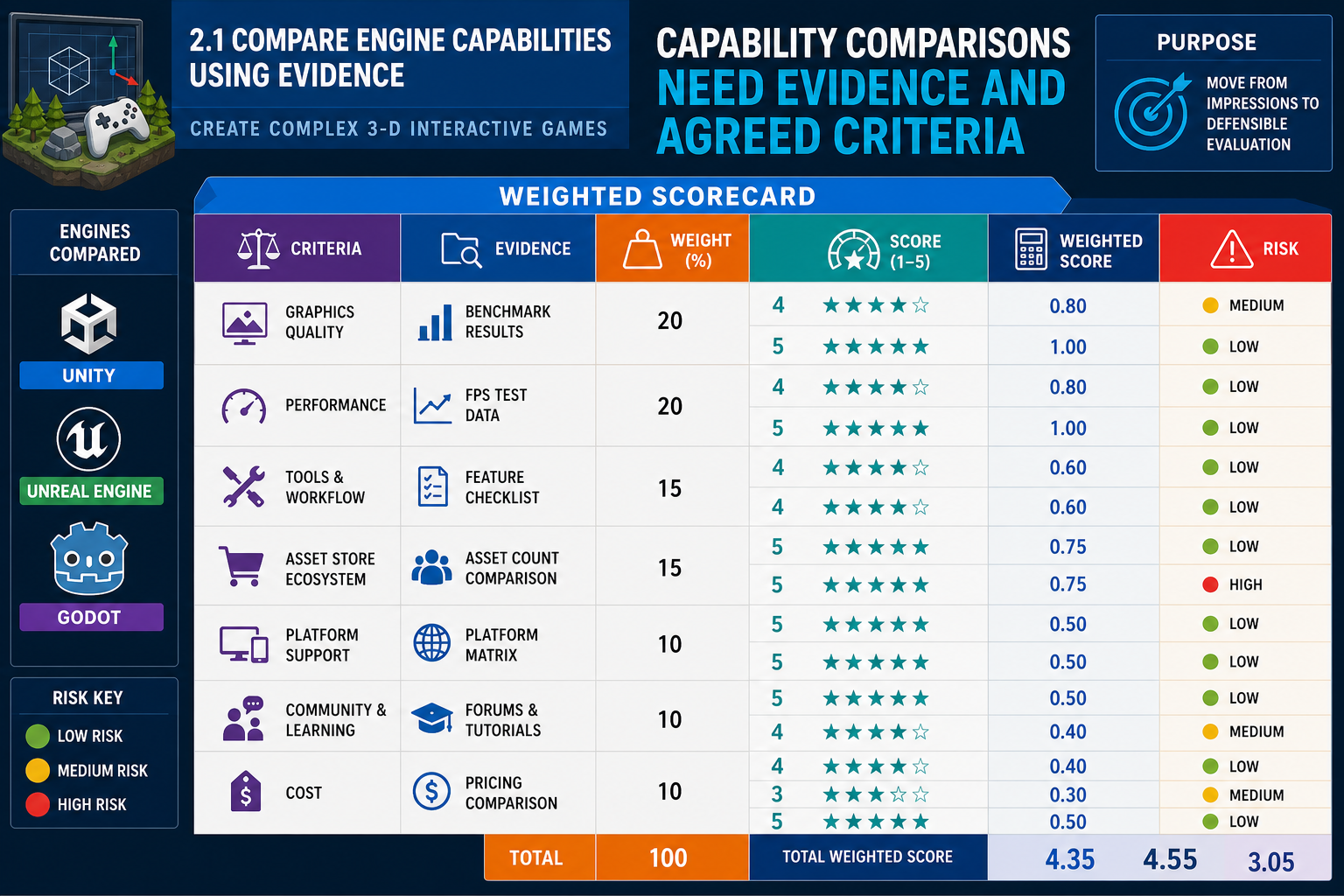
Turning a review into evidence
A professional review is more than a list of features. It evaluates each engine against criteria that matter to 3-D game production. Your comparison matrix should be specific enough that another developer can understand why a tool is suitable, risky or unsuitable.
Useful comparison criteria include:
- Rendering capability: lighting model, shadows, post-processing, material systems, particle effects, volumetrics, terrain, water and scalability settings.
- Physics and interaction: rigid bodies, character controllers, collision layers, vehicles, destructibles, ragdolls and trigger systems.
- Animation: skeletal animation, blend trees, inverse kinematics, retargeting, timeline/cinematic tools and animation compression.
- Scripting and extensibility: C#, C++, GDScript, visual scripting, plugin systems, source access and debugging tools.
- Asset workflow: import formats, reimport behaviour, prefabs/blueprints/scenes, dependency management, addressable assets and packaging.
- Performance tooling: profilers, frame debugging, memory analysis, GPU visualisation and platform-specific diagnostics.
- Publishing support: PC, console, mobile, VR/AR and web export paths, including certification implications.
Applied comparison
Unreal Engine may score highly when the game concept depends on high-end real-time lighting, cinematic presentation and large 3-D worlds. Unity may score highly where the team needs fast iteration, broad platform deployment, a large plugin ecosystem and C# skills. Godot may score highly for open-source control, lightweight installation and transparent engine code, while being reviewed carefully for demanding 3-D visual targets.
Do not treat these as permanent truths. Engine capability changes by version. A sound review names the version, cites current documentation and, where possible, tests a small feature sample.
Step-by-step review method
- Create a weighted table. For example, rendering might be high priority for a cinematic action game, while tooling speed might be high priority for an assessment prototype.
- Score each engine against each criterion using evidence: documentation, release notes, prototype results or prior studio experience.
- Add comments explaining the score. A number without reasoning is weak evidence.
- Identify showstoppers, such as no supported export path to the required platform.
- Summarise strengths, weaknesses and unknowns for each candidate.
For scoring, use a consistent scale. For example, 1 might mean unsupported or high-risk, 3 might mean possible with moderate work, and 5 might mean well-supported with proven workflow. Weight the criteria before scoring so you do not manipulate the outcome after seeing the numbers. Include a short evidence note such as "tested with greybox build", "confirmed in official documentation" or "requires third-party plugin".
Contingencies
If you cannot verify a capability from documentation, mark it as unconfirmed and plan a proof of concept. If an engine supports a feature only through a third-party plugin, review plugin licence, maintenance history and compatibility with the current engine version. If a tool works on Windows but your team includes macOS users, check editor support and file path issues before committing.
Workplace scenario
A Brisbane studio is reviewing engines for a co-op cave exploration game. The gameplay needs dynamic lights, network replication, physics interactions and large cave meshes. Unreal's built-in networking and rendering tools look strong, but the team has more Unity experience. The review records both facts: Unreal may reduce technical feature risk, while Unity may reduce training risk. This prepares the team for a balanced decision rather than an emotional debate.
2.1 Review constraints, licences and industry conditions
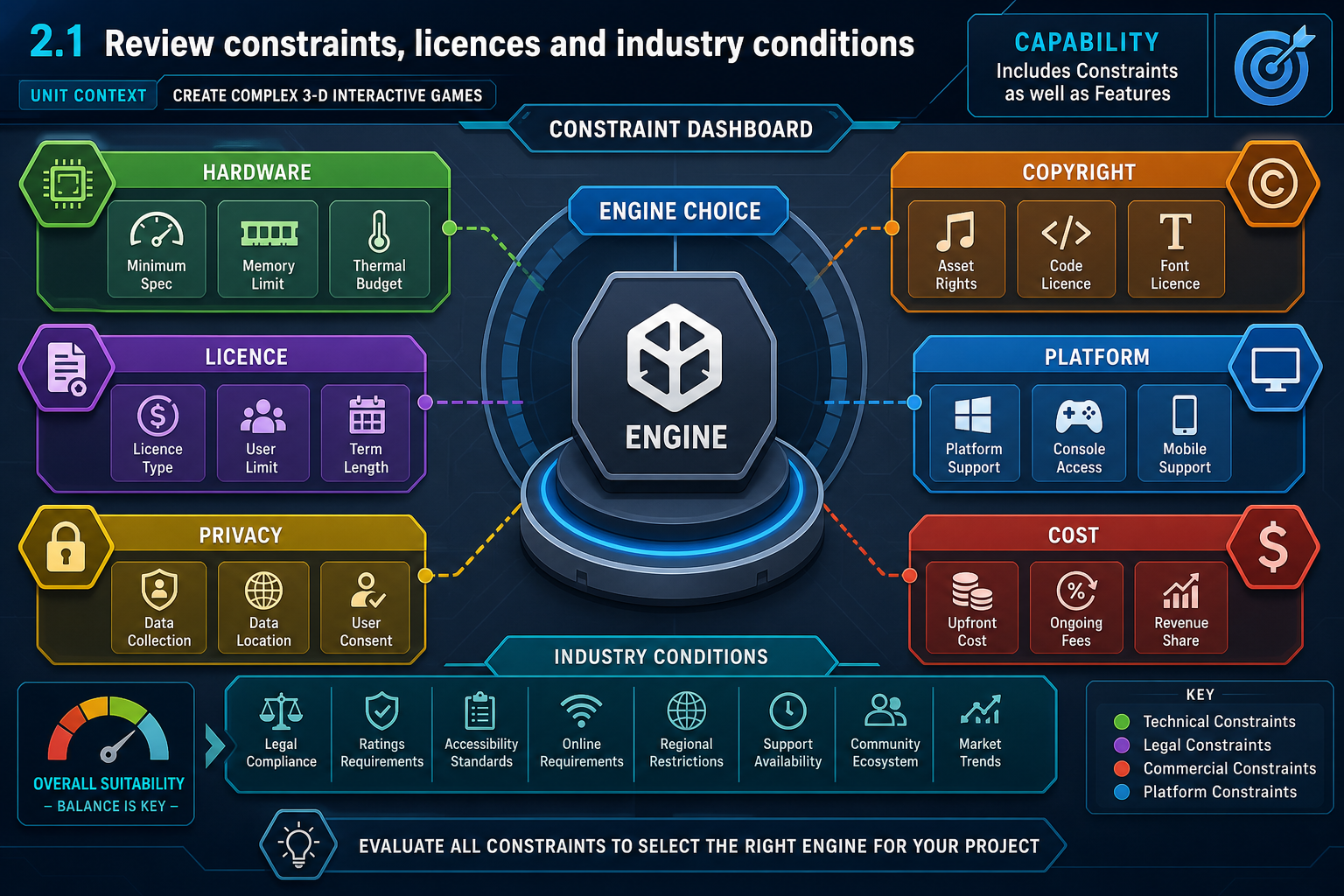
Capability is not only features
An engine can have excellent features and still be a poor choice if its constraints do not suit the project. Your review should include technical, legal, commercial and production constraints because these affect whether the software can be used safely and lawfully in an Australian workplace.
Technical constraints to review
Hardware imposes limits on 3-D games through:
- CPU performance: AI, physics, gameplay logic and animation update costs.
- GPU performance: lighting, shadows, materials, post-processing, particle effects and resolution.
- Memory: textures, meshes, animation clips, audio banks and streaming systems.
- Storage and loading: install size, asset bundles, patches and streaming worlds.
- Thermals and battery: especially on laptops, handhelds, VR and mobile devices.
- Input and display: controller support, frame rate targets, VR motion comfort and accessibility settings.
High-fidelity engines can impose heavier development hardware demands. The research brief notes that Unreal projects often have larger file sizes and may require powerful development machines compared with lighter workflows. That matters for online learners and small studios working on student-supplied hardware.
Legal and industry review points
Review licence terms for the engine, plugins, marketplace assets and development tools. Check whether the licence allows commercial release, team use, source code access, modification and distribution. For assets, check attribution and redistribution terms. Copyright obligations in Australia sit under the Copyright Act 1968 (Cth).
If the game collects player data, analytics or online account information, consider the Privacy Act 1988 (Cth) and Australian Privacy Principles where they apply. If the game will be released publicly in Australia, classification requirements may also become relevant through the Australian Classification framework, particularly for violence, gambling-like content, drug references or online content concerns.
Cost review
Total cost includes:
- engine fees, royalties or subscriptions
- DCC and audio tool licences
- marketplace assets and plugins
- platform developer accounts and SDK access where applicable
- build storage and version control hosting
- training time and productivity loss
- hardware upgrades.
Document costs as known, estimated or not yet confirmed. For example, a free open-source engine may reduce licence cost, but the project may need more custom development. A commercial engine may have no upfront fee for learning, but release terms, plugin costs or paid collaboration services may affect a workplace budget. In an education setting, confirm whether institutional licences cover home use and assessment use.
Common mistakes
Do not use educational licences for commercial work unless terms allow it. Do not assume free means unrestricted. Do not ignore minimum hardware requirements for your own development machine; if the editor runs poorly, productivity and WHS risk both worsen. Keep a review date and engine version in your documentation, because licence terms and technical features can change.