Week 1 — Element 1
1.2 Identify game production assets required to meet creative and production requirements and technical specifications
1.2 Identify asset categories
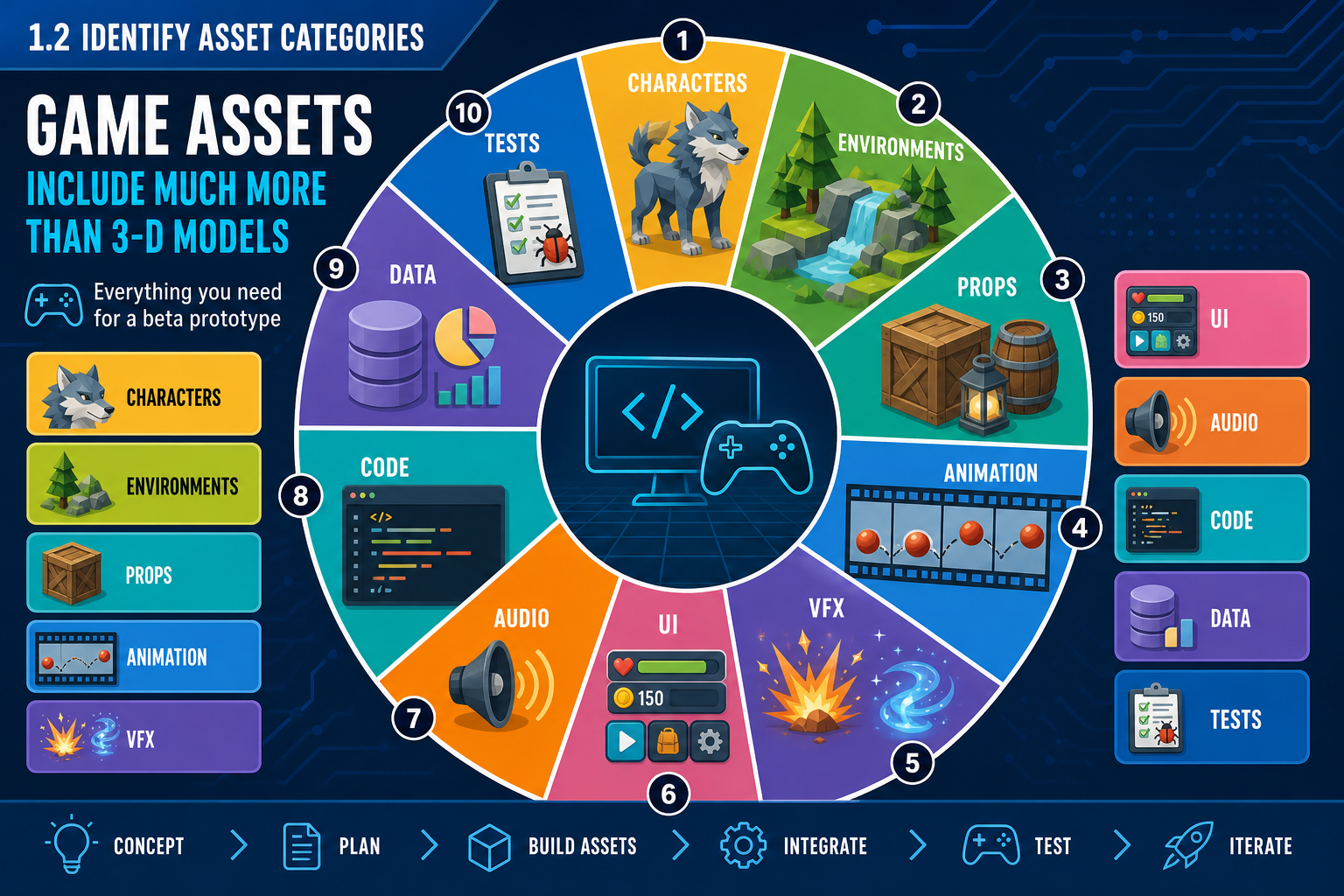
What game production assets include
A game production asset is any created or acquired item needed to build the game. Many learners think only of 3-D models, but a complex 3-D interactive game requires a broad asset set. Asset identification is the process of working from the brief, GDD and technical specifications to determine what must exist for the beta-version prototype to meet creative, production and technical requirements.
Asset categories include:
- 3-D characters: player avatars, enemies, NPCs, creatures and variants.
- 3-D environments: terrain, buildings, modular kits, foliage, interiors and skyboxes.
- Props and interactables: pickups, doors, tools, weapons, vehicles, switches and puzzle objects.
- Rigs and animations: skeletons, animation clips, blend spaces, inverse kinematics setups and motion capture data.
- Materials and textures: albedo/base colour, normal, roughness, metallic, emissive and mask maps.
- VFX: particles, trails, decals, explosions, weather, impact effects and shader effects.
- UI and UX assets: menus, HUD, icons, fonts, reticles, prompts and accessibility indicators.
- Audio: music, ambience, foley, UI sounds, voice-over and implementation events.
- Scripts and data: game-play code, AI behaviours, configuration files, dialogue data, level data and save data.
- Testing assets: test levels, debug tools, automated test scripts, checklists and sample builds.
Link assets to requirements
Do not create an asset list by brainstorming alone. Trace each asset to a requirement. If the GDD requires a stealth mechanic, assets may include enemy vision cone debug visualisation, patrol animations, detection UI, alert audio, AI state data, cover objects and test scenarios. If the brief requires a beta prototype to test racing feel, assets may include one driveable vehicle, one representative track section, vehicle physics tuning data, camera rigs, controller mappings and telemetry displays.
Workplace example
A Melbourne indie team is preparing a 3-D co-op dungeon prototype. The creative requirement is a stylised underground temple; the production requirement is a playable beta in eight weeks; the technical requirement is Windows PC with two gamepads. The asset list identifies not only stone walls and enemies, but also local multiplayer input maps, split-screen UI, collision meshes for modular corridors, low-cost torch VFX, placeholder voice callouts, and test rooms for combat encounters.
Common mistakes
A frequent mistake is listing final visual assets but missing integration assets, such as colliders, sockets, navmesh surfaces, animation controllers, physics materials or UI data. Another mistake is over-listing assets that do not serve the beta goal. If the beta tests the core combat loop, five decorative enemy variants may matter less than one enemy with complete animations, hit reactions, audio cues and reliable AI behaviour.
1.2 Translate creative requirements into assets
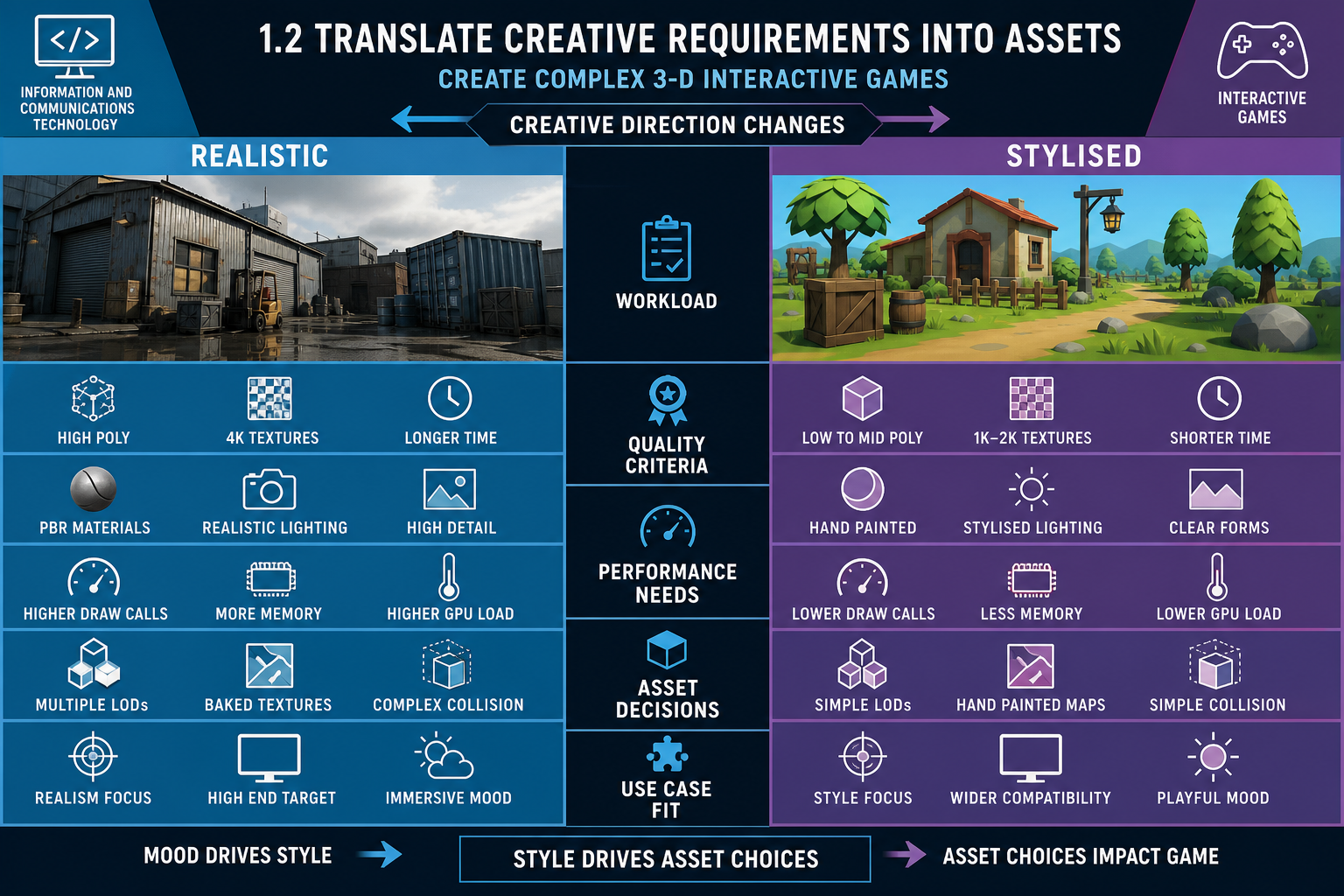
Creative requirements and asset decisions
Creative requirements describe the intended player experience. They may cover mood, genre, narrative, art style, pacing, camera, interaction feel and audio identity. To identify assets correctly, translate these creative intentions into specific production items.
For example, “lonely sci-fi exploration” may require wide environmental vistas, ambient sound loops, slow-opening doors, soft UI feedback, low-frequency drones, environmental storytelling props and a camera that supports scale. “Fast arcade combat” may require bright hit flashes, responsive animation cancels, strong enemy silhouettes, punchy impact sounds and readable UI warnings.
Art style as a production constraint
A well-defined art style guides asset complexity, rendering performance and development timelines. A realistic style generally requires more detailed models, physically based materials, high-resolution textures, careful lighting and more quality assurance for visual defects. A stylised style may use simpler geometry and textures, but still needs strong art direction, consistent proportions and clean shader behaviour.
You should identify assets according to the selected style. For a realistic 3-D character, the asset may include a high-poly sculpt, low-poly game mesh, baked normal maps, physically based texture sets, facial rig, cloth simulation settings and multiple LODs. For a stylised character, the asset may require custom outline shaders, exaggerated animation poses and palette-controlled materials.
Acceptance criteria and definition of done
To avoid vague quality expectations, define acceptance criteria for assets. In agile practice, a Definition of Done (DoD) describes the conditions that must be met before work is considered complete. For game assets, acceptance criteria may include:
- correct scale and pivot
- approved naming convention
- clean topology and no visible non-manifold errors
- texture resolution within budget
- material slots within limit
- LODs and collision supplied where required
- imported successfully into the target engine
- tested in a representative scene
- approved by art and technical reviewers.
If acceptance criteria are not defined, the team cannot consistently filter assets as fit or unfit. A model might look good in Blender or Maya but fail in engine because its normals are broken, it has too many materials, or its pivot makes animation impossible.
Applied approach
Start from the player experience, then list assets by game-play function and scene. For each asset, note whether it must be final, representative, placeholder or excluded for beta. This supports realistic planning. In a beta combat prototype, one polished enemy with complete behaviours may provide more useful testing than ten unfinished enemy models.
Contingencies
If creative direction is still changing, use proxy assets or greybox assets to test mechanics while art direction stabilises. Record them clearly so nobody mistakes temporary assets for final deliverables.
1.2 Translate technical specifications into assets
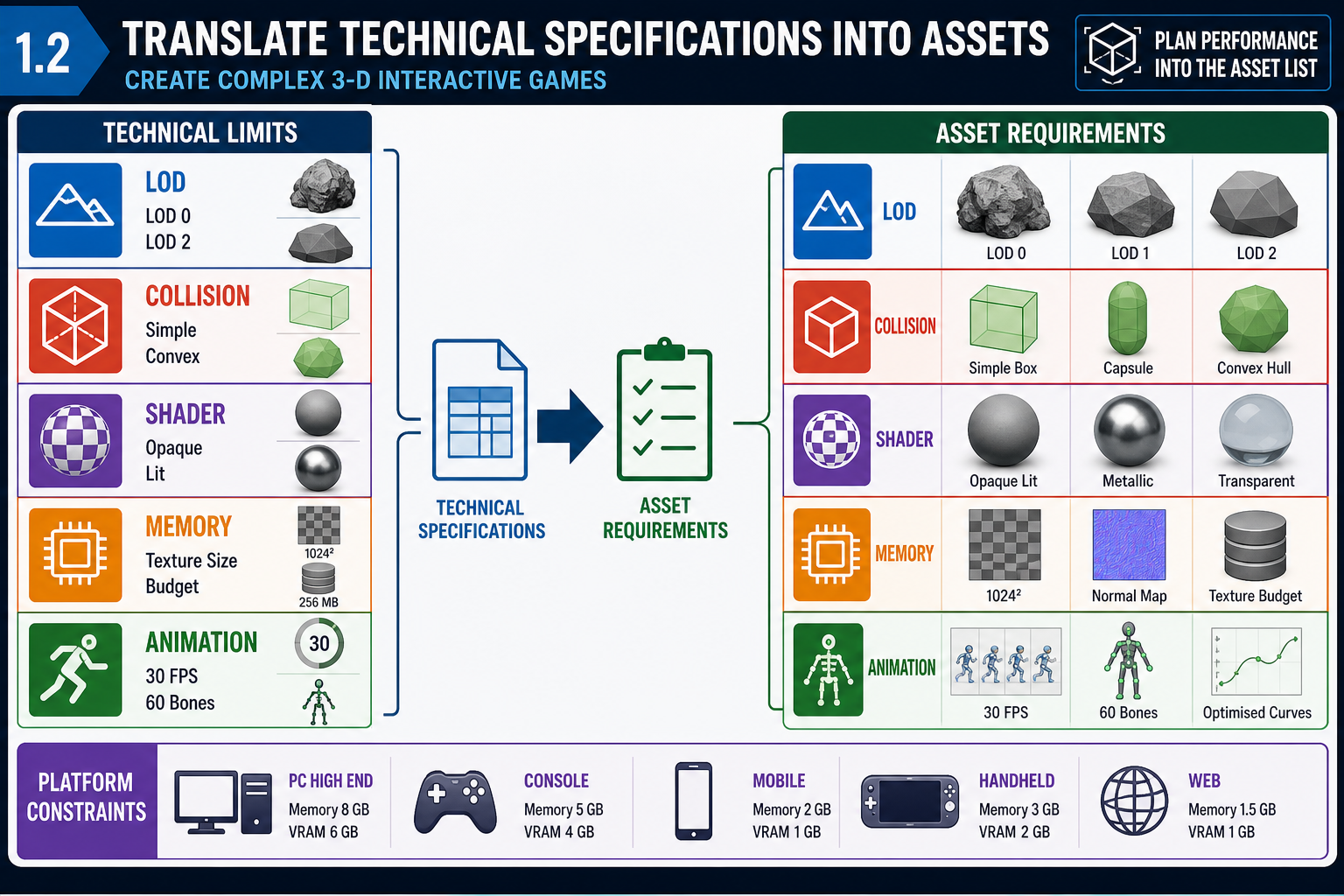
Technical specifications shape the asset list
Technical specifications define the conditions under which assets must work. They may include engine version, target hardware, frame rate expectations, memory budgets, rendering pipeline, physics requirements, networking model, input devices and build platform. When identifying assets, you must include technical variants and support items needed for integration.
A game engine is a development environment that simplifies game creation. It may include rendering, physics, sound, animation, scripting, artificial intelligence, user interface and build systems. However, every engine has constraints. Unity is widely used for its flexibility, accessibility, Asset Store ecosystem and C# scripting workflow. Unreal Engine is known for high visual fidelity, including technologies such as Nanite and Lumen, but these can impose high hardware demands and require careful optimisation. The right asset plan depends on the selected engine and target hardware.
Technical asset requirements
For each asset, identify technical requirements such as:
- polygon or triangle budget
- texture size and compression format
- number of materials and shader complexity
- LOD levels for distance rendering
- collision mesh type and physics materials
- skeleton and rig compatibility
- animation state naming and root motion settings
- navmesh requirements for AI
- lightmap UVs or dynamic lighting settings
- audio format, looping and spatialisation requirements
- UI resolution and safe-area behaviour
- export settings and file format.
Performance rules can be specific: a visual effect may be limited by GPU cost, particle count, shader complexity, overdraw, memory usage and platform support. Even when exact numeric budgets are not supplied, you should flag the need for them and identify assets that are likely performance risks.
Programming and data assets
Basic programming techniques affect asset identification. A scripted interaction may require code classes, prefabs, data tables, animation events, trigger volumes and test cases. For example, a locked door system is not just a door mesh. It may need a hinge animation, collider setup, interact prompt UI, inventory key data, audio events, save-state variables and a script that checks whether the player has permission to open it.
Workplace example
A Sydney studio plans a VR museum experience in Unity. The creative team wants highly detailed artefacts. The technical specification requires comfortable VR performance on standalone headsets. The asset list therefore includes simplified mesh versions, baked lighting, texture atlases, spatial audio zones, gaze interaction UI, collision proxies and performance test scenes. Without those technical assets, the visual design may cause discomfort or low frame rates.
Common mistakes
Avoid identifying assets only at final visual quality. Technical support assets are not “extra”; they are required to make the game work. Also avoid assuming that engine features remove optimisation work. Advanced rendering tools can improve visuals, but they still require disciplined asset budgets and testing.
1.2 Build an asset register
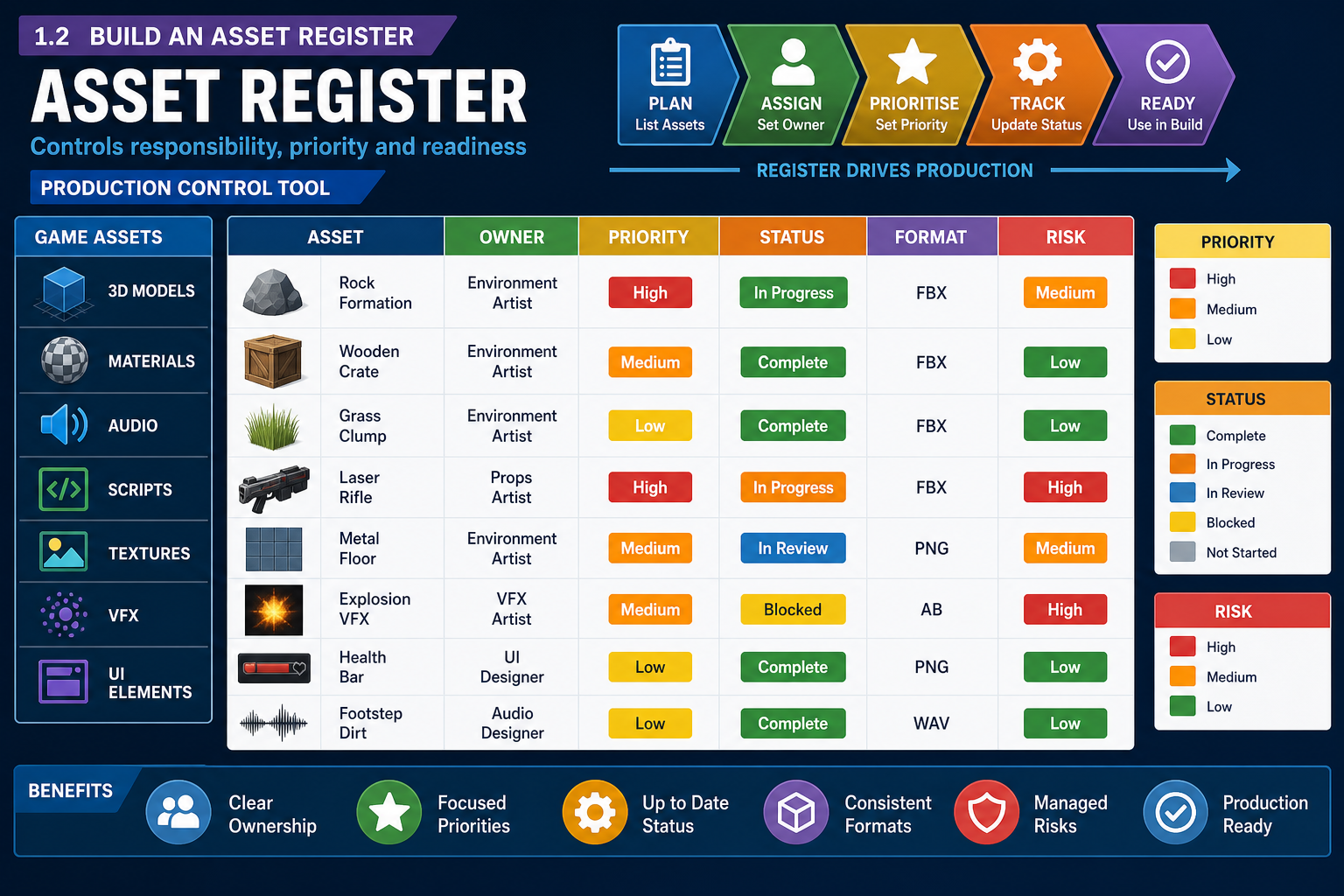
Asset register purpose
An asset register is a controlled list of required assets and their production details. It is the bridge between creative intent and production scheduling. A good register allows producers, artists, programmers, technical artists and testers to see what is needed, who owns it, what status it is in, and whether it meets requirements.
A practical asset register includes:
- asset ID and name
- category and description
- source requirement or GDD reference
- owner or responsible role
- priority for beta
- required format and engine destination
- dependencies, such as rig, shader or code system
- technical budgets and acceptance criteria
- current status, such as not started, in progress, review, approved or blocked
- review notes and risk rating.
Prioritising for beta
Not every final game asset is required for a beta-version prototype. Prioritise assets that support the game-play test. Ask: what must players experience for the beta to produce valid feedback? A core loop usually needs representative input, camera, movement, feedback, challenge, reward and failure conditions. Assets that do not affect those elements may be deferred.
Use categories such as:
- Must have: required to test core game play.
- Should have: improves validity or presentation but can be simplified.
- Could have: useful if time allows.
- Not for beta: planned for later production.
This is similar to MoSCoW prioritisation and helps manage scope.
Dependencies and risk
Assets rarely stand alone. A player character may depend on concept approval, model, rig, animation set, controller script, camera rig, input mappings, sound effects and UI prompts. If the rig is late, animation and game-play integration may also be late. Mark these dependencies in the register so they can feed into the schedule and critical path.
Risk rating should consider uncertainty, complexity and impact. High-risk assets include new technology, unfamiliar plugins, networking features, complex shaders, realistic facial animation, multiplayer synchronisation, destructible environments and platform-specific features.
Australian online learning scenario
In an online Diploma project, a learner team prepares a beta for a 3-D environmental puzzle game. Their asset register shows that decorative plants are low priority, but pressure plates, door animations, puzzle state scripts, UI prompts, audio feedback and collision settings are beta-critical. The register prevents the team spending the first two weeks polishing foliage while the puzzle loop remains untestable.
Contingencies
If asset information is unknown, mark it as TBC with an owner and due date. Do not leave blank cells that hide uncertainty. Unknown format, budget or dependency information should become a planning issue, not an unpleasant surprise during integration.