Week 12 — Element 5
5.4 Assist if required in tests and user trials
5.4 Understand tests and user trials
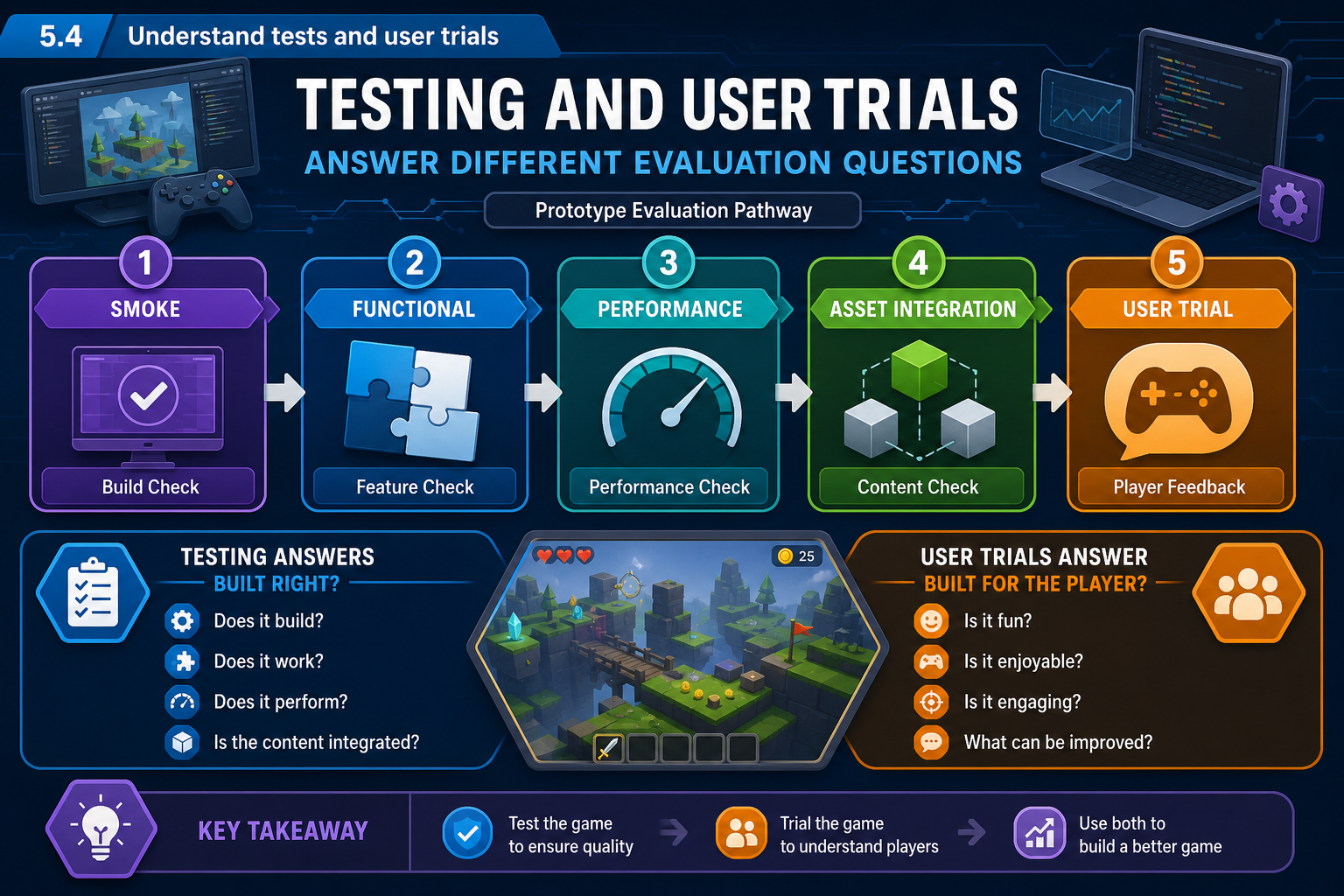
Testing and user trials are related but different
The criterion says to assist, if required, in tests and user trials. Testing is a broad quality activity that checks whether the prototype behaves as intended. User trials, often called playtests in games, involve people using the prototype so the team can observe player experience, usability, engagement and problems. Both are needed because a build can be technically correct but confusing, or enjoyable but unstable.
Common prototype tests include:
- Smoke testing: does the build launch and can the main loop be reached?
- Functional testing: do controls, interactions, UI, enemy behaviours, triggers and win or fail states work?
- Regression testing: did a recent change break something that previously worked?
- Compatibility testing: does the build run on target operating systems, input devices and hardware profiles?
- Performance testing: what happens to frame rate, loading, memory and responsiveness in representative scenes?
- Asset integration testing: do imported models, textures, rigs, animations, audio and UI assets appear correctly and efficiently?
- User trials or playtesting: can intended players understand, use and respond to the prototype as expected?
Define goals first
Do not run a user trial just to 'see what happens'. Set trial goals. Examples include: determine whether first-time players understand the objective without explanation; test whether combat difficulty is appropriate; compare two camera settings; identify motion discomfort in a movement system; or check whether players notice a visual affordance.
Clear goals determine the method. If you need usability evidence, observation and task completion are important. If you need preference evidence, a short questionnaire may help. If you need performance evidence, capture device specifications and build metrics. If you need accessibility direction, include participants with relevant needs where possible and use respectful, voluntary processes.
Ethical and legal considerations
If trials involve identifiable people, handle personal information responsibly. Tell participants what the trial is for, what data is collected, how it will be used, and whether their gameplay, voice or screen will be recorded. Obtain consent before recording. For minors, obtain appropriate parent or guardian consent and follow organisational requirements.
WHS also applies. Plan comfortable session length, breaks, safe equipment setup and warnings for flashing imagery, loud sounds, horror content, motion sickness risk or VR use. Do not pressure participants to continue if they feel unwell.
Workplace example
A Newcastle studio developing a 3-D VR maintenance trainer schedules a user trial with apprentices. The goal is to test whether users can identify hazards and complete a lockout sequence. Because VR can cause discomfort, the team limits session length, provides a seated rest area, explains how to stop at any time, sanitises shared equipment and records only necessary observations.
Common mistakes
Avoid using only the development team as testers. They know too much. Also avoid collecting more personal data than needed. Prototype testing should produce useful evidence without creating unnecessary privacy, safety or ethical risk.
5.4 Manage test data and defects
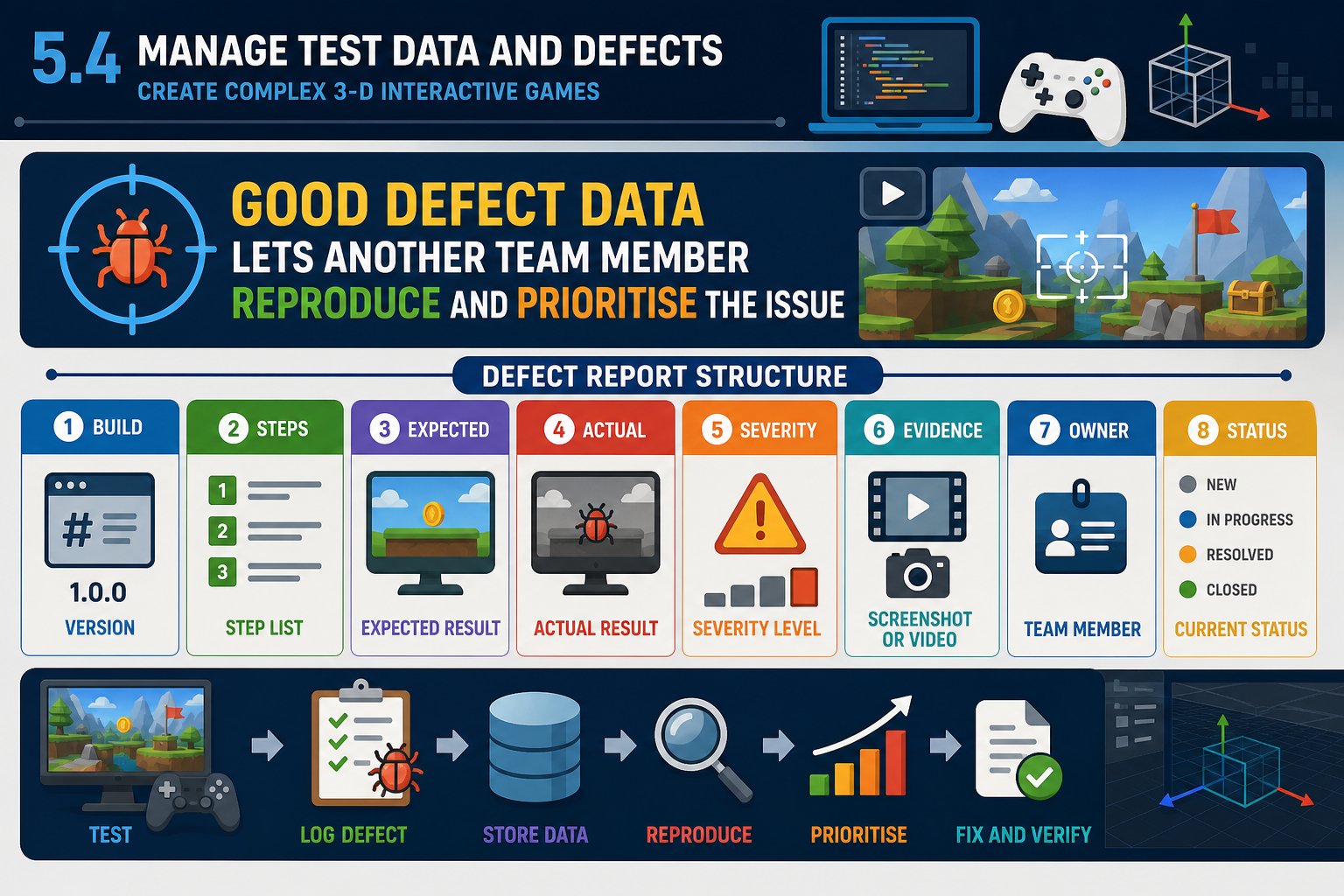
Data quality affects decisions
Assisting with tests and user trials includes managing the data that comes out of them. Poorly organised test data leads to poor evaluation. A useful defect or observation record should allow another team member to understand, reproduce and prioritise the issue.
For a defect, record:
- Title and short description.
- Build version, platform and hardware.
- Steps to reproduce.
- Expected result.
- Actual result.
- Frequency, such as always, sometimes or once.
- Severity and impact.
- Screenshots, video, logs or crash reports.
- Related asset, script, scene or system.
- Owner and status.
For a user observation, record:
- Participant code or profile category, not unnecessary personal details.
- Task or scenario.
- Behaviour observed.
- Verbal comment, if relevant.
- Time or location in the prototype.
- Possible interpretation, clearly separated from fact.
- Link to criterion being tested.
Defect triage
Triage is the process of reviewing issues and deciding priority. A crash in the first minute is usually higher priority than a minor visual seam. However, repeated confusion by several participants may be more important than a rare physics glitch if the criterion is user-friendliness. Use the project criteria, severity and schedule impact to triage.
Technical evidence
Game engines often produce logs, profiler data and warnings. Learn to collect relevant evidence without drowning the team. For example, an Unreal or Unity log can help identify missing assets, script exceptions, shader compilation problems or memory issues. A profiler capture can support a performance issue. Asset integration evidence might include screenshots of a broken material, import settings, polygon counts relative to project guidelines, rig errors or texture compression settings.
Privacy and confidentiality
If recordings or notes identify participants, treat them as personal information. Use participant codes where possible, restrict access to the project team, and delete or archive data according to organisational requirements. Do not upload recordings of testers to public channels without explicit permission. If the prototype is under client or studio confidentiality, do not share builds, logs or videos outside approved systems.
Example
A Darwin team testing a 3-D underwater exploration prototype receives a report that 'the fish AI is broken'. The note-taker improves the issue: in build 0.5 on Windows laptop with integrated graphics, fish school freezes after the player collects the second sample; expected behaviour is continued avoidance; actual behaviour is all fish stop moving; reproduction 3 of 3; console shows null reference in FishSchoolManager. This issue can now be assigned and fixed.
Common mistakes
Do not mix participant preference data with confirmed defects. Also avoid deleting failed session data. Failed installs, crashes and access problems are valid evidence about readiness for broader trials or release.