Week 13 — Element 5
5.5 Evaluate feedback from user trials
5.5 Organise user trial feedback
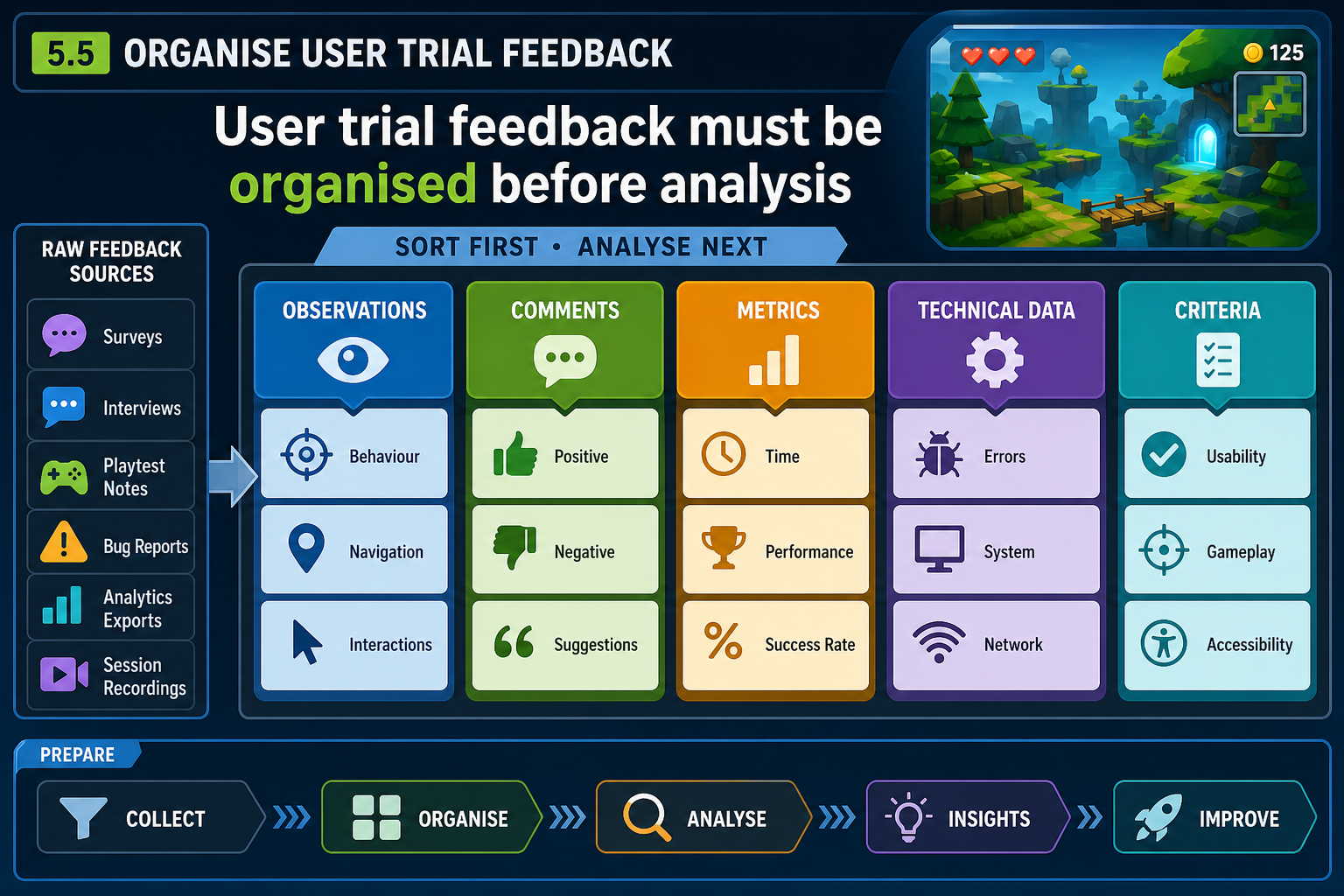
Prepare feedback for evaluation
After user trials, the next requirement is to evaluate feedback from user trials. This means more than reading comments. You need to organise the data, identify patterns, judge significance and recommend actions. Start by cleaning the data: gather notes, recordings, issue logs, questionnaires, analytics and technical reports into one organised location.
Separate feedback types:
- Observed behaviour: what participants actually did, such as missed prompts, repeated jumps, route choices or time spent stuck.
- Verbal comments: what participants said during or after play.
- Quantitative measures: task completion time, number of deaths, number of hints, crash frequency, frame-rate readings or questionnaire scores.
- Technical data: logs, hardware details, profiler captures and defect reports.
- Facilitator notes: context, interruptions, deviations from the test plan and environmental factors.
This separation matters because comments and behaviour can conflict. A participant may say the tutorial was clear but still fail to use the taught control. Another may complain about difficulty but complete the challenge quickly and replay voluntarily. Good evaluation weighs evidence, not single quotes.
Categorise against criteria
Use your prototype criteria as the main categories. If the trial goal was user-friendliness, classify findings under goal clarity, controls, feedback, camera, UI readability and error recovery. If the trial goal was creative engagement, classify findings under player interest, distinctive moments, emotional response and desire to continue. If technical feasibility was included, classify crashes, loading, frame rate and hardware compatibility.
Look for patterns
Patterns are more useful than isolated reactions. Ask:
- Did several participants experience the same issue?
- Did the issue occur at the same location, time or mechanic?
- Did it affect the target player more than expert players?
- Did it stop progress or merely cause a brief hesitation?
- Did positive feedback cluster around the intended creative hook?
- Did technical issues correlate with specific hardware or settings?
Example
A regional TAFE student team runs six user trials for a 3-D escape-room prototype. Four participants fail to notice that objects can be rotated in inventory. Two say the puzzle is too hard. Observation shows the real pattern: players do not see the small rotate icon, so they never inspect the clue on the back of an object. The evaluation finding is a user interface affordance issue, not necessarily puzzle difficulty.
Common mistakes
Do not average away important minority feedback. If one participant reports severe motion sickness, that may be critical even if others are fine. Also avoid cherry-picking only positive comments for endorsement. Evaluation must represent the trial evidence honestly.
5.5 Interpret player feedback carefully
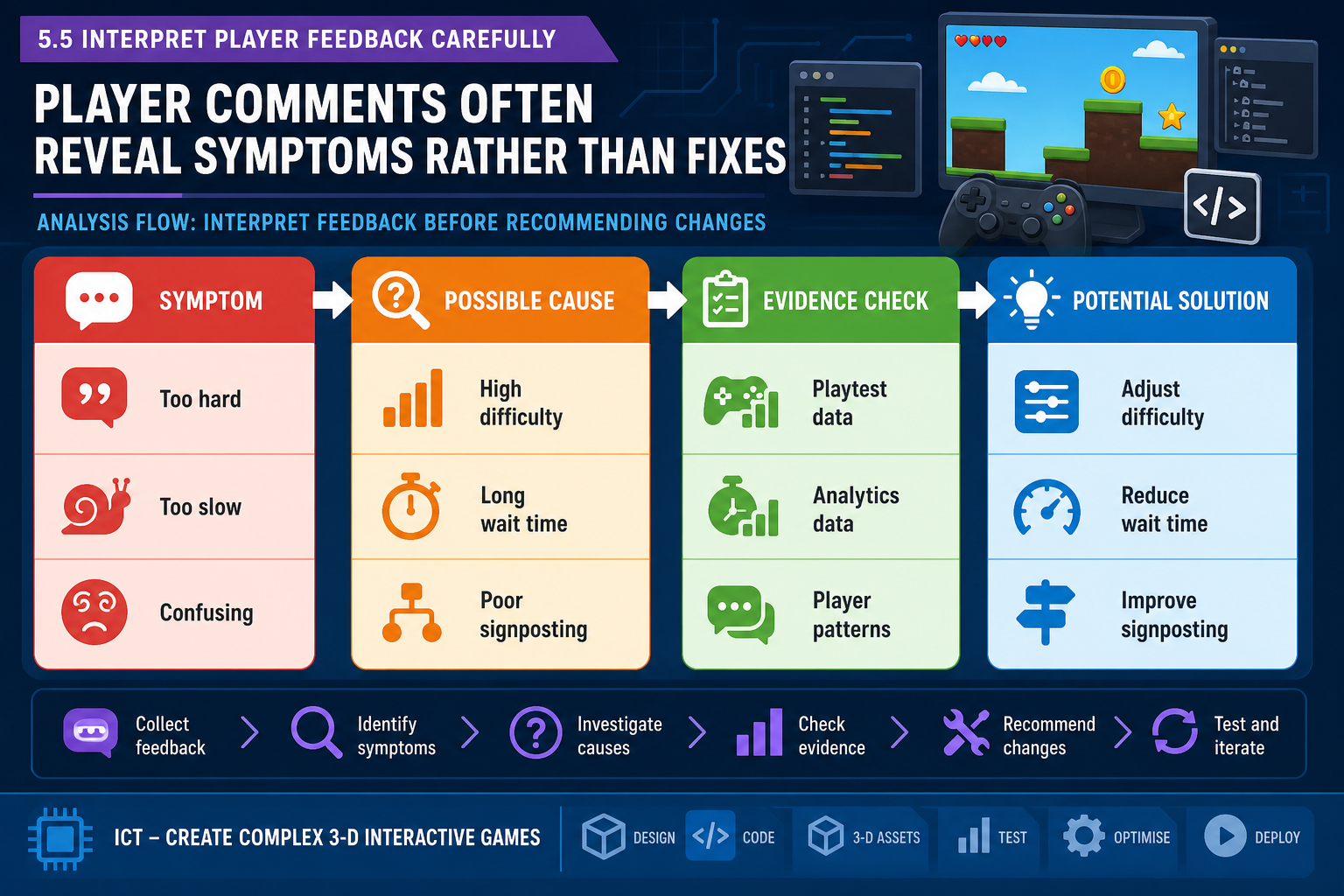
Players are expert in their experience
User trial participants are valuable because they reveal how the prototype is experienced outside the development team. However, players are not always expert in diagnosing the cause or designing the fix. A participant may say 'add a minimap' when the underlying issue is poor landmarks. Another may say 'make enemies weaker' when the real problem is that attack telegraphs are unreadable.
Treat player feedback as evidence of experience. Your evaluation should infer likely causes by comparing comments, behaviour, metrics and prototype systems.
Symptom, cause and solution
Use a three-part analysis:
- Symptom: what the player experienced or reported. Example: 'I did not know where to go.'
- Possible cause: what in the prototype may have led to it. Example: exit door blends into background; objective text disappears too quickly; level shape lacks landmarks.
- Potential solution: what the team could change. Example: improve lighting contrast, add environmental signposting, keep objective accessible in UI, or redesign the room layout.
Do not jump straight from symptom to the loudest solution. Test assumptions where possible.
Consider design intent
Some discomfort, uncertainty or challenge may be intentional. A horror game may want tension; a puzzle game may want uncertainty; a hardcore action game may expect repeated failure. The evaluation question is whether the experience matches the intended design and target player. If the design intent is suspense, players saying 'I felt nervous' may be positive. If they say 'I felt lost because the camera made me nauseous', that is a usability and comfort issue.
Sample limits and bias
Prototype trials often use small samples. Be cautious about overgeneralising. Consider who participated. Were they developers, classmates, target users, expert gamers or casual players? Did they use their own hardware? Were they being observed by the developer, which may make them overly polite? Did online lag affect input feel? These factors do not invalidate feedback, but they shape confidence.
Use phrases such as 'in this trial group' and 'evidence suggests' rather than making unsupported market claims. If the sample is too narrow, recommend further testing with a more representative group.
Example
A Townsville team tests a 3-D surfing game. Two expert players request more complex wave physics. Three casual players struggle to stand up and quit early. The intended audience is casual console players, so the evaluation prioritises onboarding and forgiving early controls. The expert request is logged as a possible advanced mode, not a required prototype change.
Common mistakes
Do not dismiss feedback because the participant did not explain it technically. Also do not implement every suggested feature. Your role is to evaluate what the feedback means for the prototype criteria and production direction.
5.5 Evaluate technical and production implications
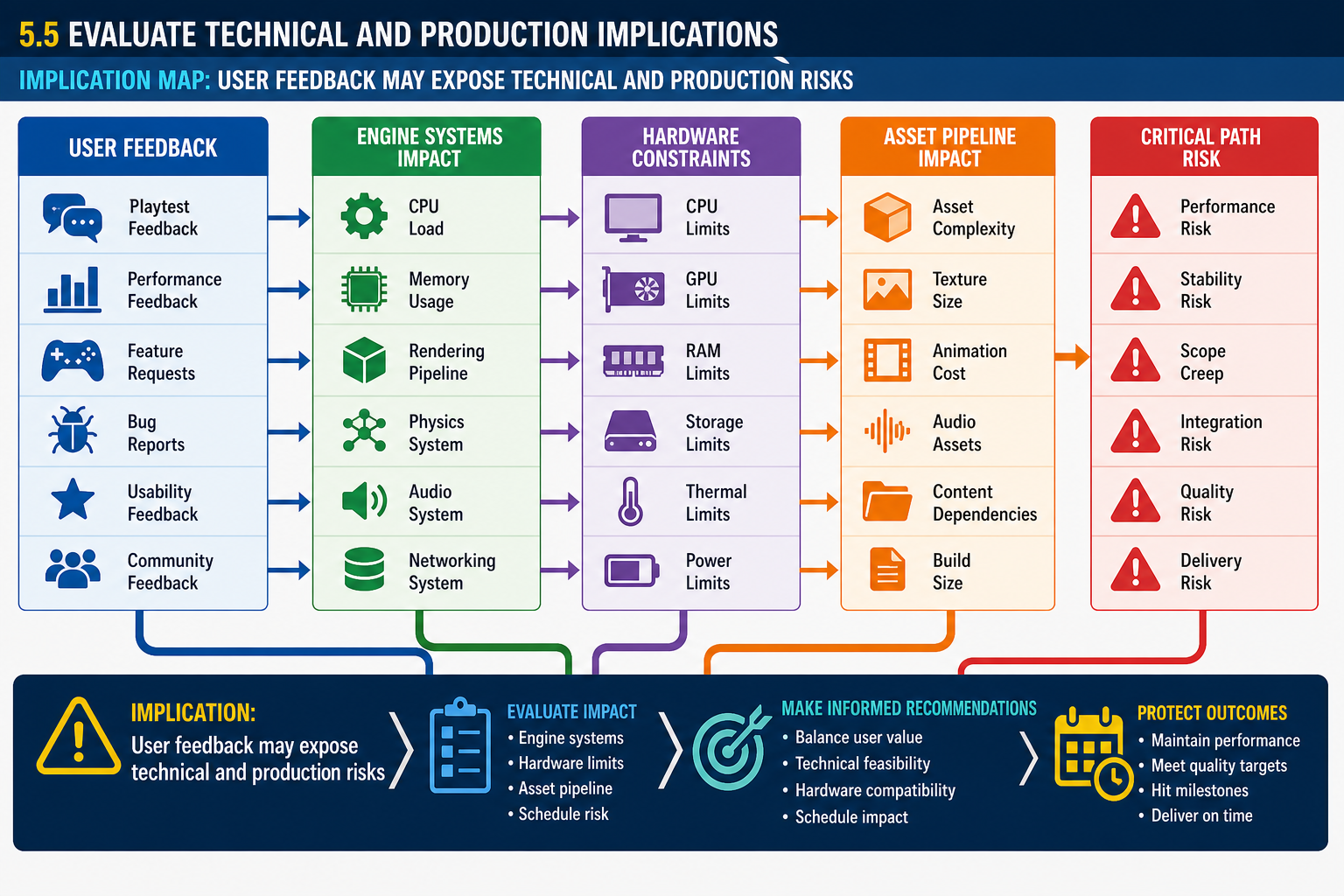
User feedback can expose technical problems
User trial feedback is not only about enjoyment. It can reveal technical and production risks that were not obvious during internal development. If players repeatedly complain about delayed input, the cause may be frame-rate instability, physics update timing, network latency, animation lockout or controller dead zones. If players cannot read the environment, the cause may include lighting, shader settings, texture compression, camera field of view, level scale or asset placement.
Evaluate technical implications by asking:
- Does the issue come from a bug, design choice, engine limitation or hardware constraint?
- Can it be fixed with tuning, or does it require re-architecture?
- Does it affect one platform or all target platforms?
- Does it require new assets, changed asset formats or pipeline work?
- Does it affect other systems, such as save data, UI, animation or networking?
- Does it block the critical path?
Engine capabilities and constraints
Game engines provide powerful reusable systems such as 3-D rendering, physics, audio, animation, scripting, AI, navigation, UI and platform deployment. These capabilities support rapid prototyping. But each engine has constraints, and each project adds its own. For example, a large open environment with dynamic lights, high-resolution textures and physics objects may exceed target hardware. A visual scripting prototype may work for one enemy but become unmanageable for dozens. A plugin may solve a problem but create licensing, platform or maintenance risk.
Asset integration implications
User feedback may point to asset pipeline issues. If animations feel unresponsive, check not only timing but rig setup, root motion, blend trees and imported frame rates. If objects are hard to select, check mesh scale, collision shapes, pivot points and naming. If loading is slow, check texture sizes, compression, mesh complexity and streaming setup. Asset integration is a production issue because it affects how quickly the team can expand content.
Production impact
Before recommending a change, estimate impact. A small visible change may require major work. For example, adding full character customisation might require UI, save data, rig compatibility, animation testing, additional art, memory budgeting and QA. A simpler colour palette option may address the user need with less risk.
Example
A Western Sydney team receives feedback that their 3-D racing prototype feels sluggish. Evaluation shows the vehicle handling is acceptable on the development PC, but on lower-spec laptops frame rate drops cause input delay. The required recommendation is performance profiling and scalable graphics settings before changing vehicle physics. This protects the design from being altered for the wrong reason.
Common mistakes
Do not treat technical feedback as separate from user experience. Performance, loading, input latency and asset issues directly affect usability and creative impact. Also avoid promising changes before checking engine and hardware constraints.